BidWise guide · Tracking and reports
Job Costs, WIP Report, Job Health and Job Closeout
BidWise Business follows each Won job from the bid to the closeout. Job costs logs every real cost, such as crew days, overtime, return trips and extras, and says who pays for it; the WIP report shows over and under billing and the expected profit on every open job; Job health compares work done with labor budget used while crews work; and Job closeout shows bid vs actual once the job is closed.


Why track job costs?
Most flooring contractors learn whether a job made money months after it ended, when the accountant closes the year. By then the same mistake is in three more bids.
BidWise already has the bid for every Won job, the material bought and the invoices sent. Add the real crew days and extras as they happen, and the reports show the job while it runs and the lesson when it closes.
The six steps
- Open Job costsBid cost, logged so far, crew days.
- Add a costType, crew, days, and who pays.
- WIP reportOver and under billing, expected profit.
- Job healthWork done vs labor budget used.
- Close the jobClose job, then read bid vs actual.
- What can go wrongNo crew days, missing bills, fade.
1Open Job costs for a Won job
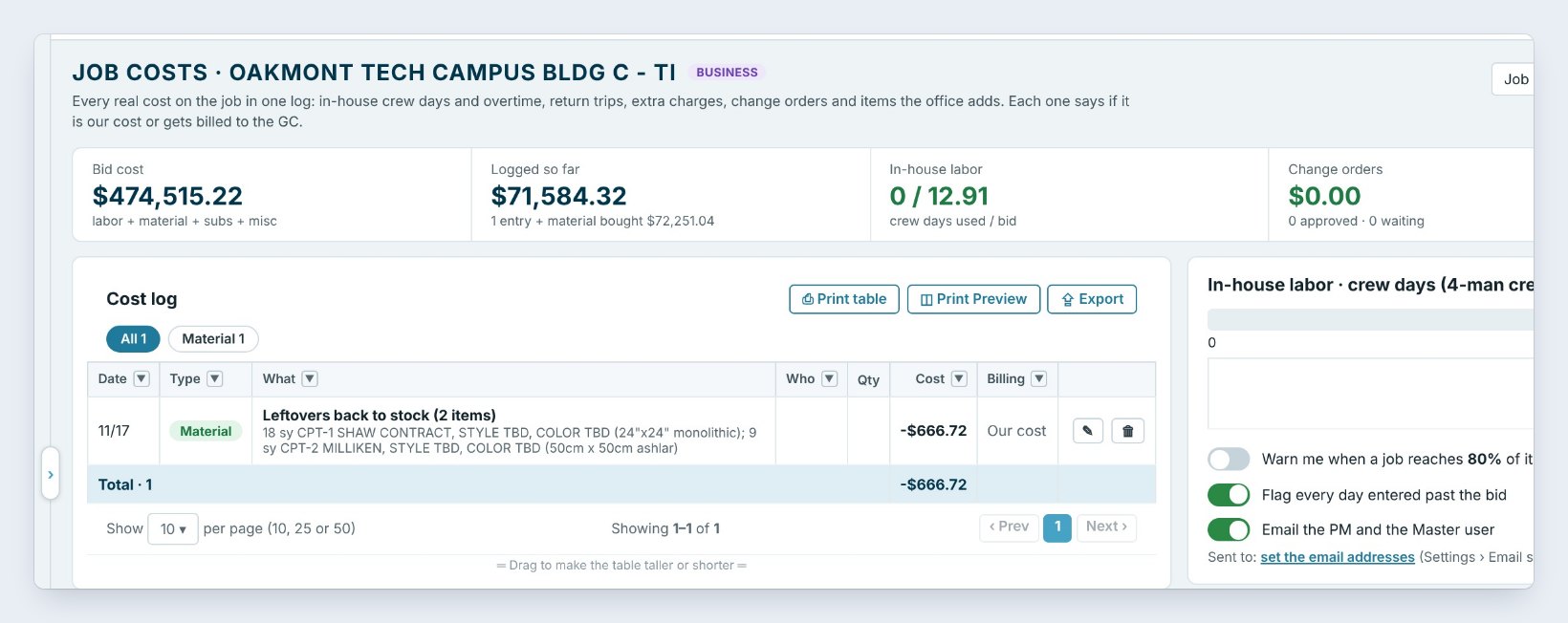
Open Reports › Job costs and pick the job at the top right, here Oakmont Tech Campus Bldg C. The tiles show the Bid cost, $474,515.22, what is Logged so far, including the material bought on the Material List, the In-house labor crew days used against the bid, Change orders and what is Waiting to bill the GC.
The Cost log lists every entry. Here the leftovers brought back to stock already show as a credit of $666.72. On the right, the crew day bar shows the bid, 12.91 days, against what is used, with the budget alerts: warn at 80% of the bid crew days, flag every day past the bid, and email the PM and the Master user.
2Add a cost as it happens
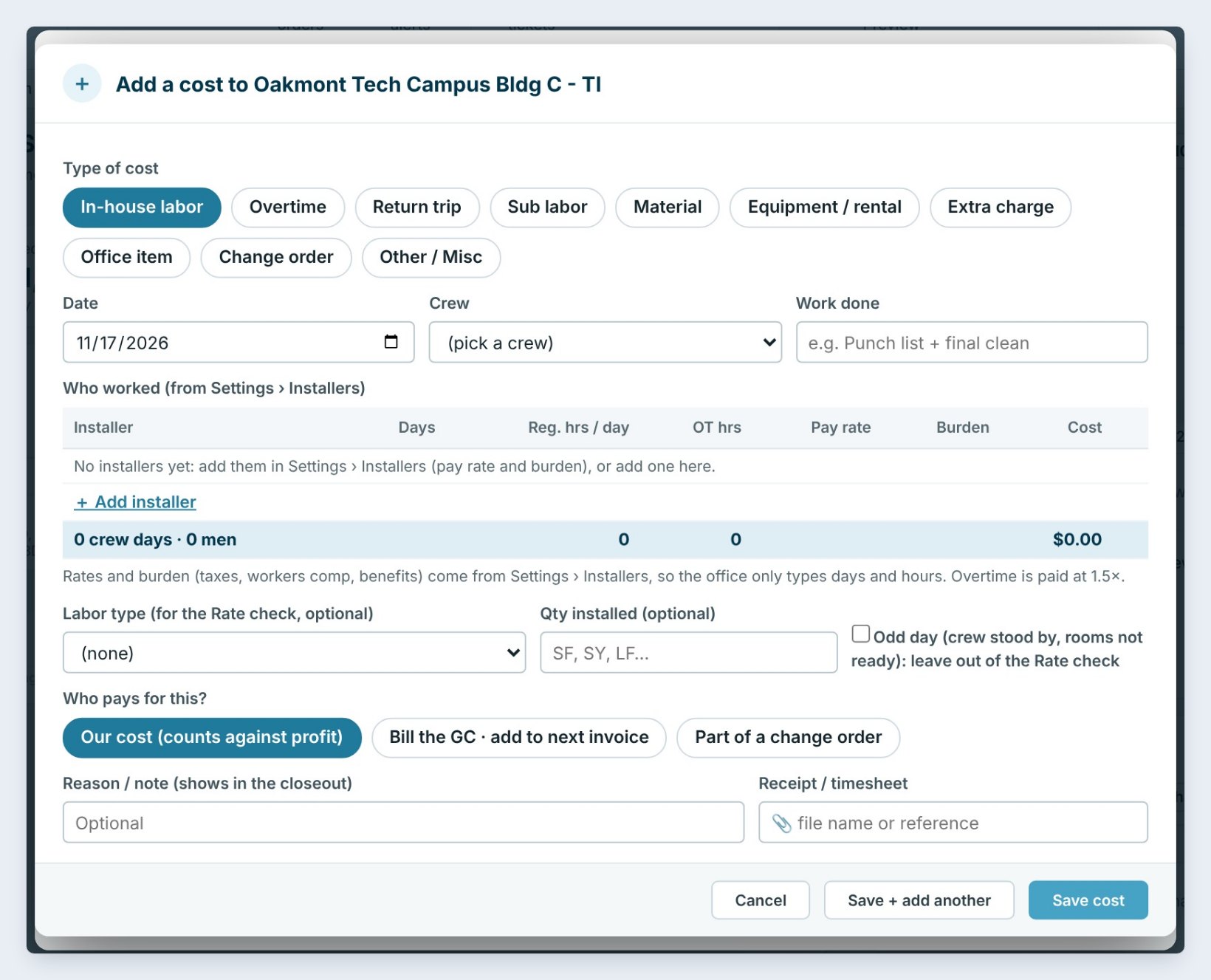
Press Add cost. Pick the Type of cost: In-house labor, Overtime, Return trip, Sub labor, Material, Equipment / rental, Extra charge, Office item, Change order or Other.
For crew days, pick the date, the crew and the work done. Who worked comes from Settings › Installers with each person’s pay rate and burden, so the office only types days and hours; overtime is paid at 1.5 times. Add the Qty installed if you want it in the Rate check, and tick Odd day when the crew stood by.
Last, Who pays for this? Our cost counts against profit, Bill the GC adds it to the next invoice, and Part of a change order ties it to one. The note shows in the closeout.
Log a return trip the day it happens, with Bill the GC if the site was not ready. It lands on the next invoice instead of being forgotten.
3Print the WIP report for the bank
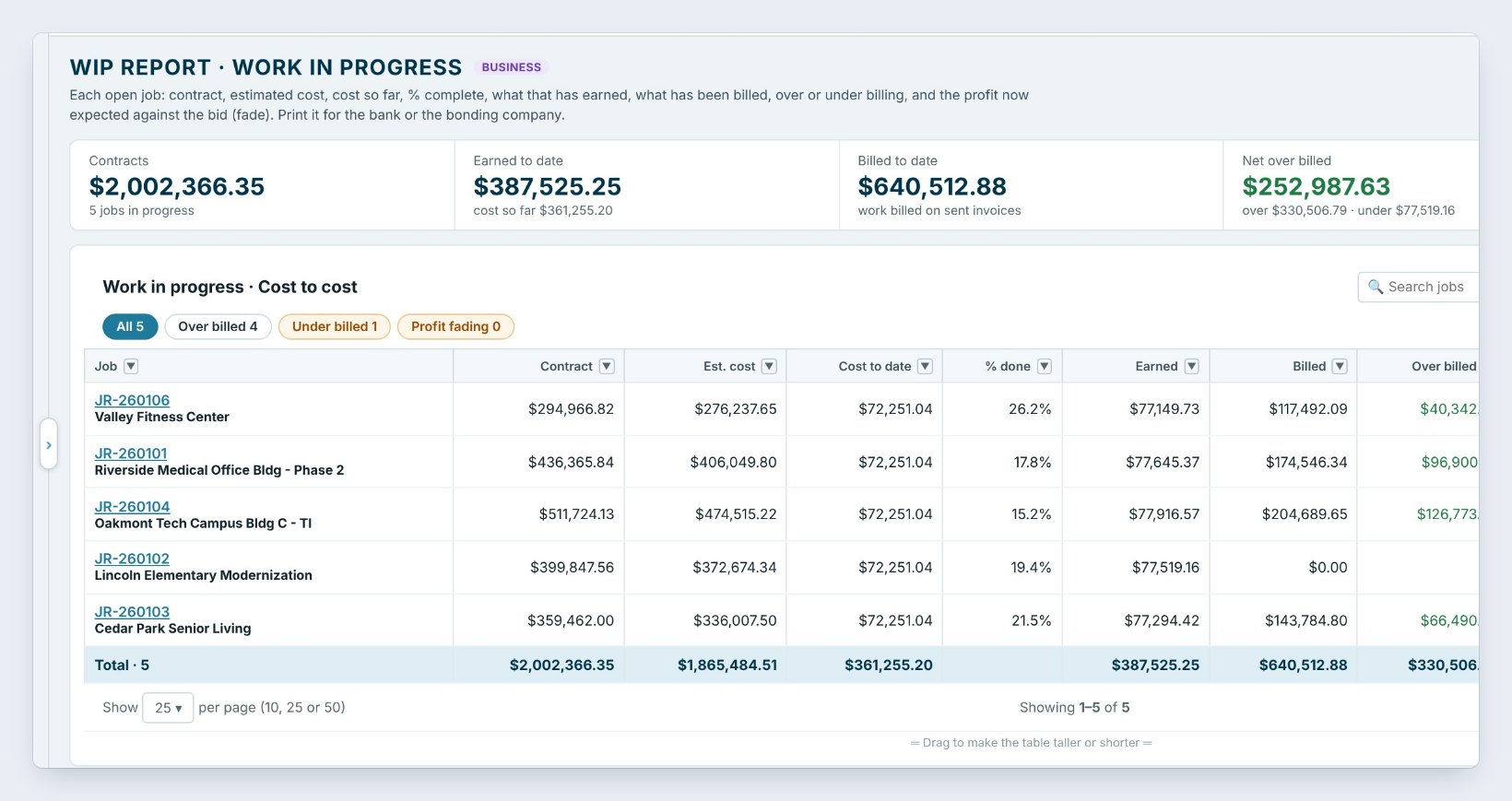
WIP report is the work-in-progress schedule your bank and bonding company ask for. Each open job shows the contract, the estimated cost, the cost to date, the % done, what it has Earned, what was Billed, and whether it is Over billed or Under billed.
Here five jobs carry $2,002,366.35 in contracts and $136,881.84 of Expected profit. Four are over billed, money in hand ahead of the work, and Lincoln Elementary is under billed by $77,519.16: work done, not billed yet. Fade shows profit slipping against the bid. The box at the bottom explains every formula, and Print Preview makes the page for the bank.
4Watch job health while the crews work
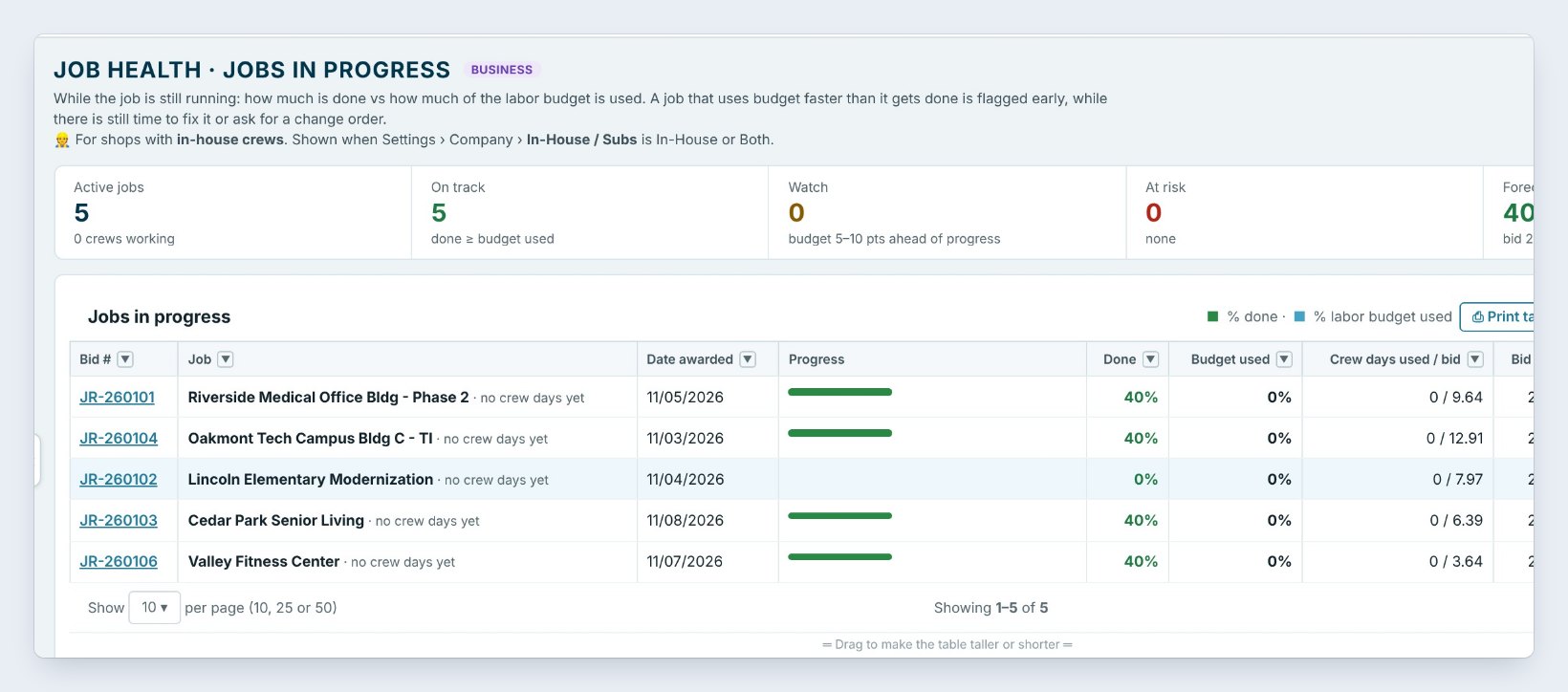
Job health is for shops with in-house crews. While a job runs, it compares how much is done with how much of the labor budget is used. A job that burns crew days faster than it gets done is flagged early.
The tiles count jobs On track, to Watch when the budget runs 5 to 10 points ahead of the progress, and At risk. Each job shows its crew days used against the bid and the Forecast profit. Click a job for its details and what you can do: Update % done, Write an extra work ticket, or Ask the GC for a change order.
5Close the job and read the closeout
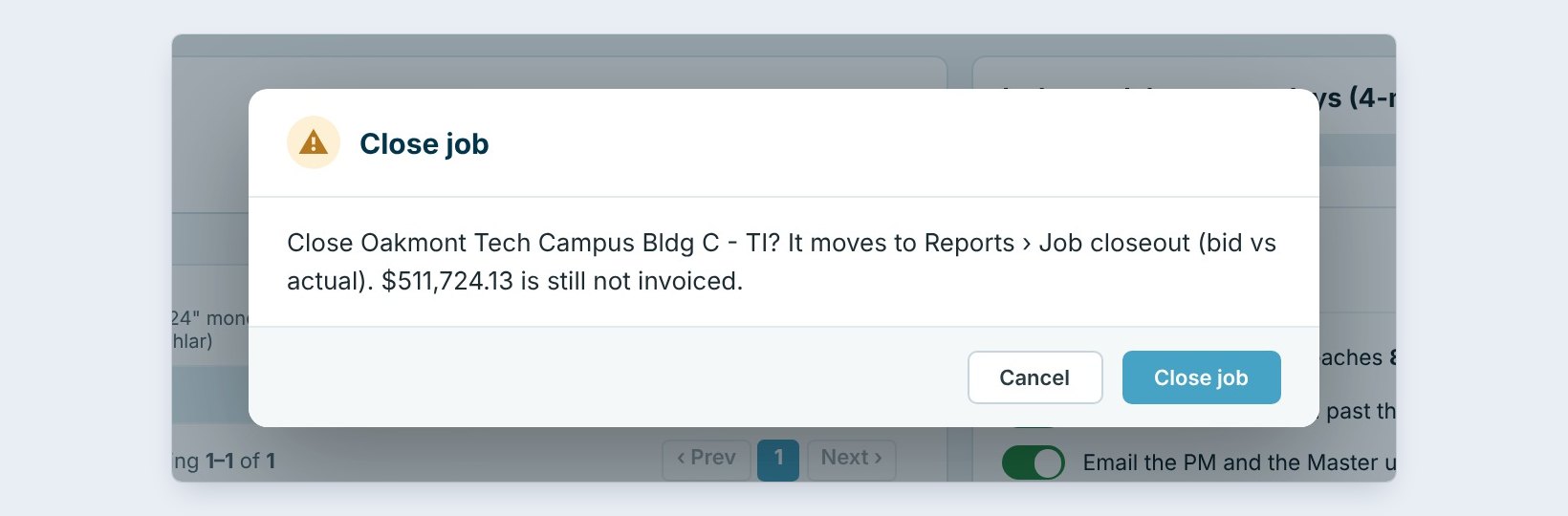
When the job is finished, press Close job on Job costs. BidWise warns you if part of the contract is still not invoiced, so nothing is left unbilled. A job that is fully invoiced and paid shows in the closeout by itself.
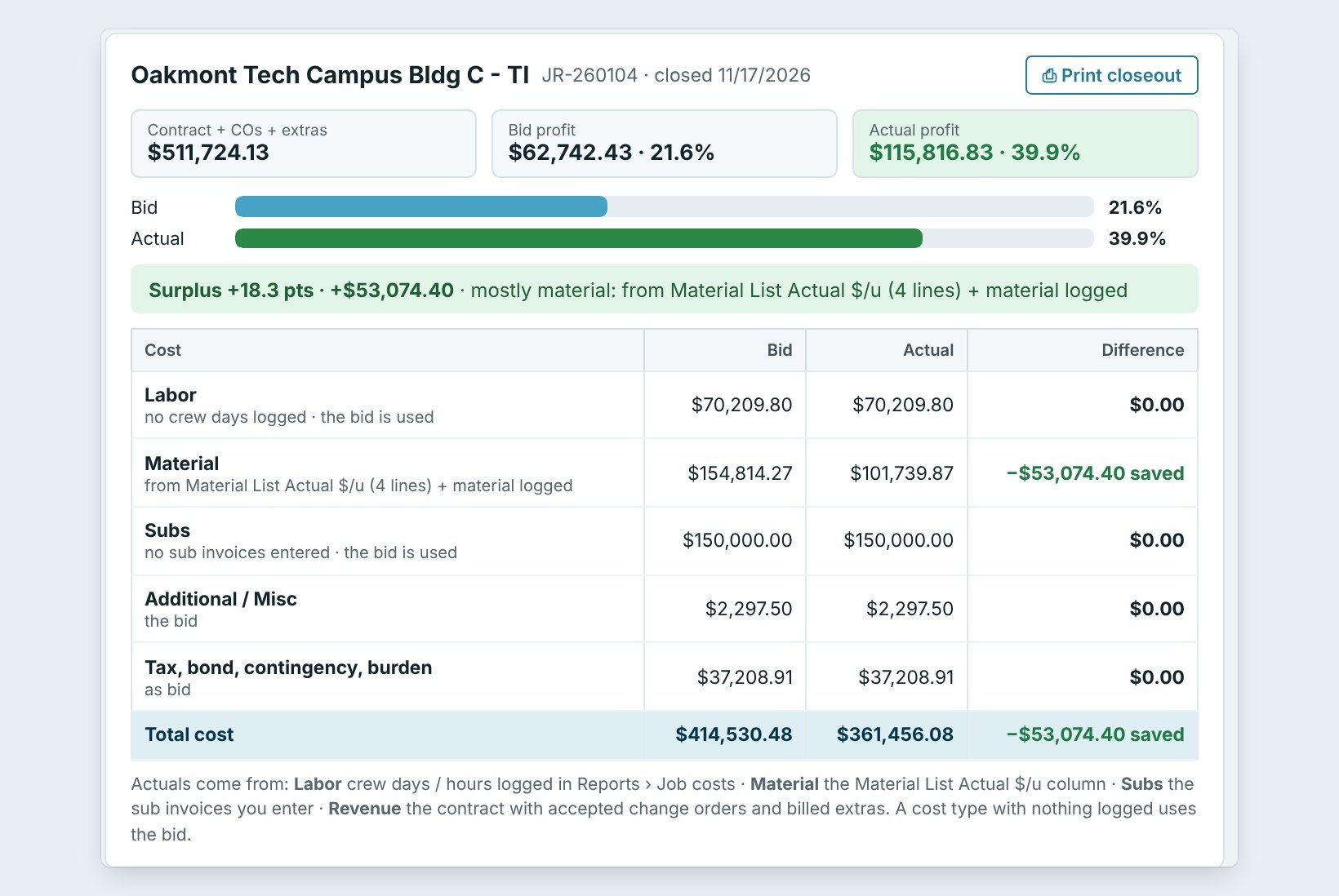
Job closeout compares the bid with what it really cost. Here Oakmont Tech was bid at 21.6% profit and came in at 39.9%, a surplus of $53,074.40. The table says why, line by line: labor, material, subs, misc and tax, bond and burden. This one saved mostly on material. The tiles count the jobs that Beat the bid and came in Under the bid, and Print closeout makes a page for the estimator.
6What can go wrong, and how to fix it
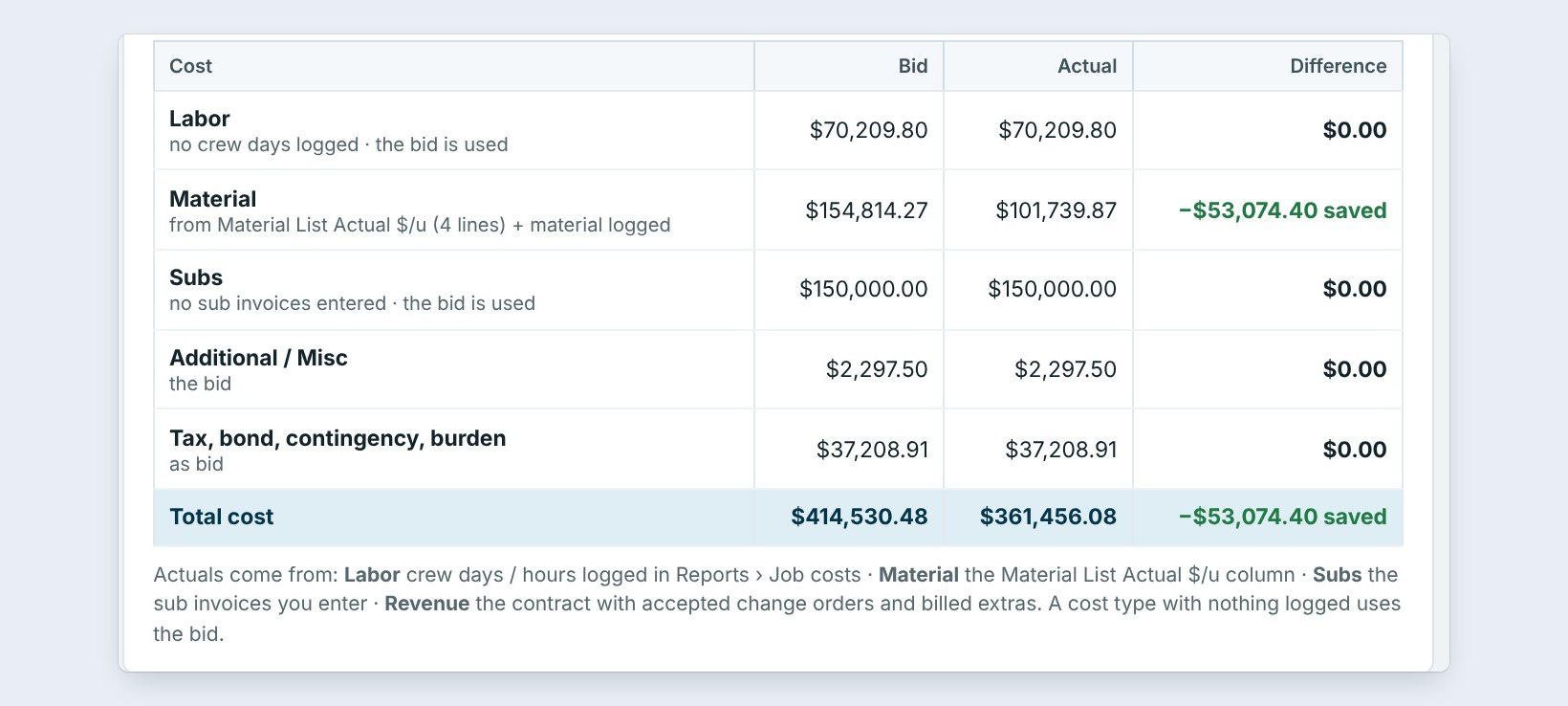
The closeout says “the bid is used”. A cost type with nothing logged uses the bid amount, so the job looks exactly on budget. Log crew days in Job costs and enter sub bills in Accounting, and the actual takes over.
The WIP shows a job far under billed. Work is done that was never invoiced. Open Invoicing and send a progress invoice for the % done.
Profit is fading. When the cost to date passes the estimate, the WIP uses the cost to date and the profit fades. Look at Job costs for crew days past the bid and extras that were never billed to the GC.
Worked example: Oakmont Tech, from bid to closeout
How Northgate followed one job:
| Report | Shows | What it meant |
|---|---|---|
| Job costs | $474,515.22 bid cost, 12.91 crew days | The budget to beat |
| WIP report | 15.2% done, $126,773.08 over billed | Cash ahead of the work |
| Job health | On track, forecast 45.8% | No action needed |
| Job closeout | 39.9% actual vs 21.6% bid | Saved $53,074.40 on material |
The estimator saw that the material came in well under the bid prices, and checked the next carpet tile quote against the vendor’s actual price.
What to do next
See subs, bills, POs and expenses, where the sub actuals come from, and leftover stock, which credits the job.
Know what every job really made
Job costs, WIP and closeout come with BidWise Business. Start with the 30-day free trial, no credit card.
Frequently Asked Questions
Where do the actual costs come from?
Crew days and hours logged in Job costs, material from the Material List actual price and material logged, and sub bills entered in Accounting. A cost type with nothing logged uses the bid.
What does over billed mean on the WIP report?
You have billed more than the work earned so far: money in hand ahead of the work. Under billed is work done but not billed yet.
Do I need in-house crews for Job health?
Yes. Job health shows when Settings › Company › In-House / Subs is In-House or Both.
Can I reopen a closed job?
Yes. Pick the job in Job costs and press Reopen job, for example when a late bill comes in.

Written by
Cristian Valcu – Founder & CEO, Commercial Flooring Estimating LLC
Cristian has estimated commercial flooring for over 20 years and built BidWise around the way flooring contractors actually price, propose and track their bids.
Last updated: