
Download CFE BidWise for Windows
CFE BidWise is free to download and free to use for 30 days, with every feature unlocked and no credit card required. After the trial it is Personal at $69.99 a month or Business at $129.99 a month per user. If you don't subscribe, the Estimate Quote worksheet keeps working for free; only the advanced features lock.
Download Free Trial for WindowsWindows 10 & 11 · 64-bit · 30 days free · no credit cardAlways the newest version · 4 MB setup, digitally signed by Commercial Flooring Estimating LLC · Watch the 5-minute intro · How the install works · Offline installer & MSI
- ✓ 30 days free
- ✓ No credit card
- ✓ Estimate Quote stays free
- Personal $69.99/mo · Business $129.99/mo per user
- Made by
- Commercial Flooring Estimating LLC
- Runs on
- Windows 10 & 11, 64-bit
- Free trial
- 30 days, no credit card
- Price after
- Personal $69.99/mo, Business $129.99/mo per user
- After the trial
- Estimate Quote stays free
- Each user
- 2 computers
- Your data
- Stored on your PC
- Version
- Always the newest, signed
See CFE BidWise in 5 minutes
A quick look before you download: takeoff import, pricing and proposals, ordering and warehouse, the install schedule and Field app, invoicing, accounting and QuickBooks Online.
- 0:21 Meet BidWise
- 0:46 Import the takeoff
- 1:24 Price and propose
- 2:07 Clients and bids
- 2:26 Order and warehouse
- 2:52 Schedule and Field app
- 3:16 Bill and get paid
- 3:43 Accounting and QuickBooks Online
- 4:11 Your team
- 4:39 United States and Canada
- 4:55 Two plans
Want the full walkthrough? Watch the 7-minute tour.
Install in four steps
The file you download is a 4 MB web installer, signed by Commercial Flooring Estimating LLC. It fetches the full program from our server, so the download starts right away and you always get the newest version.
- Download the setup fileClick Download. Your browser saves CFE-Advanced-Estimating-Worksheet-Setup.exe (about 4 MB).
- Run it and click InstallTick I agree, click Install and say Yes to Windows. It adds WebView2 if needed and installs the program. Click Open CFE.
- Create your userName, email, company and a password. A 6-digit code confirms your email. No card.
- Start estimatingYour 30-day trial starts with every feature on. Open the SAMPLE Estimate to see a finished job.
Updates come by themselves: CFE tells you when a new version is ready, or click Help › Check now. Your estimates and settings stay as they are.
Offline installer and MSI for IT
Most people only need the Download button above. These are for PCs without internet during the install, and for IT departments that deploy software to many computers. All three are signed and install the same program.
| File | Best for | Download |
|---|---|---|
| Web setup (.exe, about 4 MB) | Everyone. Always installs the newest version. | Setup.exe |
| Offline installer (.exe) | PCs with slow or blocked internet. WebView2 is inside. | Setup-Offline.exe |
| MSI package (.msi) | IT: Group Policy, Intune or silent installs (msiexec /i … /qn). Needs WebView2, which Windows 10 and 11 already have. | .msi |
Try CFE BidWise free for 30 days
Every feature unlocked. No credit card. After the trial, the Estimate Quote keeps working for free, or pick Personal ($69.99 a month) or Business ($129.99 a month per user) to keep everything.
Free for 30 days, then Personal $69.99 or Business $129.99 a month, and the Estimate Quote stays free
The trial is the full program. When it ends, CFE BidWise does not stop working: it goes into Limited Mode, where the Estimate Quote keeps working and the advanced features wait for a subscription. Subscribe to Personal or Business any time and your plan unlocks at once, with all your estimates still there.
| What you can do | 30-day free trial | After the trial (Limited Mode, free) | Personal $69.99/mo, 1 user | Business $129.99/mo per user |
|---|---|---|---|---|
| Estimating | ||||
| Estimate Quote: new, open, edit, calculate, save | ✓ Yes | ✓ Yes | ✓ Yes | ✓ Yes |
| Totals and total proposal price, always exact | ✓ Yes | ✓ Yes | ✓ Yes | ✓ Yes |
| Dashboard | ✓ Yes | ✓ Yes | ✓ Yes | ✓ Yes |
| Save the estimate as PDF | Yes | PDF with a "Limited Mode" watermark | Yes, plus print and email | Yes, plus print and email |
| Labor GP and Material GP set separately, Markup or Margin | ✓ Yes | 🔒 Locked | ✓ Yes | ✓ Yes |
| Advanced bid tracker and Win & Loss reports | ✓ Yes | 🔒 Locked | ✓ Yes | ✓ Yes |
| Alternates and change orders | ✓ Yes | 🔒 Locked | ✓ Yes | ✓ Yes |
| Import Callidus®, Measure Square, RFMS Measure and FloorRight takeoffs in one click | ✓ Yes | 🔒 Locked | ✓ Yes | ✓ Yes |
| Import Excel and CSV takeoffs | ✓ Yes | 🔒 Locked | ✓ Yes | ✓ Yes |
| Man days, labor rates and sales commission | ✓ Yes | 🔒 Locked | ✓ Yes | ✓ Yes |
| Travel subsistence calculator (miles, hotel, per diem) | ✓ Yes | 🔒 Locked | ✓ Yes | ✓ Yes |
| Pre-built sample templates to start off | ✓ Yes | 🔒 Locked | ✓ Yes | ✓ Yes |
| Unit List, L&M and Lump Sum proposals, RFI and submittal sheets | ✓ Yes | 🔒 Locked | ✓ Yes | ✓ Yes |
| GCs, subcontractors and vendors saved database and quotes | ✓ Yes | 🔒 Locked | ✓ Yes | ✓ Yes |
| Job Folder with plans, specs and photos for every bid | ✓ Yes | 🔒 Locked | ✓ Yes | ✓ Yes |
| My day | ||||
| My day: the office to-do list with reminders at 10 AM and 2 PM, Windows notifications and a morning email | ✓ Yes | 🔒 Locked | ✓ Yes | ✓ Yes |
| I’m on it, hand a line to a teammate, Team’s day | ✓ Yes | 🔒 Locked | — | ✓ Yes |
| Ordering, warehouse and the field | ||||
| Material list, orders and work orders | ✓ Yes | 🔒 Locked | ✓ Yes | ✓ Yes |
| Price Check: prices from your past jobs | ✓ Yes | 🔒 Locked | ✓ Yes | ✓ Yes |
| Purchase orders emailed per vendor, price-went-up alerts | ✓ Yes | 🔒 Locked | — | ✓ Yes |
| Warehouse: receive, stage, pull and load | ✓ Yes | 🔒 Locked | ✓ Yes | ✓ Yes |
| Dye lots, bins, trucks, leftovers and warehouse-only users | ✓ Yes | 🔒 Locked | — | ✓ Yes |
| 2 free warehouse TV boards (job board and deliveries) | ✓ Yes | 🔒 Locked | — | ✓ Yes |
| Schedule installs by month and week | ✓ Yes | 🔒 Locked | ✓ Yes | ✓ Yes |
| Week by crew, install problems, notes for every job | ✓ Yes | 🔒 Locked | — | ✓ Yes |
| BidWise Field crew app on iPhone, iPad and Android | ✓ Yes | 🔒 Locked | ✓ Yes | ✓ Yes |
| Field app clock-in, room progress and daily reports, up to 25 crew phones | ✓ Yes | 🔒 Locked | — | ✓ Yes |
| Billing, payments and accounting | ||||
| Invoices, deposits and Collect & bill | ✓ Yes | 🔒 Locked | ✓ Yes | ✓ Yes |
| Online payments with Stripe Pay Now (card or ACH) | ✓ Yes | 🔒 Locked | ✓ Yes | ✓ Yes |
| Progress billing, AIA G702/G703 pay apps, retainage and GC statements | ✓ Yes | 🔒 Locked | — | ✓ Yes |
| Team billing: estimators send Ready to bill, you choose who invoices | ✓ Yes | 🔒 Locked | — | ✓ Yes |
| QuickBooks Online sync, both ways | ✓ Yes | 🔒 Locked | — | ✓ Yes |
| Accounting: bills, expenses, sales tax and 1099 subs | ✓ Yes | 🔒 Locked | ✓ Yes | ✓ Yes |
| 13-week cash forecast, lien waivers and insurance audit | ✓ Yes | 🔒 Locked | — | ✓ Yes |
| Job costs, WIP report, job health and profit fade | ✓ Yes | 🔒 Locked | — | ✓ Yes |
| United States and Canada | ||||
| US sales tax, or Canadian GST, HST, PST and QST by province, T5018 subs | ✓ Yes | 🔒 Locked | ✓ Yes | ✓ Yes |
| Canadian holdback and lien deadlines, QuickBooks Online Canada | ✓ Yes | 🔒 Locked | — | ✓ Yes |
| Team and your data | ||||
| Team seats with one Master user and one bill | ✓ Yes | 🔒 Locked | — | ✓ Yes |
| Master user assigns roles and what each person can open | ✓ Yes | 🔒 Locked | — | ✓ Yes |
| Desktop and laptop, backup and restore to cloud | ✓ Yes | 🔒 Locked | ✓ Yes | ✓ Yes |
| Your company’s customizable settings | ✓ Yes | 🔒 Locked | ✓ Yes | ✓ Yes |
| Users | Try as Personal or Business | 1 | 1 Master user | As many users as you need |
| Your saved estimates | Kept | Kept, nothing is deleted | Kept | Kept |
| Credit card needed | No | No | At checkout only | At checkout only |
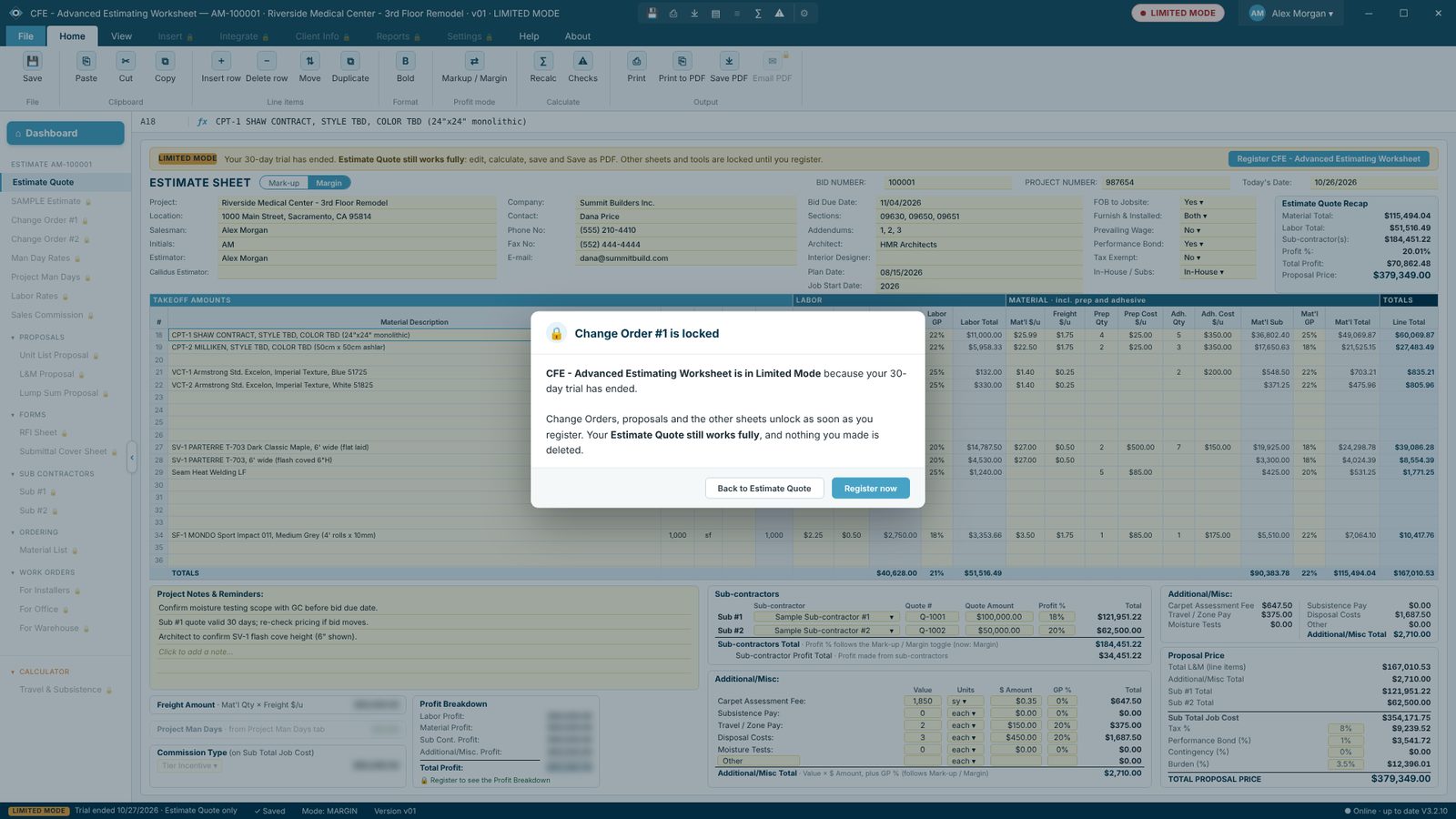
What Limited Mode looks like
A red LIMITED MODE badge sits next to your name, and locked items in the menu carry a small lock. Click one and CFE BidWise tells you what it does and offers Register now. Your Estimate Quote, its totals and the Total Proposal Price stay exact.
What you get in CFE BidWise
Built by a flooring professional with over 20 years in the business: one Windows program that takes a bid from the takeoff to the final invoice, for the estimator, the office, the warehouse and the crew.

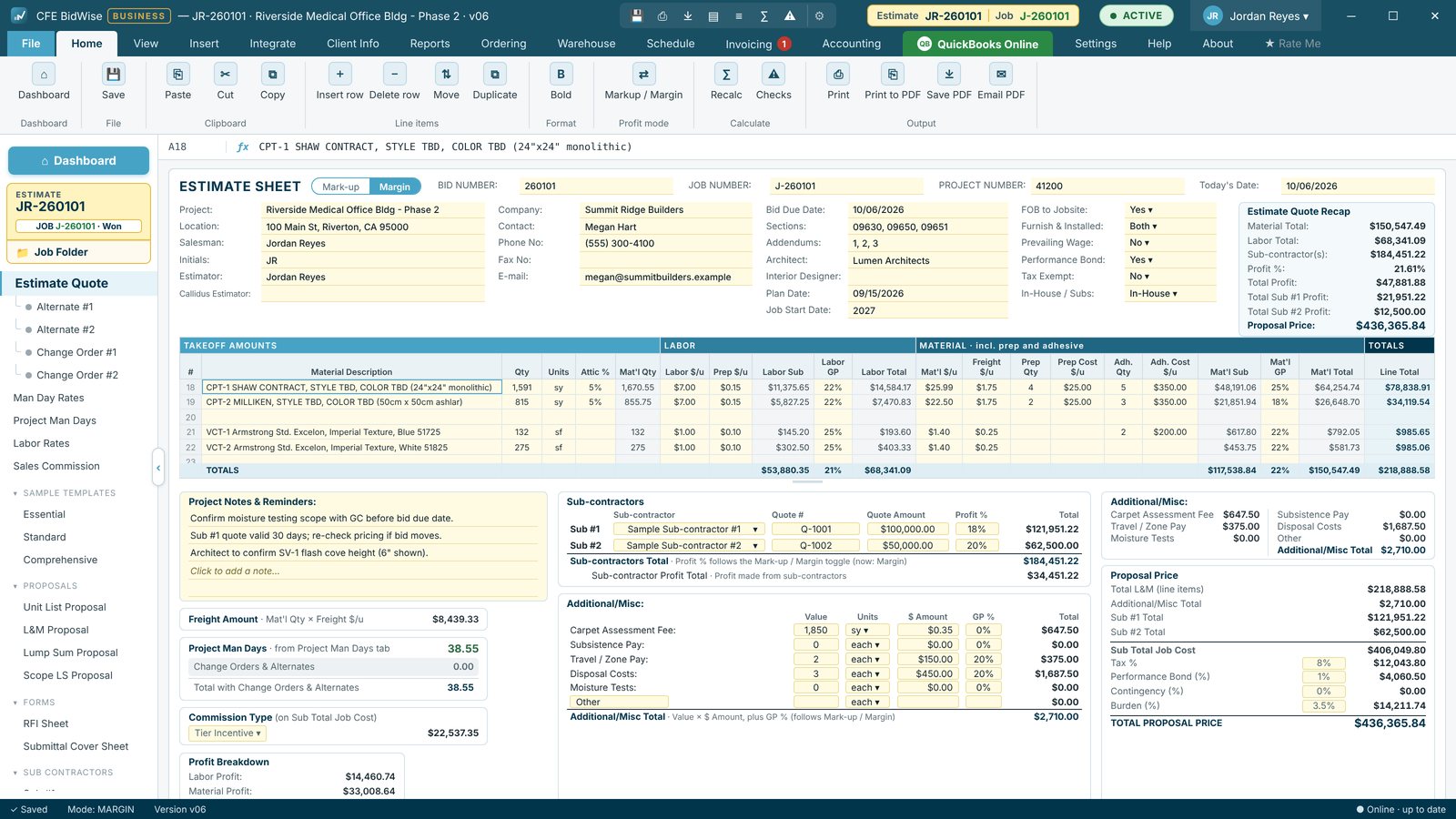
Estimate Quote worksheet
Labor GP and Material GP set separately, line by line, with subs, tax, bond and burden, priced by markup or margin.
See how it works →
Live dashboard and bid tracker
Every bid with GC, amount and status, your total bid, open bids and win rate, live.
See how it works →
Import takeoffs in one click
Callidus, Measure Square, RFMS Measure and FloorRight PDFs read into the estimate. Nothing typed twice.
See how it works →
My day reminders
The office to-do list that writes itself, with reminders at 10 AM and 2 PM and a morning email.
See how it works →
Proposals in one click
Unit List, L&M and Lump Sum proposals on your letterhead, plus RFI and submittal sheets.
See how it works →
Ordering and purchase orders
What to order, what is late and what arrives this week, with POs per vendor.
See how it works →
Price Check database
Every price you paid on past jobs, ready when you price the next one.
See how it works →
Warehouse
Receive, stage, pull and load, with stock, bins, trucks and TV boards for the crew.
See how it works →
Install scheduling
Book installs by month and week, by crew, and see which jobs are not ready.
See how it works →
BidWise Field crew app
Today’s job, plans, materials to load and GC sign-off on the crew’s phone.
See how it works →
Invoicing and Collect & bill
Invoices and deposits from the Won bid, with what is late and what to bill next.
See how it works →
Pay apps and retainage
AIA G702 / G703 pay applications, progress billing and retainage held and released.
See how it works →
Stripe online payments
GCs pay by card or ACH from the invoice, and the payment is recorded for you.
See how it works →
QuickBooks Online
Won bids, invoices, bills and payments sync with QuickBooks Online, both ways.
See how it works →
Accounting
Bills, expenses, sales tax, 1099 subs, lien waivers and a 13-week cash forecast.
See how it works →
Job costs and WIP
Job costs, WIP schedule, job health and profit fade on every open job.
See how it works →
Team access and roles
On Business, the Master user decides what each person in the office can open.
See how it works →
United States and Canada
US sales tax, or Canadian GST, HST, PST and QST, holdback and T5018.
See how it works →All the features, fully customizable
From the first takeoff quantity to the installer’s job form. Set it up with your own logo, letterhead, rates, defaults and proposal wording.
Estimating
- Estimate Quote worksheetOne page per bid: labor, material, prep, adhesive, freight, attic stock, subs, tax, bond and burden.
- Labor GP and Material GPSet gross profit for labor and for material separately, line by line, with Markup or Margin.
- Change orders & alternatesAlternate #1–2 and Change Order #1–2 on every bid, each with its own status.
- Man days & labor ratesProduction rates, saved rate sets, project man days, overtime and burden.
- Sales commission & travelFive commission systems and a travel and subsistence calculator.
- Sample templatesEssential, Standard and Comprehensive templates, or save and share your own.
Takeoff import
- Callidus® Summary ReportGrout, seam welding, padding, nosing and flash cove as sub-lines.
- Measure Square 8Summary report PDF read into the estimate, stairs included.
- RFMS MeasureTakeoff report PDF with gross quantities and transitions.
- FloorRightJob Summary PDF, tile pieces turned into square feet.
- Excel and CSVYour own spreadsheet takeoffs, with saved formats.
- Import rulesPreview, fix and untick lines before they go in. Nothing is uploaded.
Dashboard, My day & proposals
- Live dashboardEstimates, total bid, open bids and win rate, each card with its own period.
- Bid tracker & Win / LossSix bid statuses, Won and Lost details, who keeps winning the bids you lose.
- My dayA to-do list built from your jobs: reminders at 10 AM and 2 PM, Windows notifications, a morning email.
- Team’s dayI’m on it, take over or hand off a line, and a monthly log. Business
- Proposals on your letterheadUnit List, L&M, Lump Sum and Scope proposals, RFI and submittal sheets.
- Job FolderPlans, specs, photos and the takeoff PDF filed with every bid.
Ordering, warehouse & field
- Material orderingMaterial list, what to order, late deliveries and what arrives this week.
- Purchase ordersOne PO per vendor, emailed from the app, with actual $ per unit. Business
- Price CheckPrices from your past material lists and POs, by product.
- WarehouseReceive, stage, pull and load, stock and work orders for the warehouse.
- Bins, trucks & TV boardsDye lots, bays and bins, trucks, leftovers, warehouse-only users and 2 free TV boards. Business
- Install scheduleBook installs by month and week; Business adds week by crew and install problems.
- BidWise Field crew appToday’s job, plans with pins, materials, photos and GC sign-off on iPhone, iPad and Android.
- Field clock-in & daily reportUp to 25 crew phones, hours to job costs, room progress and problems. Business
Invoicing, payments & accounting
- InvoicingInvoices and deposits from the Won bid, Collect & bill and payment records.
- Pay apps & retainageProgress billing, AIA G702 / G703, retainage, receivables and GC statements. Business
- Team billingEstimators send Ready to bill; you choose who invoices. Business
- Stripe Pay NowGCs pay by card or ACH from the invoice email or PDF.
- QuickBooks OnlineWon bids, invoices, bills and payments sync both ways. Business
- AccountingBills, expenses, sales tax, 1099 subs and the accountant pack.
- Cash forecast & liens13-week cash forecast, lien rights and waivers, insurance audit. Business
- Job costs & WIPJob costs, WIP schedule, job health, over and under billing, profit fade. Business
United States & Canada
- US companiesSales tax, AIA pay apps, liens, 1099-NEC and QuickBooks Online.
- Canadian companiesGST, HST, PST and QST by province, T5018 subs, amounts in CAD.
- Holdback & Canadian liensHoldback in place of retainage, lien deadlines, QuickBooks Online Canada. Business
Team, customizing & your data
- Fully customizableYour logo, letterhead, rates, defaults, proposal terms, exclusions and qualifications.
- Team seatsOne Master user, one bill, as many users as you need. Business
- Roles & accessThe Master user picks what each person can open and who sees bid prices. Business
- Desktop & laptopTwo computers per user, kept in sync.
- Safe dataAutosave, version history, cloud backups, export all your data any time.
- Help built inFull User Guide, Remote Support and automatic updates.
System requirements
- Operating system
- Windows 10 or Windows 11, 64-bit
- Display
- 1366×768 or larger; designed for full HD (1920×1080) and up
- Disk space
- About 300 MB once installed
- Install rights
- Windows asks once for permission (it installs for all users in Program Files)
- Internet
- Needed to install, update and check the license; estimating works offline
- Also uses
- Microsoft Edge WebView2 Runtime (part of Windows 10 and 11; added by the installer if missing)
- Not supported
- Mac, Linux, 32-bit Windows, tablets and phones
Frequently Asked Questions
Is CFE BidWise really free to download?
Yes. The download and the 30-day trial are free, with every feature unlocked. No credit card is asked for. You only create your user inside the app with your name and email.
What happens when the 30-day trial ends?
CFE BidWise switches to Limited Mode. The Estimate Quote keeps working for free: you can still create, open, edit, calculate and save estimates and save them as PDF (with a Limited Mode watermark). The advanced features lock until you subscribe, and nothing you made is deleted.
How much does CFE BidWise cost after the trial?
Two plans, billed monthly: Personal $69.99 a month for 1 user, or Business $129.99 a month per user. Each user covers two computers. Every 6 months saves 5% ($398.94 Personal, $740.94 Business per user) and yearly saves 15% ($713.90 Personal, $1,325.90 Business per user). Plans auto-renew until you cancel.
Which Windows versions does it run on?
Windows 10 and Windows 11, 64-bit. It uses the Microsoft Edge WebView2 Runtime that is already part of Windows 10 and 11; the installer adds it if a PC is missing it.
Why is the download file so small?
You download a small setup file (a web installer, about 4 MB). When you run it and click Install, it downloads the latest full version of CFE BidWise from our server, adds Microsoft Edge WebView2 if the PC needs it, and installs it, so you always start on the newest build. An offline installer and an MSI for IT departments are also on this page.
Is the installer digitally signed?
Yes. The setup files, the MSI and the program itself are code-signed by Commercial Flooring Estimating LLC. Right-click the downloaded file, choose Properties and open the Digital Signatures tab to see it.
How do I get updates?
CFE BidWise checks for updates by itself and tells you when a new version is ready. You can also click Help › Check now. The update installs in a minute and reopens the program; your estimates and settings stay as they are.
Where is my estimating data stored?
On your own PC, in Documents\CFE Estimating. Every estimate is saved in a local database plus a .cfe file, autosaved every 30 seconds, and can be backed up to OneDrive, Google Drive, Dropbox or a network folder.
Can I use one license on two computers?
Yes. Each seat covers two computers, for example a desktop and a laptop, used one at a time. Open it on the other computer and it asks Move it here?; the first computer turns read-only and keeps a copy of any unsaved work. Desktop and laptop sync keeps your estimates the same on both through OneDrive, Google Drive or Dropbox.
Can my whole team use it?
Yes. Choose Team and the number of seats when you subscribe. The person who buys is the Master user: they invite estimators by email with a 6-digit team code, add or reduce seats, and remove users from Integrate › Team.
Do I need the internet to use it?
Only to install it, to check for updates and to check your license now and then. Estimating works offline.
Can it import my Callidus takeoff?
Yes. Import a Callidus Summary Report PDF and the quantities fill the Estimate Quote. The PDF is read on your PC by plain code; nothing is uploaded and no AI reads your plans.
Is there a user guide?
Yes. The full User Guide is built into the program (Help › User Guide) and is also online, with step-by-step help for every screen. If you get stuck, Help › Remote Support lets us look at your screen with your permission.
CFE BidWise is made by Commercial Flooring Estimating LLC, estimating commercial flooring since 2008. Last updated: