BidWise guide · Accounting
Subs, Vendors, Bills, POs and Expenses
The Accounting tab in BidWise tracks the money going out, built from the jobs you already run. Subs shows what you agreed to pay each sub, what they billed and what you still owe; Vendors shows what you ordered, what arrived and what was billed; Bills lists what you owe by age; POs matches every purchase order to its bill; and Expenses adds it all up by type, vendor or job.


Why track bills in the estimating app?
A flooring contractor pays for material before the general contractor pays, and pays subs on every job at once. When the bills sit in a pile, a sub gets paid twice, a vendor bill is missed until the late fee, or material arrives and the bill never shows up.
BidWise already knows what you agreed with each sub, what you ordered on every PO and what arrived in the warehouse. The Accounting tab puts the bills next to all of that, so you can see what is owed, what is late and what is missing.
The six steps
- Subs: who we pay for workAgreed, billed, paid and still owed.
- Vendors: who we buy fromOrdered, received, billed, paid.
- Bills: what we oweEnter a bill; see it by age.
- POs: what we committedEvery PO against its bill.
- ExpensesBy type, vendor, job or every line.
- What can go wrongNo bill yet, no COI, paid twice.
1See what every sub is owed
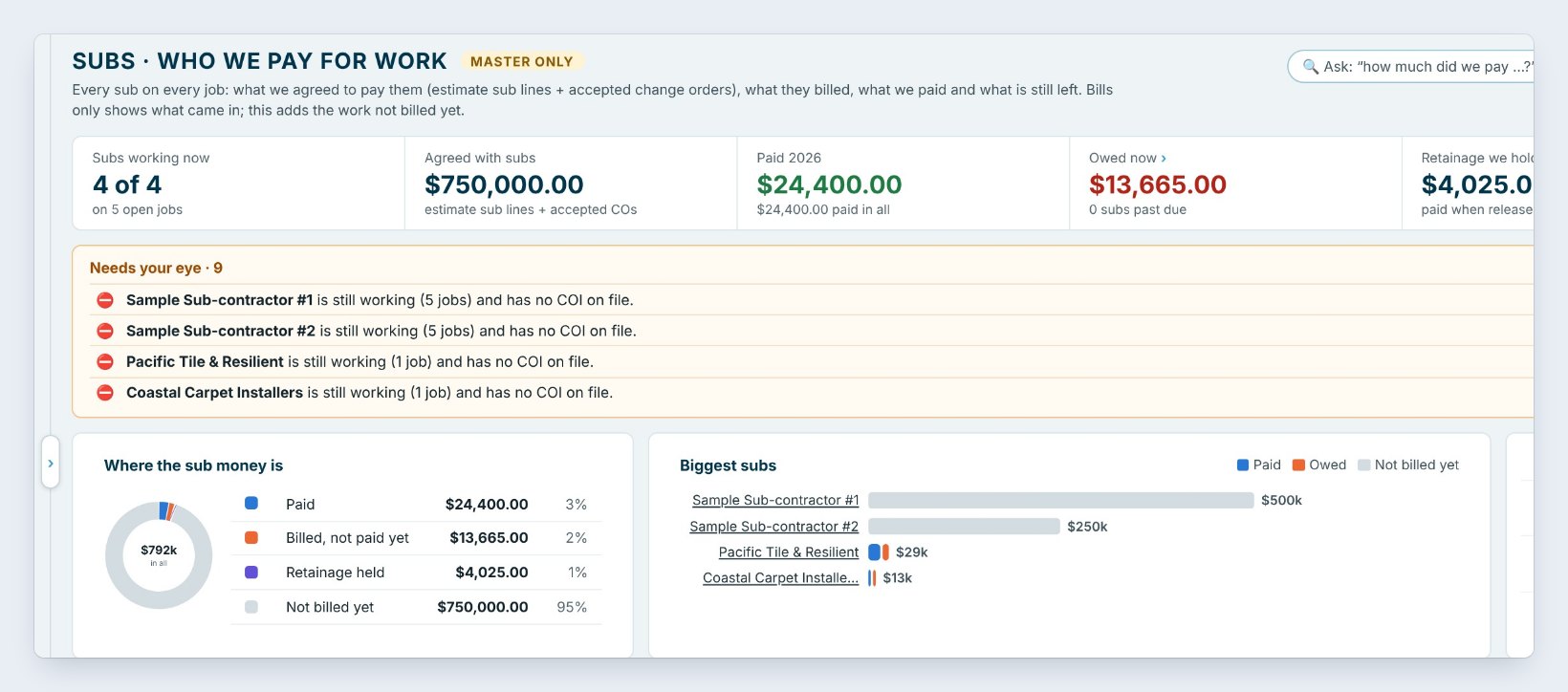
Open Accounting, type your Accounting password, and press Subs. Every sub on every job is here: what you agreed to pay them, from the estimate’s sub lines and accepted change orders, what they billed, what you paid and what is left.
The tiles show Agreed with subs, Paid this year, here $24,400.00, Owed now $13,665.00, the Retainage we hold, $4,025.00, paid when it is released, and what is Not billed yet. Below, Where the sub money is and Biggest subs show it at a glance, and Coming up lists installs starting and sub bills due in the next 30 days.
The table has filters for Working now, Owe money, Past due, No lien waiver, Retainage held and Billed over agreed, so a sub who bills more than the deal stands out.
2See what every vendor is owed
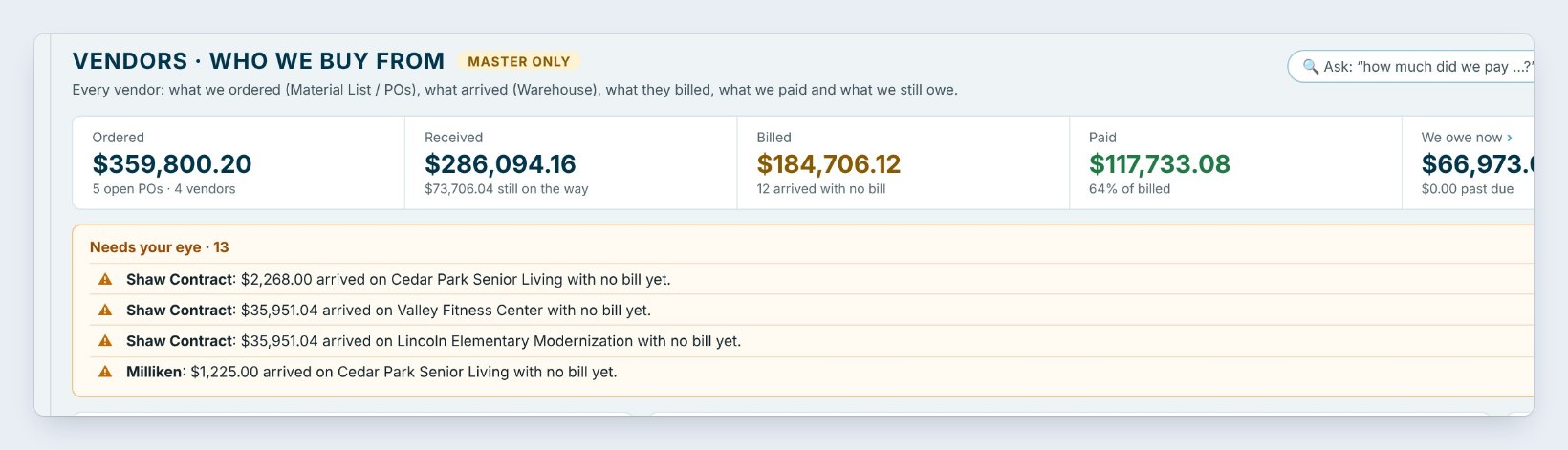
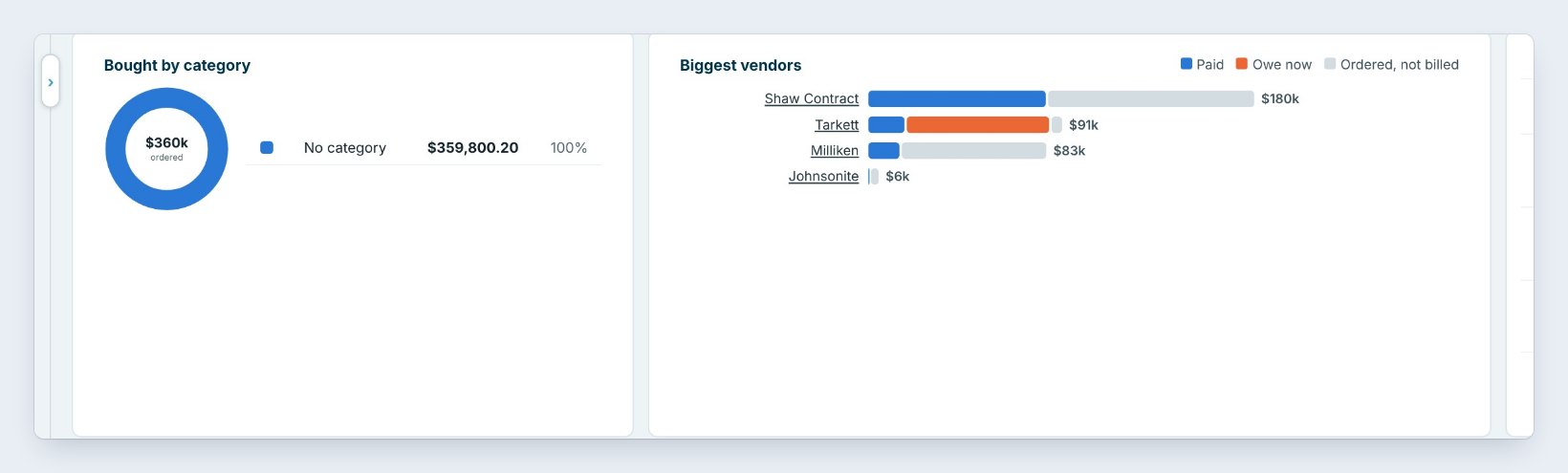
Vendors follows each vendor from the order to the payment. The tiles show what you Ordered on the Material List and POs, here $359,800.20, what was Received in the warehouse, what the vendor Billed, what you Paid and what We owe now, $66,973.04.
Needs your eye is the part to read first. Here Shaw Contract delivered $2,268.00 of material to Cedar Park Senior Living, and no bill has come in yet. Biggest vendors shows paid, owed and ordered for each one, and Coming up lists the bills due and deliveries due in the next 14 days. The Price check tab compares what each vendor charged for the same product.
3Enter bills and see what you owe by age
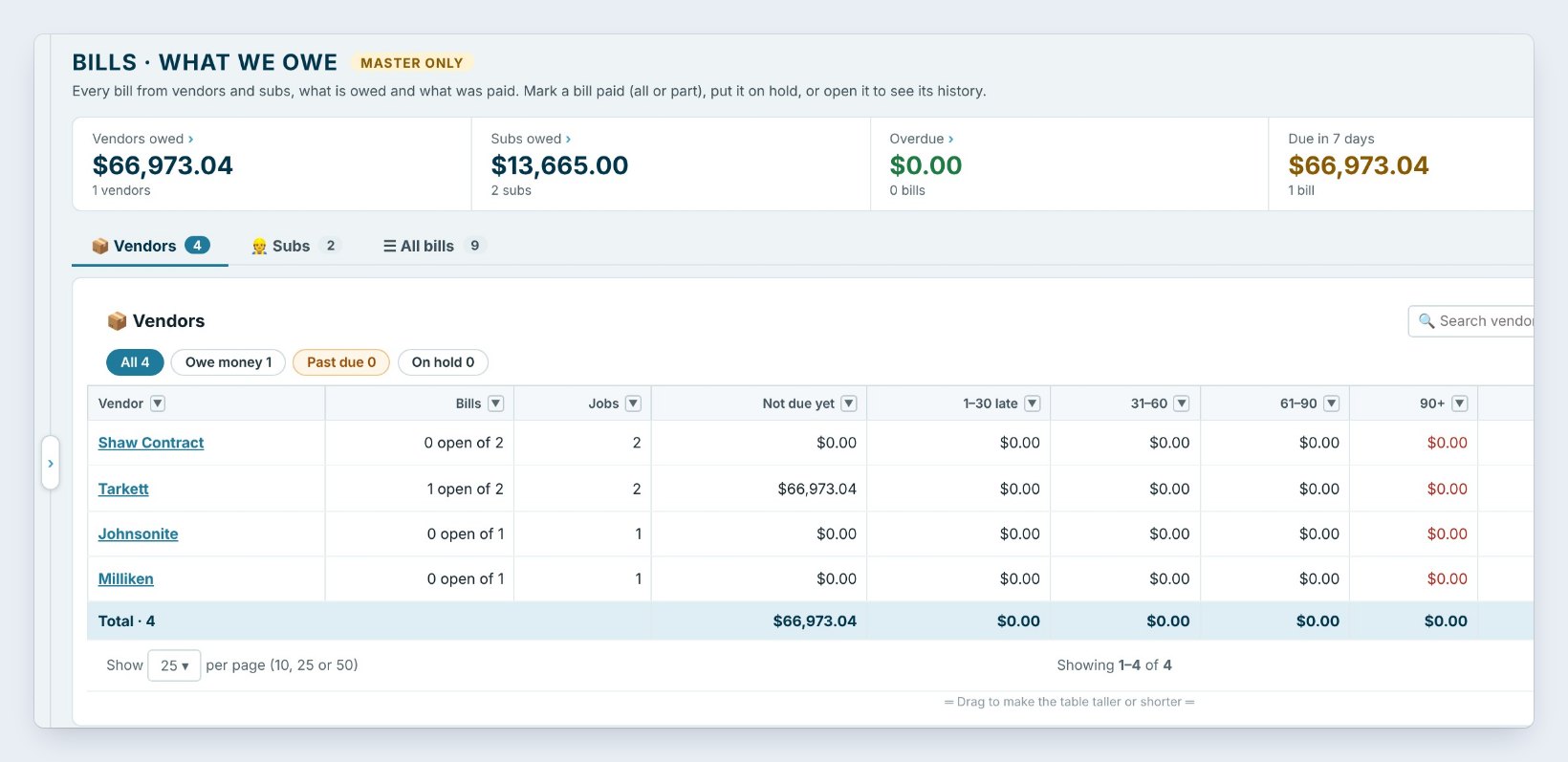
Bills is every bill from vendors and subs. Press Enter a bill to type one, or Bring in from POs / job costs to start it from a PO you already sent, so the amounts are not typed twice.
The tiles show Vendors owed, Subs owed, Overdue, Due in 7 days and Paid this month. The tabs split it into Vendors, Subs and All bills, and each row shows what is Not due yet, 1–30 late, 31–60, 61–90 and 90+, with Owed now and what you paid this year. Open a bill to mark it paid, all or part, put it On hold, or see its history.
Sort Bills by Due in 7 days every Friday and pay from that list. A bill on hold stays out of the cash forecast until you take it off hold.
4Match every purchase order to its bill
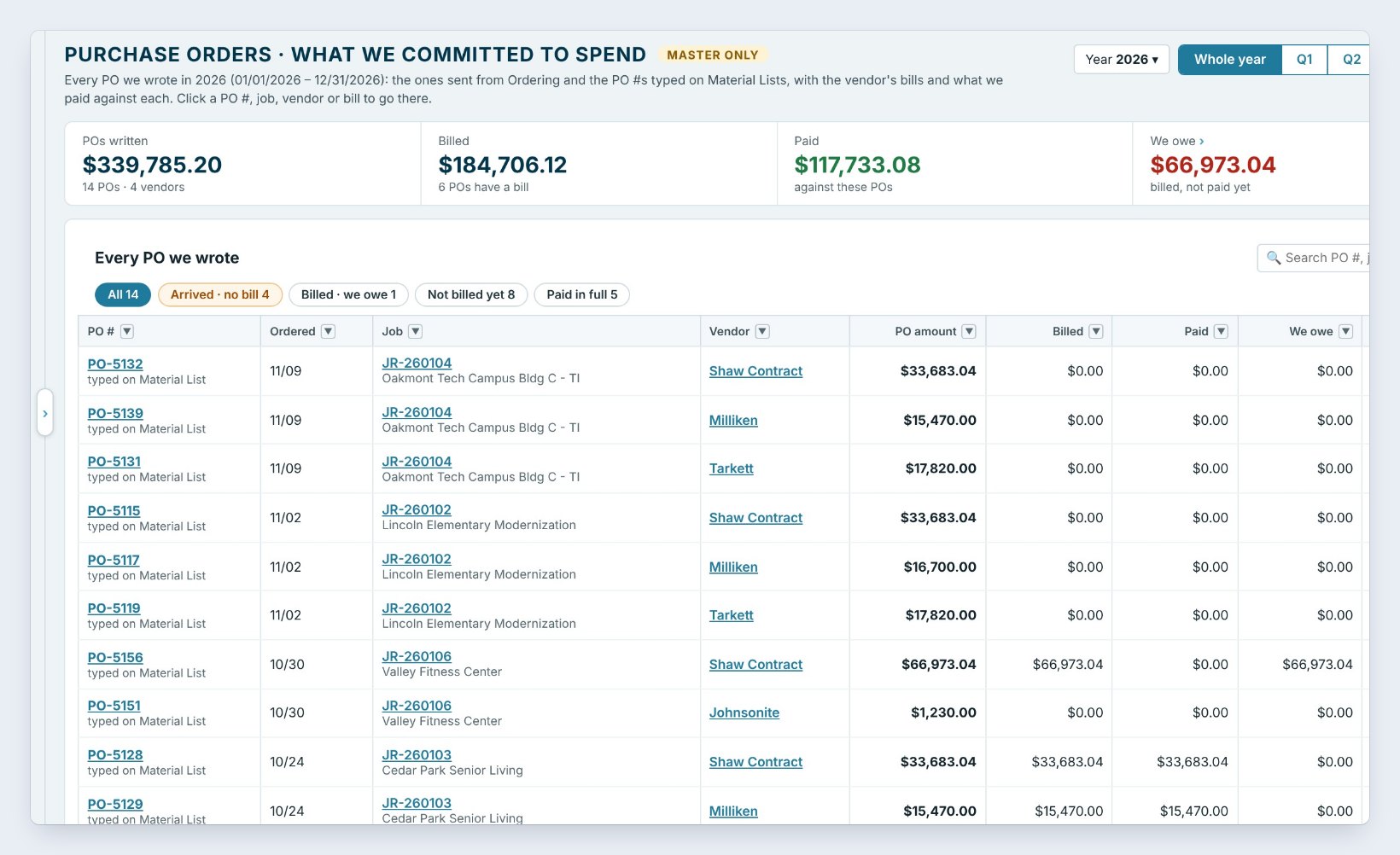
POs lists every purchase order for the year: the ones sent from Ordering and the PO numbers typed on Material Lists. Each row shows the job, the vendor, the PO amount, what was Billed, Paid, what We owe and what is Not billed yet.
The status says where it stands: Ordered, Arrived, no bill, Billed, owe or Paid in full. Press Bill on a line to enter the vendor’s bill against that PO, or Pay to record the payment. The buttons on top pick the whole year or one quarter, and Open in Ordering jumps back to the order.
5Add up expenses by type, vendor or job
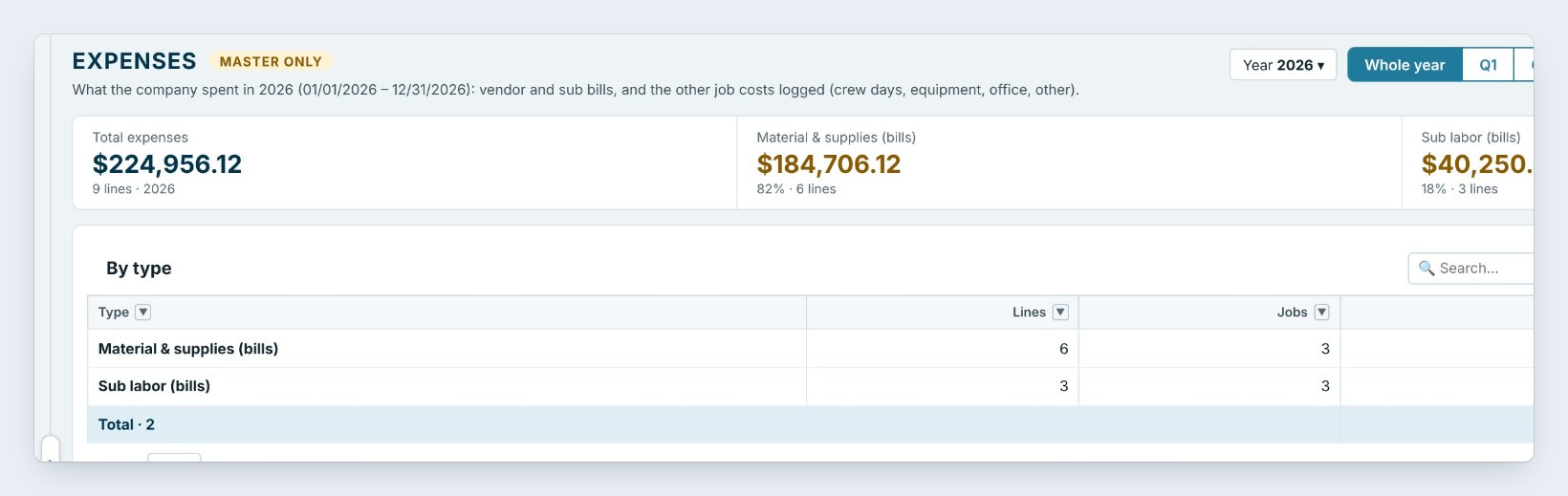
Expenses adds up what the company spent on jobs: vendor and sub bills, plus the other job costs logged, such as crew days, equipment and office items. Here the year is $224,956.12, of which $184,706.12 is Material & supplies and $40,250.00 is Sub labor.
The buttons on the right show it By type, By vendor, By job or Every line, for the whole year or one quarter. Export saves it to Excel for your accountant, and the same numbers go into the accountant pack.
6What can go wrong, and how to fix it
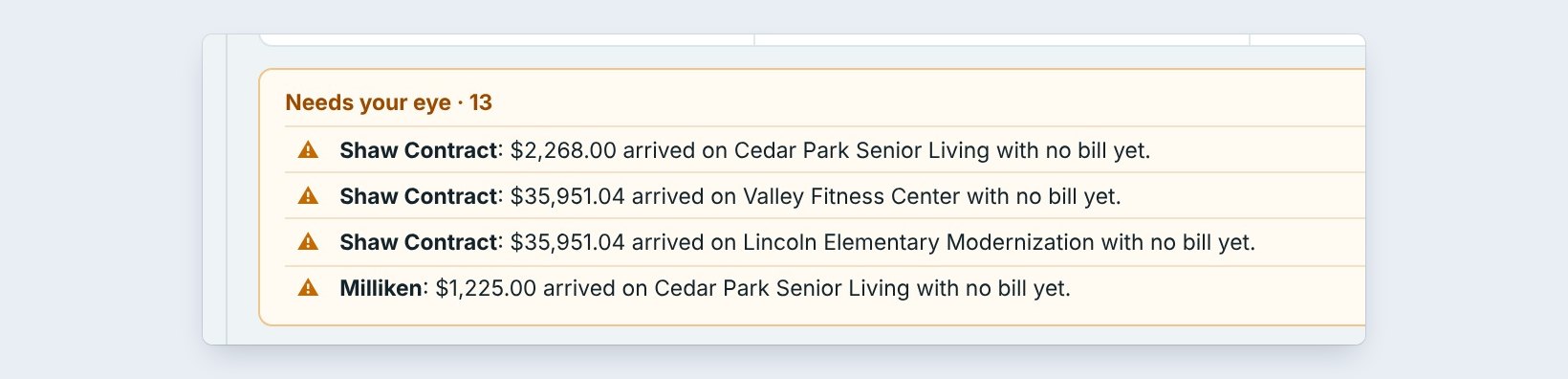
Material arrived but no bill came. Vendors and POs flag it as Arrived, no bill. Call the vendor for the invoice, then press Bill on that PO. Until the bill is in, the job’s costs and your cash forecast are missing that money.
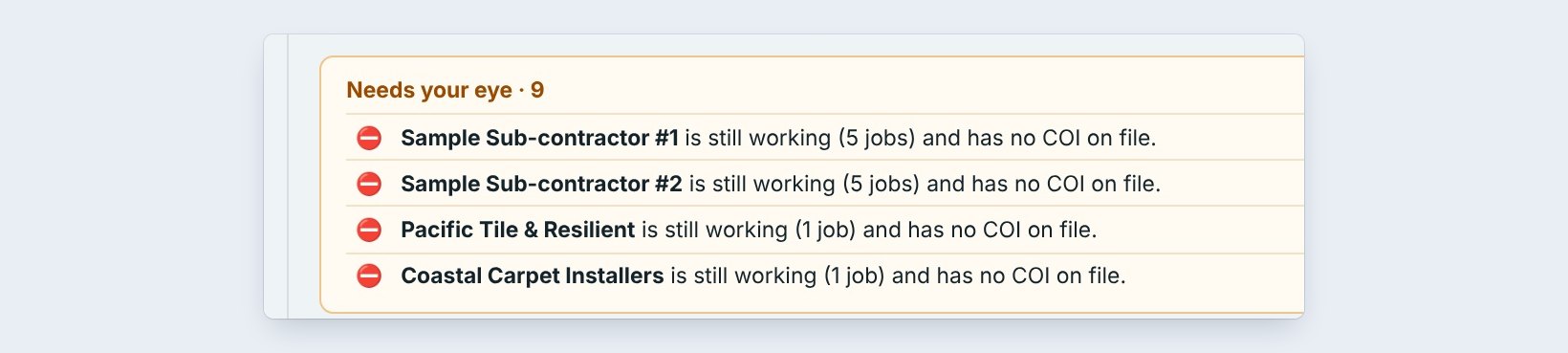
A sub has no certificate of insurance. Subs lists every sub still working with no COI on file. Ask for it before the next payment; your insurance company can charge you for subs paid without one.
A sub billed more than the deal. Filter on Billed over agreed. Either an extra was never written up as a change order, or the bill is wrong. Hold the bill until you know which.
Worked example: Friday bills at Northgate
What the office checks before paying on Friday, November 13:
| Screen | Shows | What the office does |
|---|---|---|
| Bills | $66,973.04 due in 7 days | Pays Tarkett on its due date |
| Vendors | $2,268.00 arrived, no bill | Asks Shaw Contract for the invoice |
| POs | 4 POs arrived, no bill | Enters 2 bills that came in the mail |
| Subs | $13,665.00 owed, no COI on 2 subs | Holds payment until the COIs arrive |
Twenty minutes, every bill accounted for, and no sub paid without insurance.
What to do next
Next, get ready for year-end: 1099s, the insurance audit and lien rights, or go back to the Accounting tab tour.
Know what you owe before it is late
Subs, bills, POs and expenses come with BidWise. Start with the 30-day free trial, no credit card.
Frequently Asked Questions
Where do the agreed sub amounts come from?
From the sub lines on each Won estimate, plus accepted change orders. You do not type them again.
Can I start a bill from a PO?
Yes. Press Bill on the PO, or Bring in from POs / job costs on Bills, and the vendor, job and amount fill in.
Who can see Bills and Subs?
Only the Master user, after typing the Accounting password.
Do bills go to QuickBooks?
BidWise Business sends Won jobs and invoices to QuickBooks Online. Keep bills in one place, either BidWise or your accounting software, so they are not entered twice.

Written by
Cristian Valcu – Founder & CEO, Commercial Flooring Estimating LLC
Cristian has estimated commercial flooring for over 20 years and built BidWise around the way flooring contractors actually price, propose and track their bids.
Last updated: