BidWise guide · Getting started
Set Up BidWise for a Canadian Company
BidWise works for Canadian flooring contractors with one setting. In Settings › Company info, pick Canada under Company location and choose your province. BidWise then uses Canadian names, forms and taxes for the whole company: GST, HST, PST or QST on the right lines, T5018 slips for subs and T4 for your own installers, holdback instead of retainage, provincial lien days, and amounts in CAD.


Why one setting for Canada?
A flooring contractor in British Columbia pays PST on the material it installs and charges GST on the invoice. In Ontario it is one 13% HST. In Quebec it is GST plus QST, an RL-1 for your own installers, and a legal hypothec instead of a lien. Software built for the United States gets all of that wrong.
In BidWise the province sets it all at once: the tax lines on estimates and invoices, the year-end slips, the holdback and the lien days, so the office does not have to remember the rules for every job.
The six steps
- Switch to CanadaSettings › Company info › Canada.
- Pick your provinceProvince, tax numbers, WorkSafe number.
- Check the taxesSettings › Tax / Bond / Burden.
- Ontario and QuebecHST in Ontario; GST + QST in Quebec.
- Payments in CADPay Now with bank debit or card.
- What can go wrongWrong province, old bids, missing numbers.
1Switch the company to Canada
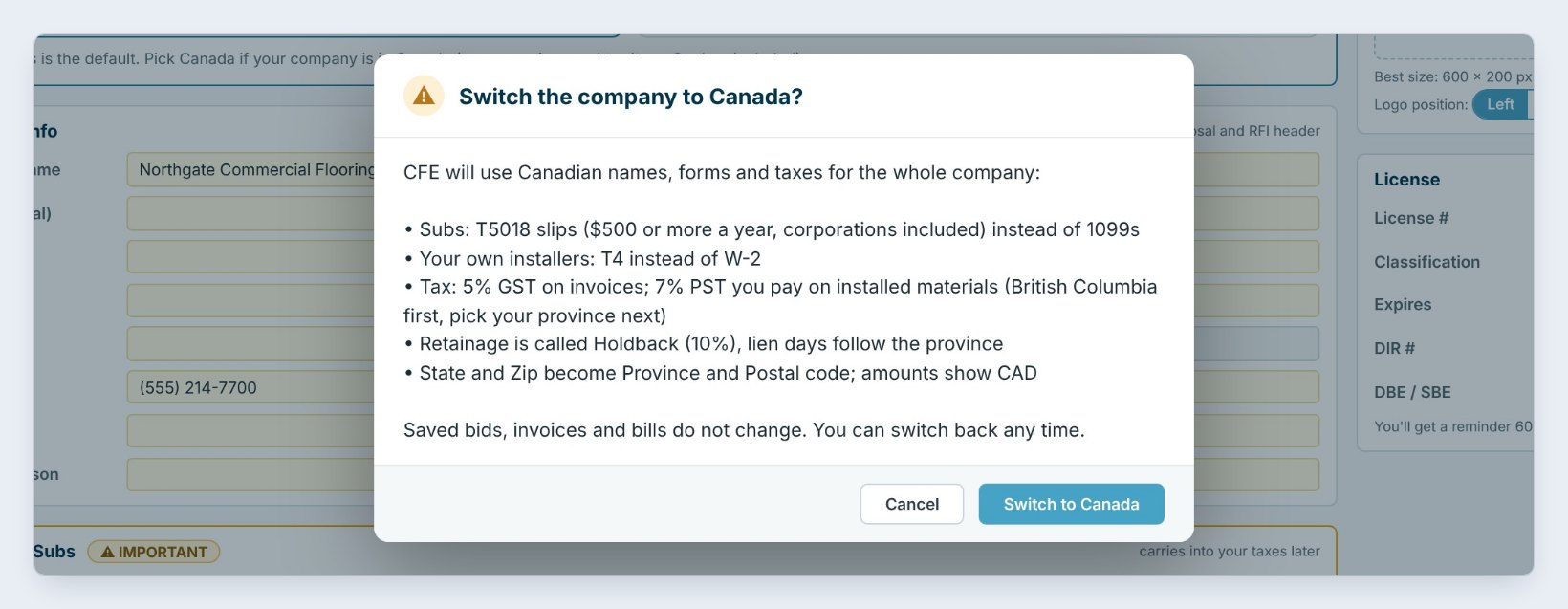
Open Settings › Company info. At the top, Company location says Set this first, because it decides the taxes, forms and names BidWise uses. Click Canada.
BidWise explains what changes before it does anything. Subs get T5018 slips, at $500 or more a year with corporations included, instead of 1099s. Your own installers get a T4 instead of a W-2. Retainage is called Holdback, 10%, and lien days follow the province. State and Zip become Province and Postal code, and amounts show in CAD. Saved bids, invoices and bills do not change, and you can switch back any time. Press Switch to Canada.
2Pick your province and type your numbers
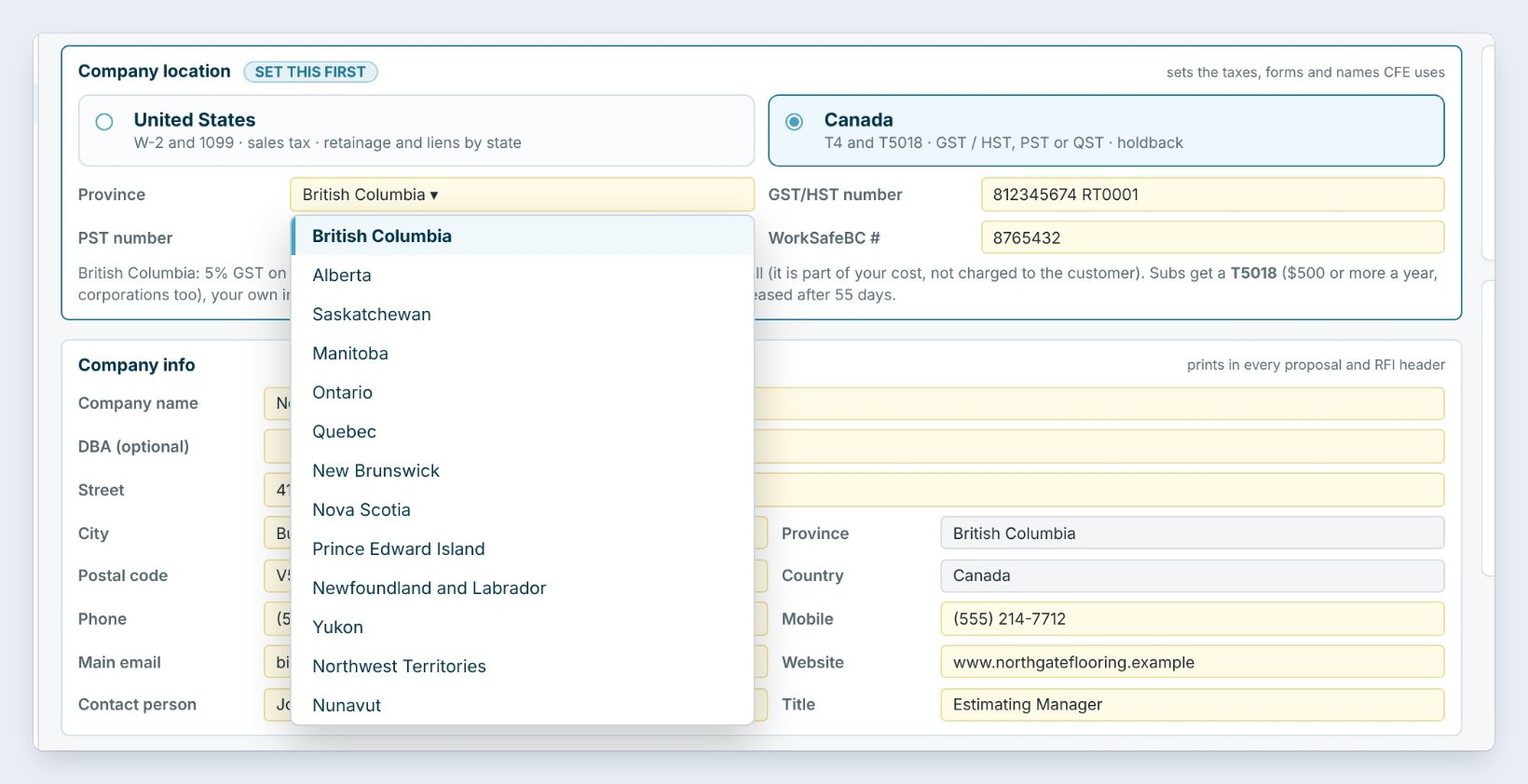
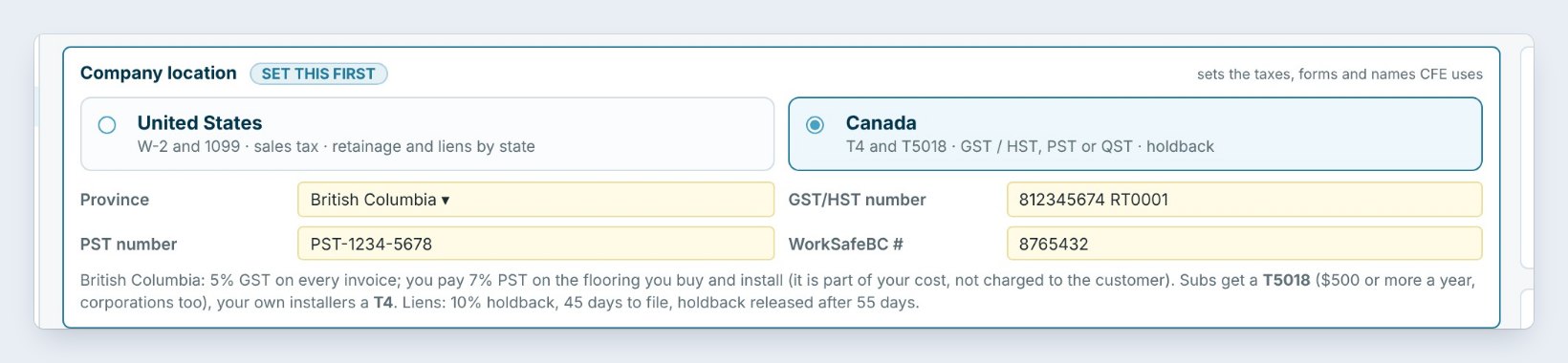
Pick your Province. Every province and territory is on the list. The boxes beside it change with the province. In British Columbia you type the GST/HST number, the PST number and your WorkSafeBC number.
The note under the boxes sums up the rules BidWise will use: 5% GST on every invoice, 7% PST that you pay on the flooring you buy and install, a T5018 for subs, a T4 for your own installers, and a 10% holdback with 45 days to file a lien. Below, the address now asks for a Postal code, and the In-House / Subs card talks about CPP, EI and WorkSafeBC instead of a W-2.
3Check the tax settings for your province
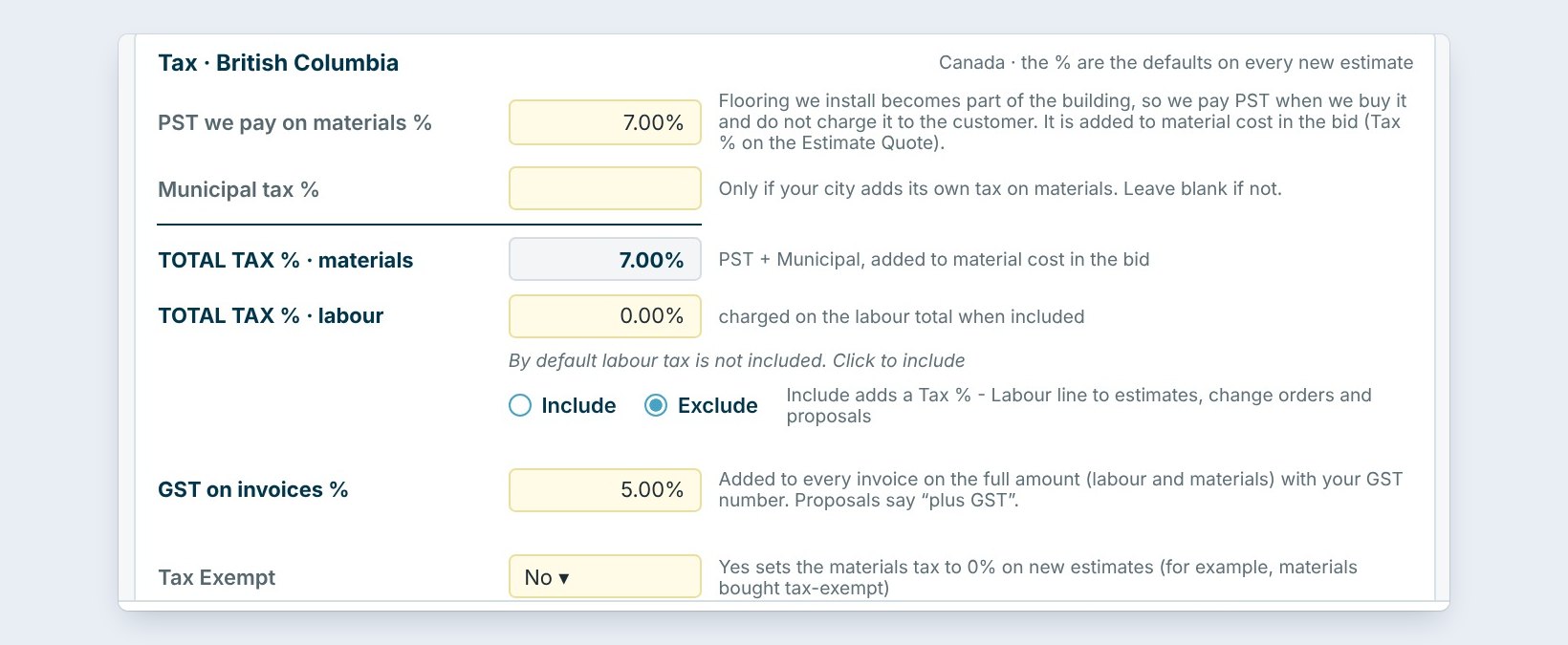
Open Settings › Tax / Bond / Burden. The Tax box is now named for your province, and its numbers are the defaults on every new estimate.
In British Columbia, PST we pay on materials is 7%. Flooring you install becomes part of the building, so you pay PST when you buy it and it goes into the material cost of the bid; it is not charged to the customer as a tax line. GST on invoices is 5%, added to every invoice on the full amount, labour and materials, with your GST number. Proposals say “plus GST”. Labour tax stays off unless you include it.
Leave Municipal tax blank unless your city adds its own tax on materials. Every percent here can still be changed on one estimate.
4See how Ontario and Quebec are set up
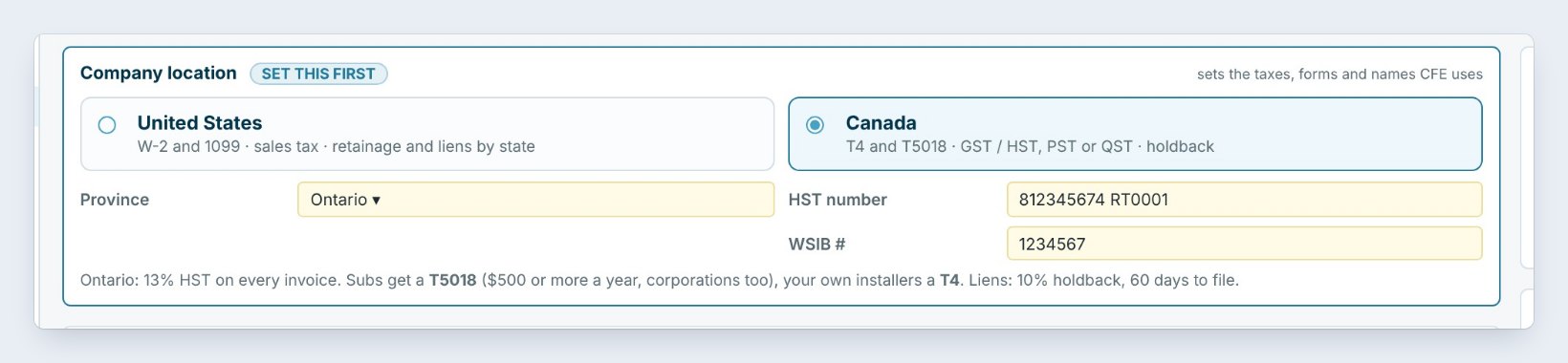
In Ontario you type the HST number and your WSIB number. Invoices carry one 13% HST. The tax on materials in the bid is 0%, because the HST you pay on materials comes back as input tax credits. Liens are a 10% holdback with 60 days to file.
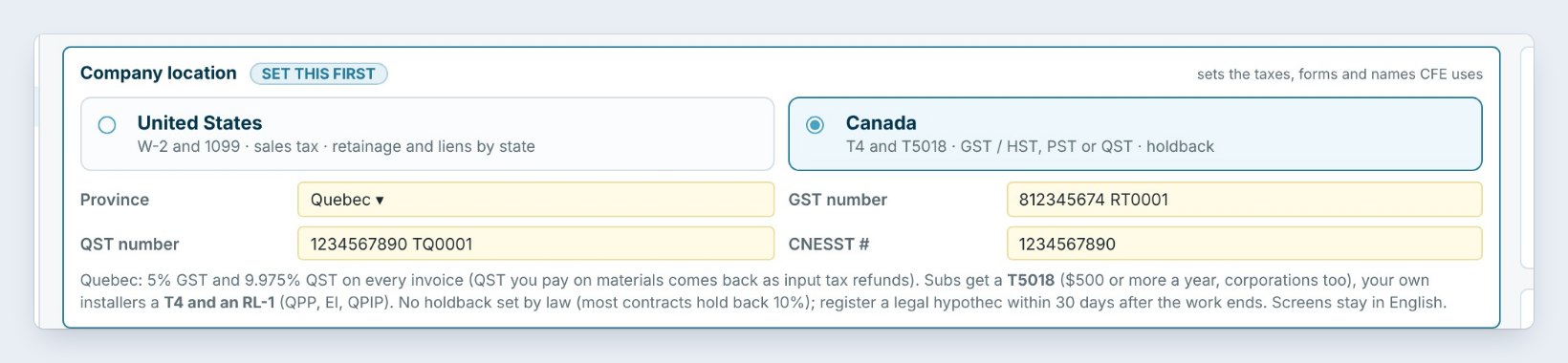
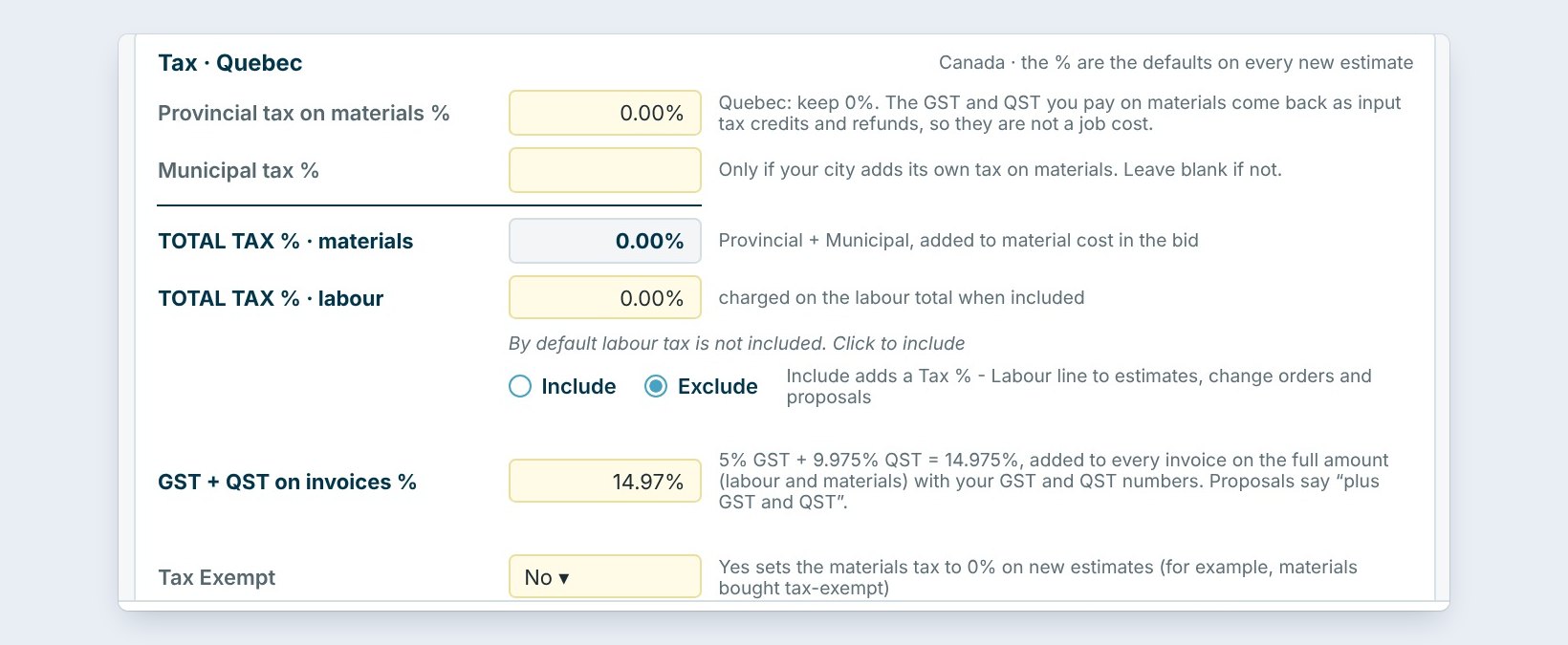
In Quebec you type the GST and QST numbers and your CNESST number. Invoices carry 5% GST plus 9.975% QST, 14.975% in all, and proposals say “plus GST and QST”. Your own installers get a T4 and an RL-1. There is no holdback set by law, though most contracts hold back 10%, and a legal hypothec must be registered within 30 days after the work ends.
5Take online payments in Canadian dollars
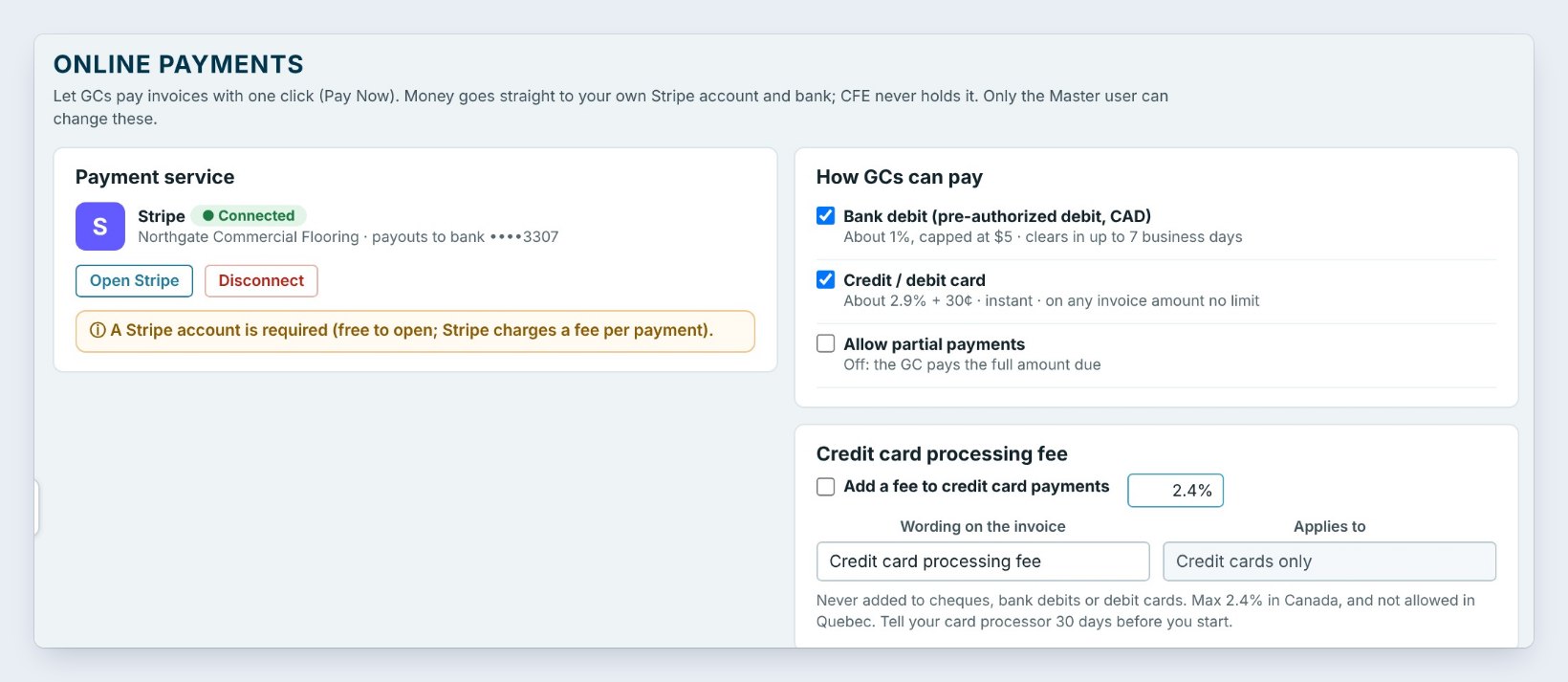
With Canada picked, Settings › Online payments works in CAD. A general contractor can press Pay Now on an invoice and pay by Bank debit, a pre-authorized debit in CAD, or by Credit / debit card. The money goes straight to your own Stripe account and bank.
The Credit card processing fee follows the Canadian rules: at most 2.4%, never on bank debits or debit cards, and not allowed in Quebec. Tell your card processor 30 days before you start charging it. A maple leaf beside Active at the top of the window shows the company runs the Canadian setup; point at it to see which province.
6What can go wrong, and how to fix it

The tax is wrong on a new estimate. Check the maple leaf: it names the province the company runs. If it is wrong, pick the right province in Company info, then check Tax / Bond / Burden.
An old bid still shows US tax. Saved bids, invoices and bills do not change when you switch, so nothing you already sent is rewritten. Change the tax on that one estimate, or start a new one.
The invoice has no GST or QST number. Type the numbers in Company info and press Save settings. Settings are shared by every user of the company, so only an Admin user can change them.
Worked example: one company, three provinces
What BidWise puts on a $100,000 flooring invoice:
| Province | On the invoice | In the bid |
|---|---|---|
| British Columbia | 5% GST: $5,000.00 | 7% PST in the material cost |
| Ontario | 13% HST: $13,000.00 | No tax on materials |
| Quebec | 5% GST + 9.975% QST: $14,975.00 | No tax on materials |
The estimator picks nothing per job: the province in Company info sets the right lines on every estimate, proposal and invoice.
What to do next
Next, finish the company settings, then make BidWise yours.
Estimate the Canadian way
BidWise handles GST, PST, HST and QST. Start with the 30-day free trial, no credit card.
Frequently Asked Questions
Does BidWise work in Canada?
Yes. Pick Canada and your province in Settings › Company info, and BidWise uses GST, HST, PST or QST, T5018 and T4, holdback and CAD.
Does switching change my old bids?
No. Saved bids, invoices and bills do not change, and you can switch back any time.
Is the program in French in Quebec?
Quebec gets the Quebec taxes and forms; the screens stay in English.
Is the Canadian setup on BidWise Personal?
Yes. Company location is on both plans.

Written by
Cristian Valcu – Founder & CEO, Commercial Flooring Estimating LLC
Cristian has estimated commercial flooring for over 20 years and built BidWise around the way flooring contractors actually price, propose and track their bids.
Last updated: