BidWise guide · Accounting
Year-End: 1099s, Insurance Audit and Liens
The Accounting tab in BidWise gets the year-end paperwork ready from the payments you already recorded. 1099 subs lists every sub paid $2,000 or more in the year, with any missing W-9 or tax ID; Insurance audit shows subs paid without a valid certificate of insurance; Lien rights tracks the preliminary notice and lien deadline on jobs that still owe you; and the Accountant pack puts it all in one Excel workbook.


Why do year-end in BidWise?
Every January a flooring contractor hunts for the same things: which subs need a 1099, whose W-9 is missing, and the insurance certificates the auditor will ask for. Miss a certificate and the insurance company charges you for that sub’s payroll as if they were your own crew.
BidWise already has every sub payment with its date. The year-end screens sort it the way the IRS, the insurance auditor and your accountant ask for it, and lien rights keeps the deadlines that protect what you are still owed.
The five steps
- 1099 subsWho needs a 1099-NEC, and what is missing.
- Insurance auditSubs paid without a valid COI.
- Lien rightsNotice due dates and lien deadlines.
- Accountant packOne Excel workbook, a sheet per report.
- What can go wrongMissing W-9, no tax ID, wrong sub.
1See which subs need a 1099-NEC
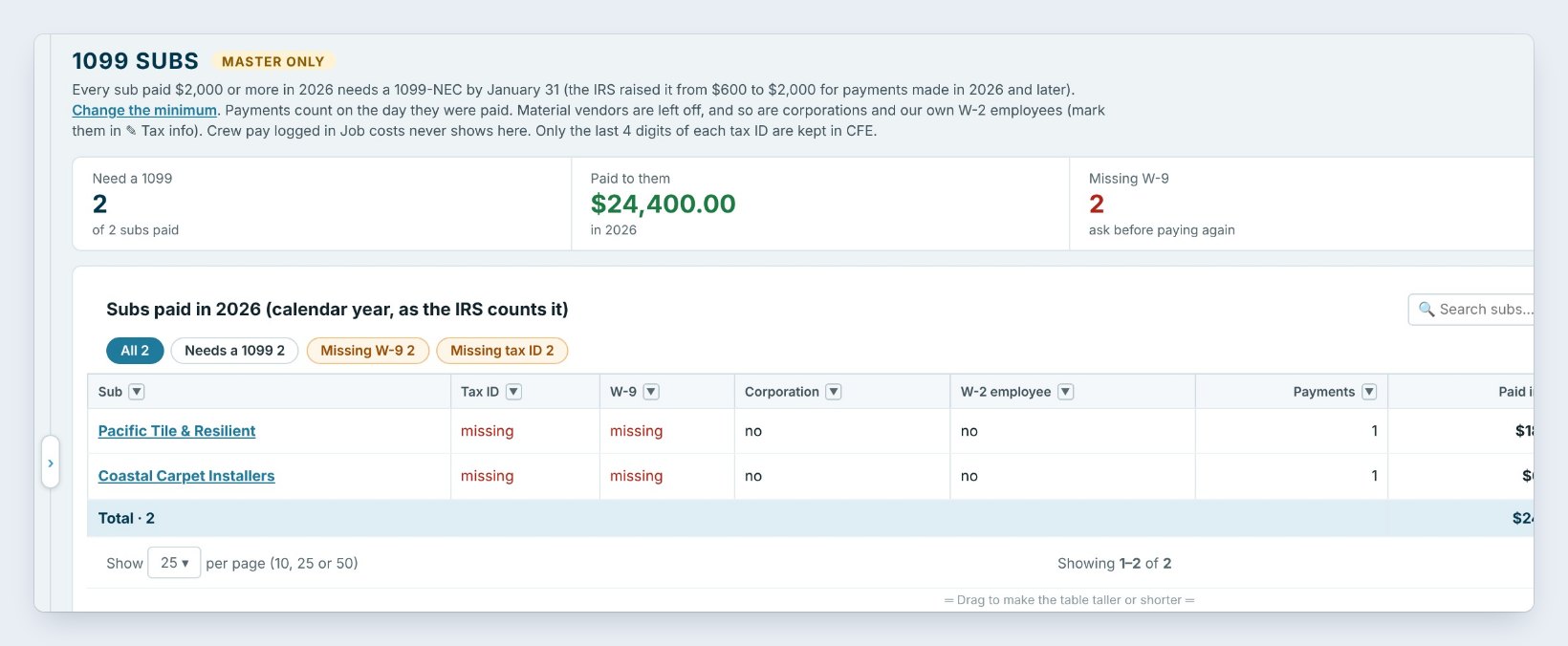
Open Accounting › 1099 subs. It lists every sub paid $2,000 or more in the calendar year, who needs a 1099-NEC by January 31. The IRS raised the minimum from $600 to $2,000 for payments made in 2026 and later, and Change the minimum lets you set it.
Payments count on the day they were paid, the way the IRS counts them. Material vendors are left off, and so are corporations and your own W-2 employees. The tiles show who Needs a 1099, what was Paid to them, here $24,400.00, and who is Missing a W-9 or a tax ID. Press Tax info on a sub to fill them in. Only the last 4 digits of each tax ID are kept in BidWise.
2Get ready for the insurance audit
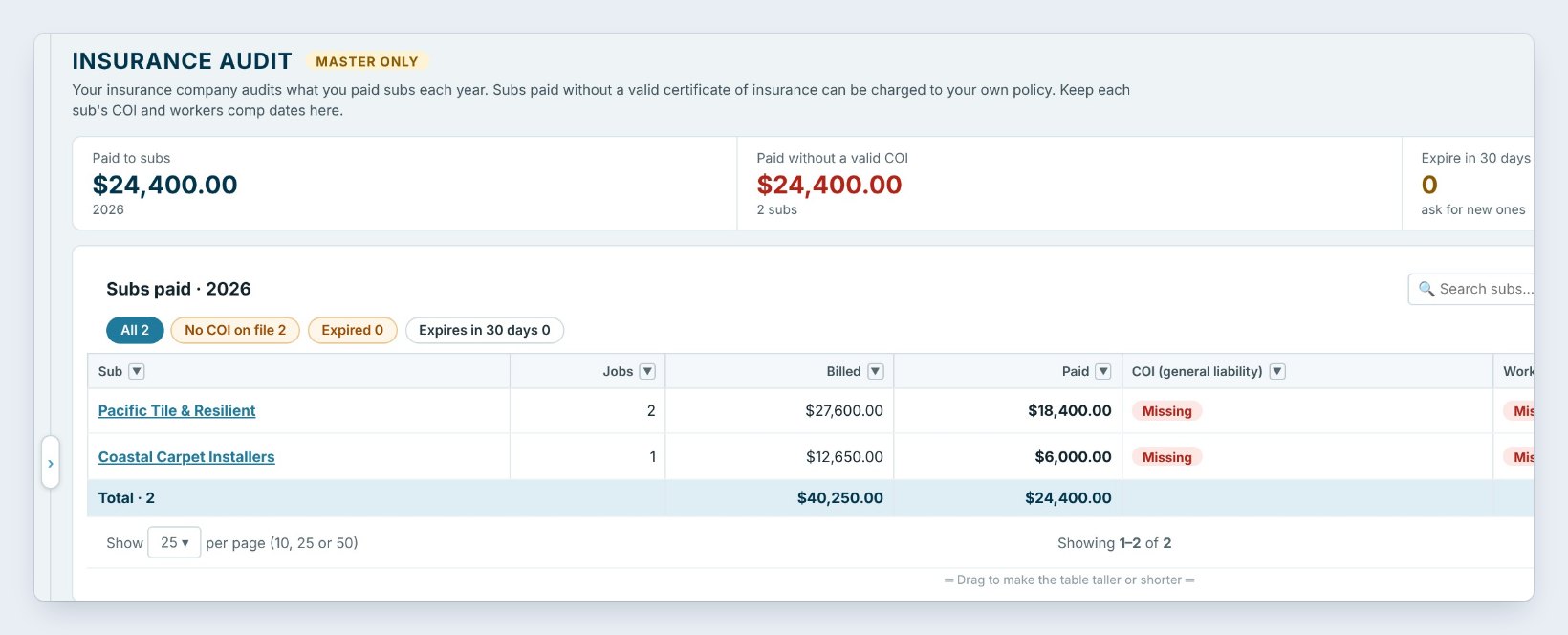
Your insurance company audits what you paid subs each year. A sub paid without a valid certificate of insurance can be charged to your own policy. Open Insurance audit to see it the way the auditor will.
The tiles show what you Paid to subs, how much was Paid without a valid COI, here all $24,400.00, and which certificates Expire in 30 days. Each sub shows its jobs, what it billed and was paid, and the status of its COI for general liability and its Workers comp. Press Insurance on the line to type the dates, and use the filters for No COI on file, Expired and Expires in 30 days.
Ask for a new COI when Expires in 30 days shows a sub, not at audit time. A certificate dated after the work does not help.
3Keep your lien rights on jobs that owe you
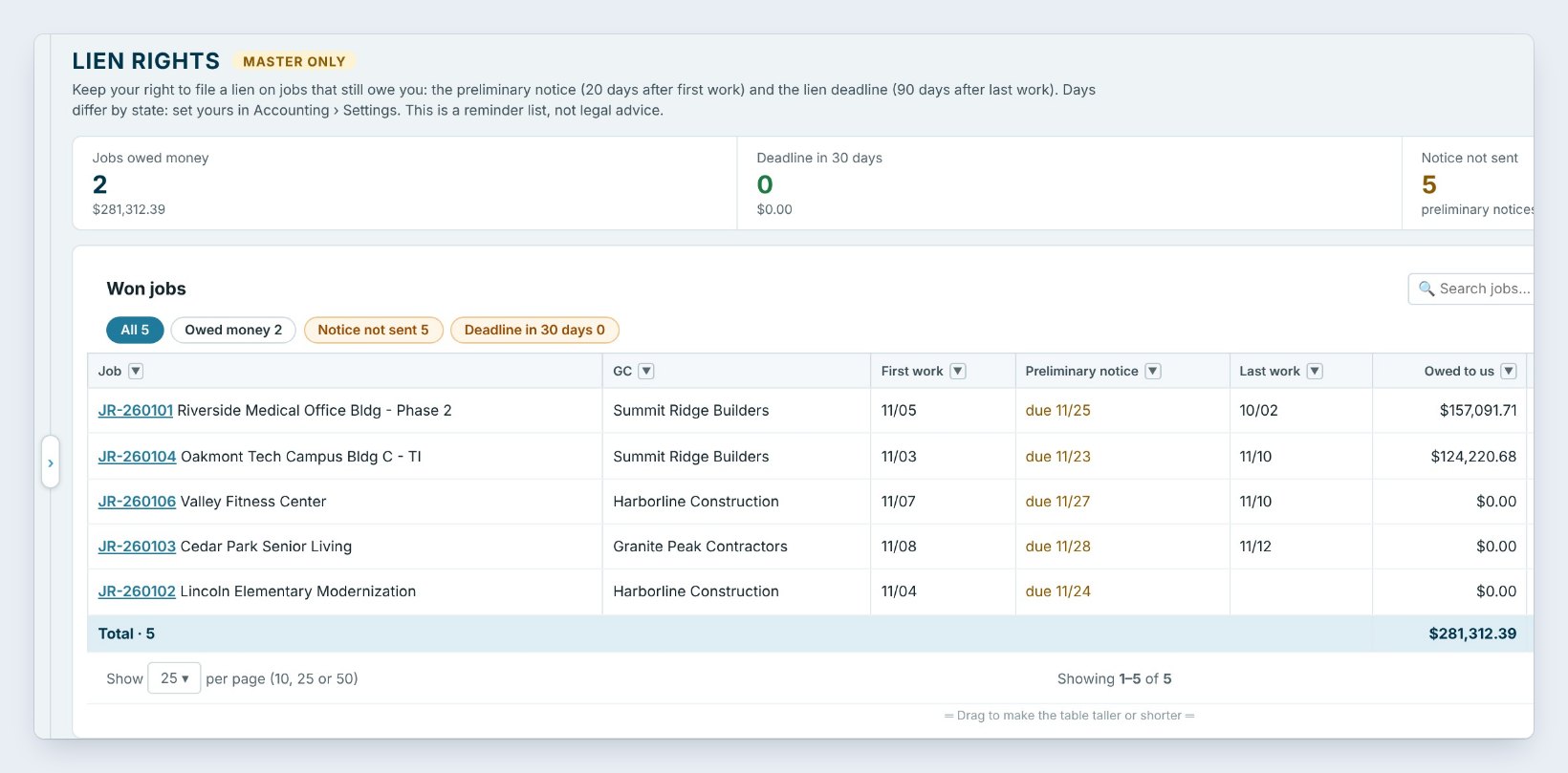
Lien rights keeps your right to file a lien on jobs that still owe you. For each Won job it shows the general contractor, the First work date, when the Preliminary notice is due, what is Owed to us and the Lien deadline with the days left.
The standard days are a preliminary notice 20 days after first work and a lien deadline 90 days after last work. They differ by state, so press Days for my state and set yours. Here Riverside Medical owes $157,091.71 and its lien deadline is 12/31, 46 days away. Press Notice / waiver to record a notice you sent or a lien waiver you signed. It is a reminder list, not legal advice.
4Send the accountant pack
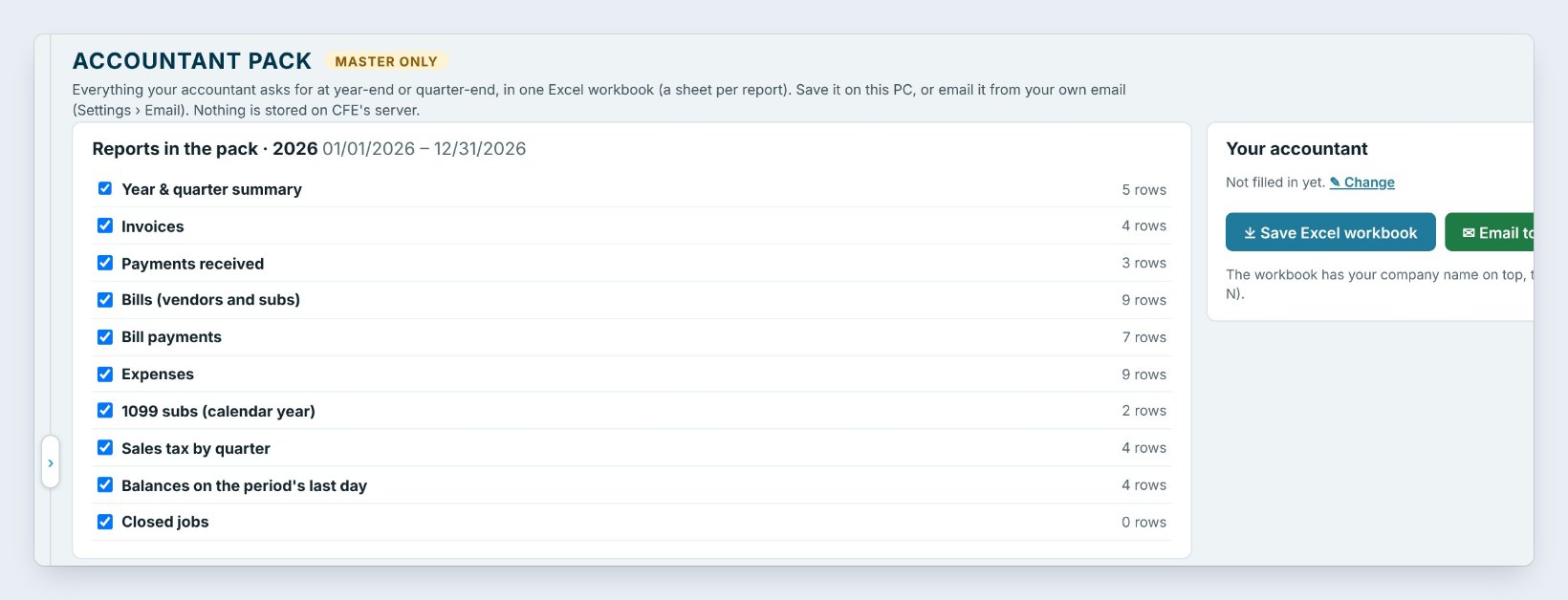
Accountant pack puts everything your accountant asks for at year-end or quarter-end into one Excel workbook, a sheet per report: the year and quarter summary, invoices, payments received, bills, bill payments, expenses, 1099 subs, sales tax by quarter, balances on the last day and closed jobs.
Pick the year or a quarter, untick what they do not need, and press Save Excel workbook, or Email to my accountant from your own email. Fill in Your accountant once with Change. Each sheet has your company name, the period and page setup for printing, and nothing is stored on BidWise’s server.
5What can go wrong, and how to fix it
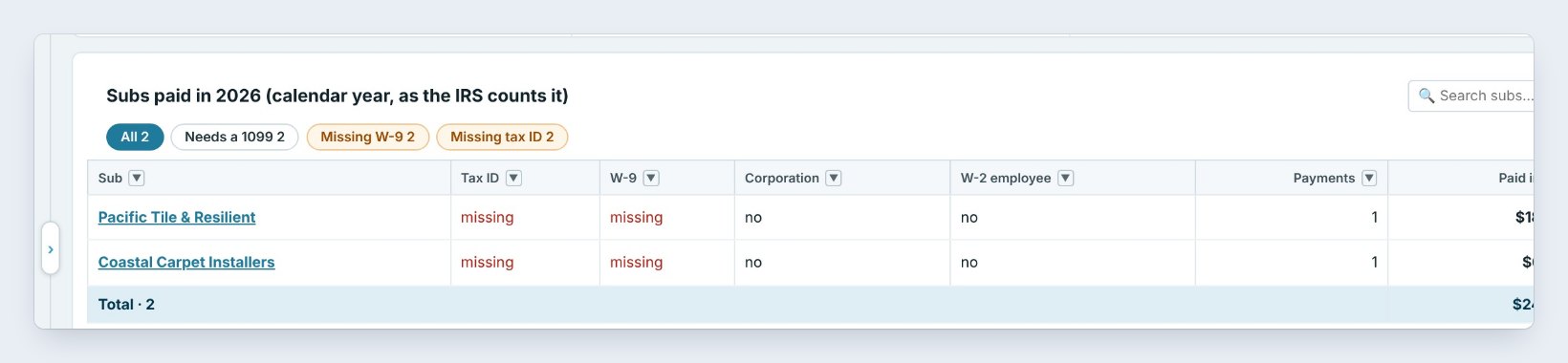
A sub is missing a W-9 or a tax ID. It shows in red. Ask for the W-9 before you pay that sub again, then press Tax info and fill it in. Without a tax ID the 1099 cannot be filed.
A sub is on the list but should not be. If the sub is a corporation, or the person is really your own W-2 employee, mark it in Tax info and it drops off. Material vendors never show here.
The total looks wrong. 1099 subs counts payments by the day they were paid, not the bill date. A December bill paid on January 4 belongs to next year. Check the payment dates in Bills.
Worked example: Northgate in January
The office closes out 2026 on January 6:
| Screen | Shows | What the office does |
|---|---|---|
| 1099 subs | 2 subs need a 1099, 2 W-9s missing | Gets the W-9s, files 2 by Jan 31 |
| Insurance audit | $24,400.00 paid without a COI | Collects both COIs for the auditor |
| Lien rights | Riverside deadline 12/31 | Sent the notice in November |
| Accountant pack | 10 sheets, whole year | Emails it to the accountant |
The accountant had everything in one workbook, and the auditor had every certificate before the first call.
What to do next
See subs, bills, POs and expenses, or go back to the Accounting tab tour.
Make year-end an afternoon
1099 subs and the accountant pack come with BidWise. Start with the 30-day free trial, no credit card.
Frequently Asked Questions
What is the 1099 minimum?
From 2026, $2,000 or more paid to a sub in the calendar year. It was $600 through 2025. You can change the minimum on the 1099 subs screen.
Does BidWise file the 1099s?
No. It shows who needs one and what was paid; you or your accountant file them.
Does BidWise keep the full tax ID?
No. Only the last 4 digits of each tax ID are kept.
Which parts need BidWise Business?
Insurance audit and Lien rights. 1099 subs and the accountant pack are on both plans.

Written by
Cristian Valcu – Founder & CEO, Commercial Flooring Estimating LLC
Cristian has estimated commercial flooring for over 20 years and built BidWise around the way flooring contractors actually price, propose and track their bids.
Last updated: