BidWise guide · Accounting
Tour the Accounting Tab and Cash Forecast
The Accounting tab in BidWise keeps the numbers your accountant asks for, built from the invoices, payments and bills you already enter. It has its own password. Year & quarter shows invoiced, collected, sales tax and paid out; Balances shows who owed what on any date; Cash forecast looks 13 weeks ahead; Close quarter locks a finished quarter; and Ask answers questions from your own numbers.


Why an Accounting tab in an estimating app?
Flooring contractors live on cash flow: material is paid for weeks before the general contractor pays the invoice, and retainage sits for months. Most owners find out how tight a month was after it is over.
Because BidWise already has the invoices, the payments and the bills for every job, the Accounting tab can show the year, any date and the next 13 weeks without anyone typing the numbers twice.
The six steps
- Open AccountingIts own password; Year & quarter first.
- Balances on a dateOwed to you and by you, on any date.
- Cash forecast13 weeks of money in and out.
- Close a quarterLock it once the accountant has it.
- Ask a questionCtrl + K: answers from your own numbers.
- What can go wrongForgot the password, a missing payment.
1Open Accounting and read Year and quarter

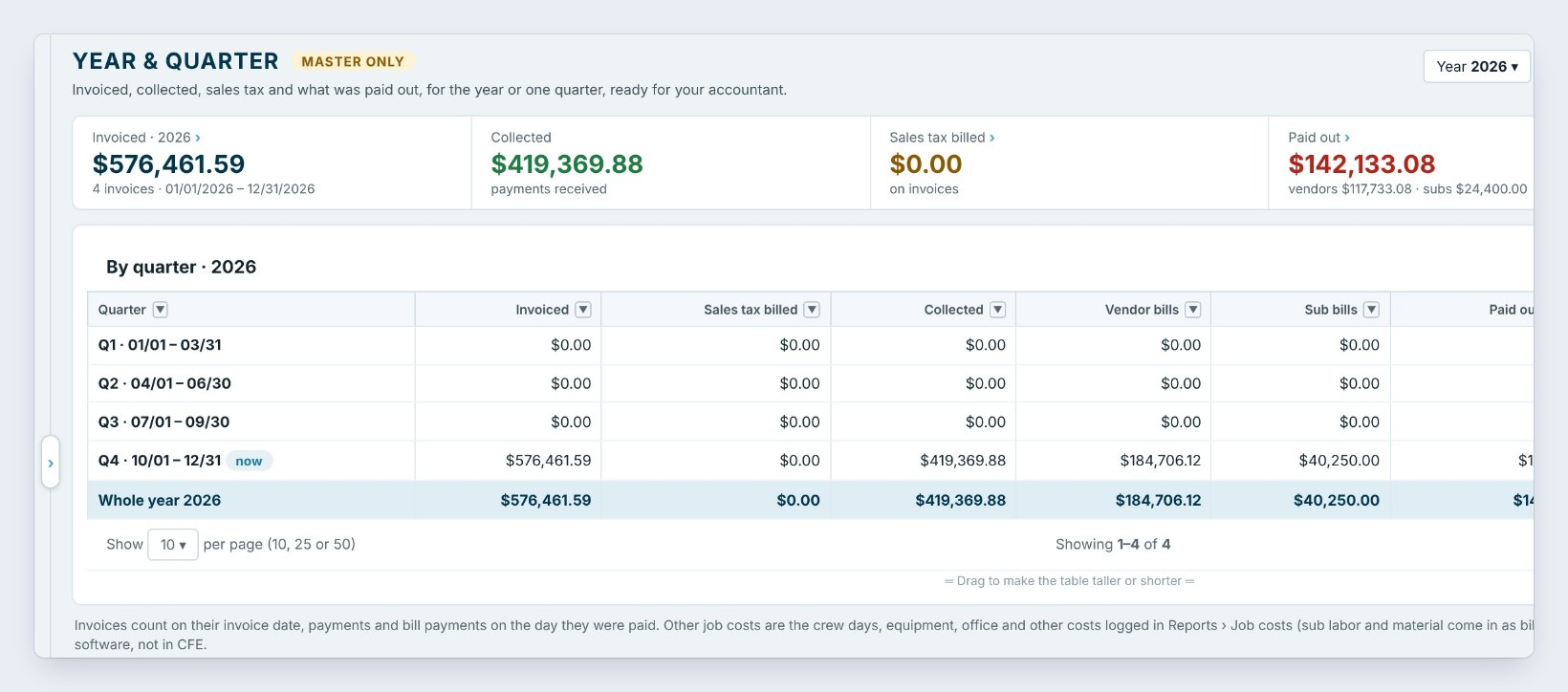
Accounting sits right after Invoicing. It has its own password, different from your sign-in, so someone who walks up to your PC cannot open the books. It locks itself after 10 minutes without use, or press Lock.
The ribbon is grouped: Period, Who we work with, Expenses, Tax & liens, Output and Setup. It opens on Year & quarter. Five tiles show the year: Invoiced, here $576,461.59, Collected $419,369.88, Sales tax billed, Paid out to vendors and subs, $142,133.08, and Cash in minus out, $277,236.80. The table splits it by quarter, with vendor bills, sub bills and other job costs, and the buttons on the right pick the whole year or one quarter. Accountant pack sits right beside them.
2See balances on any date
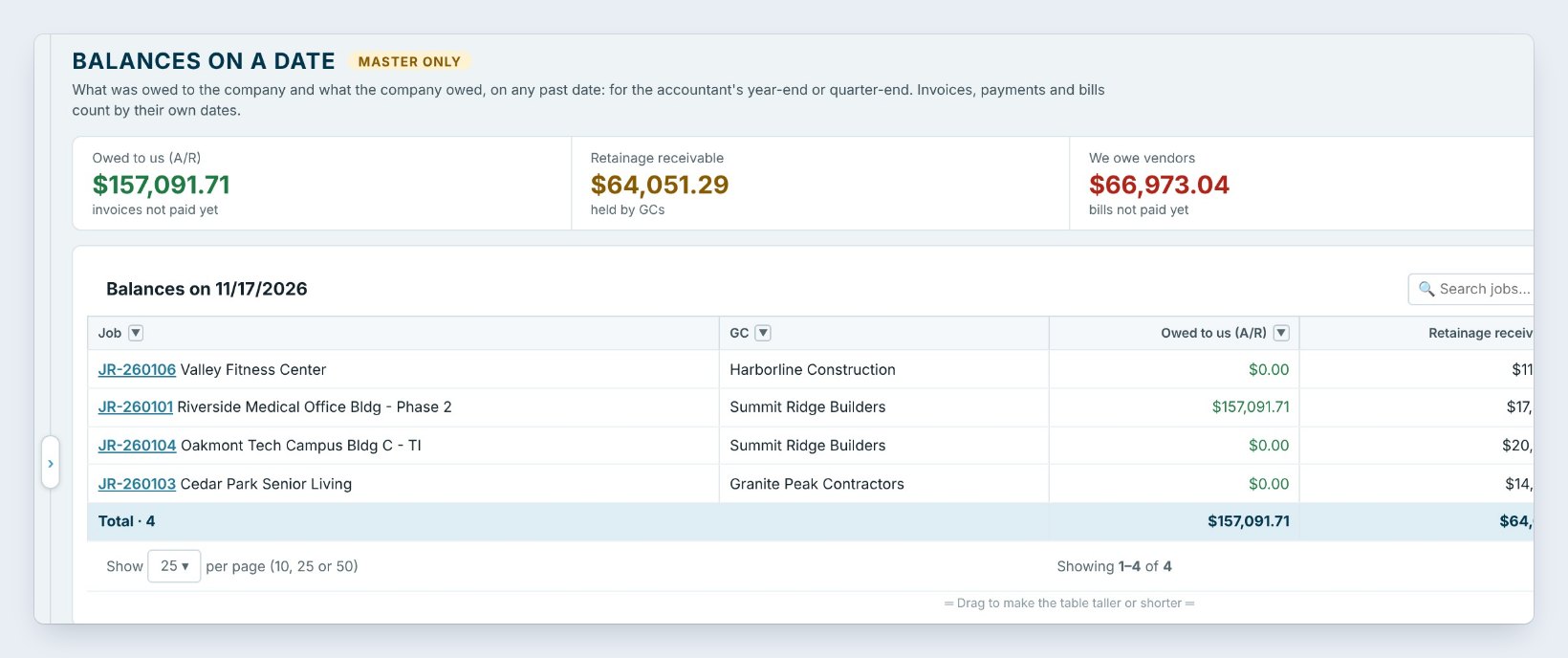
Balances answers the question your accountant asks at every year-end: what was owed on that day? Pick the date, or press Last year-end or Last quarter-end.
The tiles show Owed to us, the receivables, here $157,091.71, Retainage receivable still held by general contractors, $64,051.29, We owe vendors, $66,973.04, and We owe subs, $15,850.00. The table splits each one by job. Invoices, payments and bills count by their own dates, so a payment that came in the next week does not change last month’s balance.
3Look 13 weeks ahead with the cash forecast
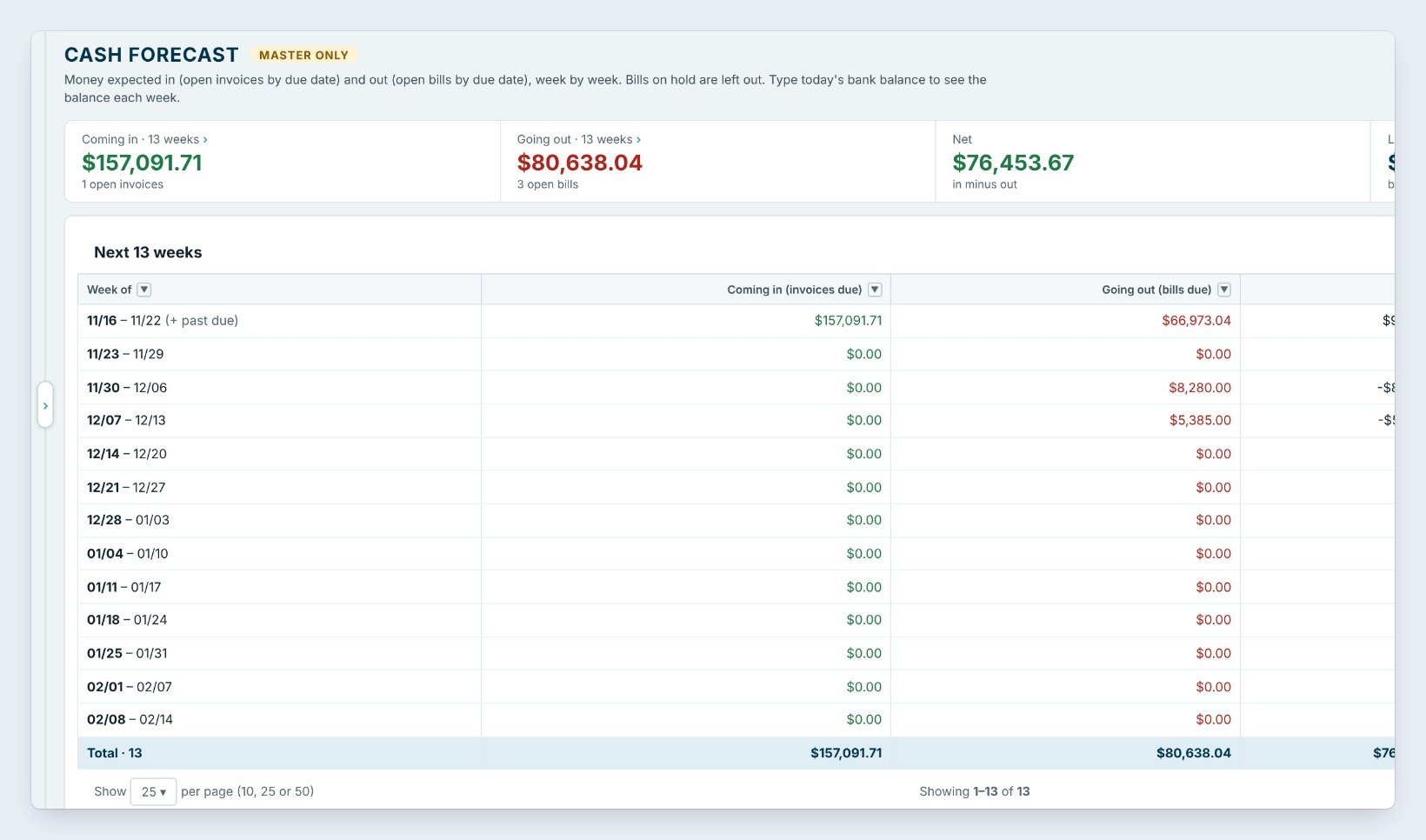
Cash forecast lays out the next 13 weeks. Money coming in is your open invoices by due date; money going out is your open bills by due date. Bills on hold are left out.
Press Bank balance today at the top right, type what is in the bank, and each week shows an estimated balance. The tiles add it up: here $157,091.71 coming in, $80,638.04 going out, a net of $76,453.67, and the Lowest week. That lowest week is the one to watch: if it dips, chase an invoice or move a bill before it happens, not after.
Look at the cash forecast every Monday. A big material bill due the week before a general contractor pays is the most common cash crunch in flooring.
4Close a quarter when the accountant has it
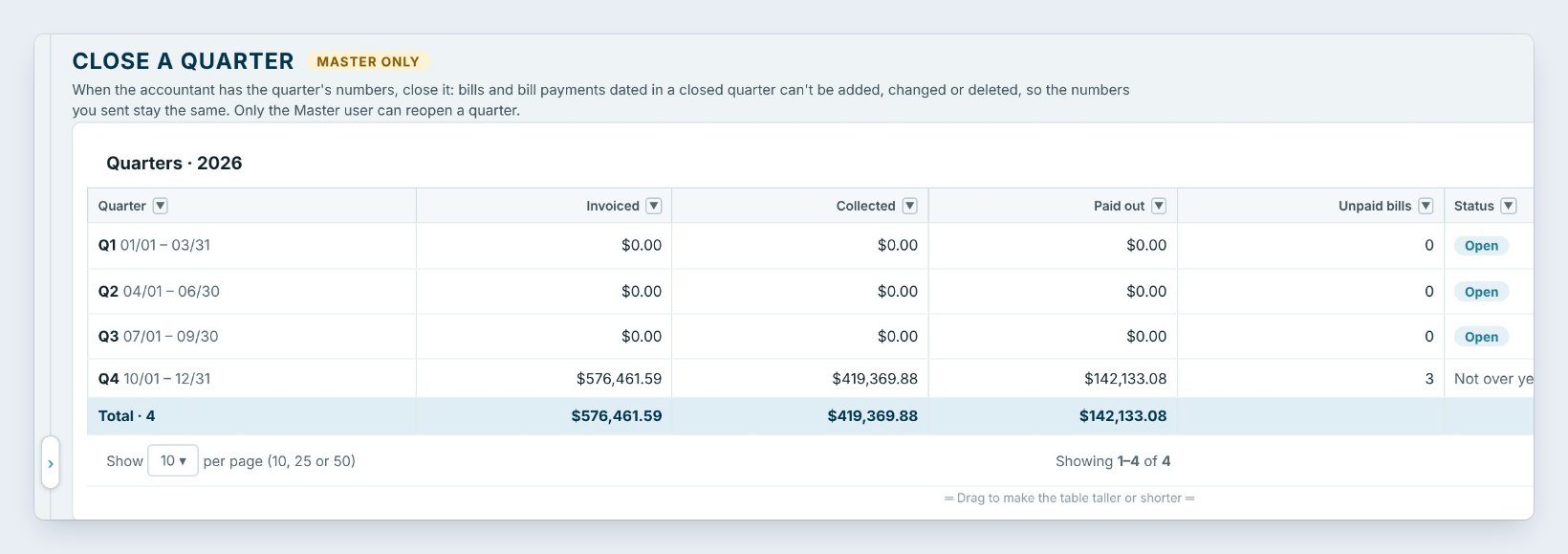
When your accountant has a quarter’s numbers, open Close quarter and press Close quarter on that line. Bills and bill payments dated in a closed quarter cannot be added, changed or deleted, so the numbers you sent stay the same.
The table shows each quarter’s invoiced, collected, paid out and how many bills are still unpaid, so you can clean those up first. A quarter that is not over yet says so; here the fourth quarter still has 3 unpaid bills. Only the Master user can reopen a closed quarter.
5Ask a question with Ctrl + K
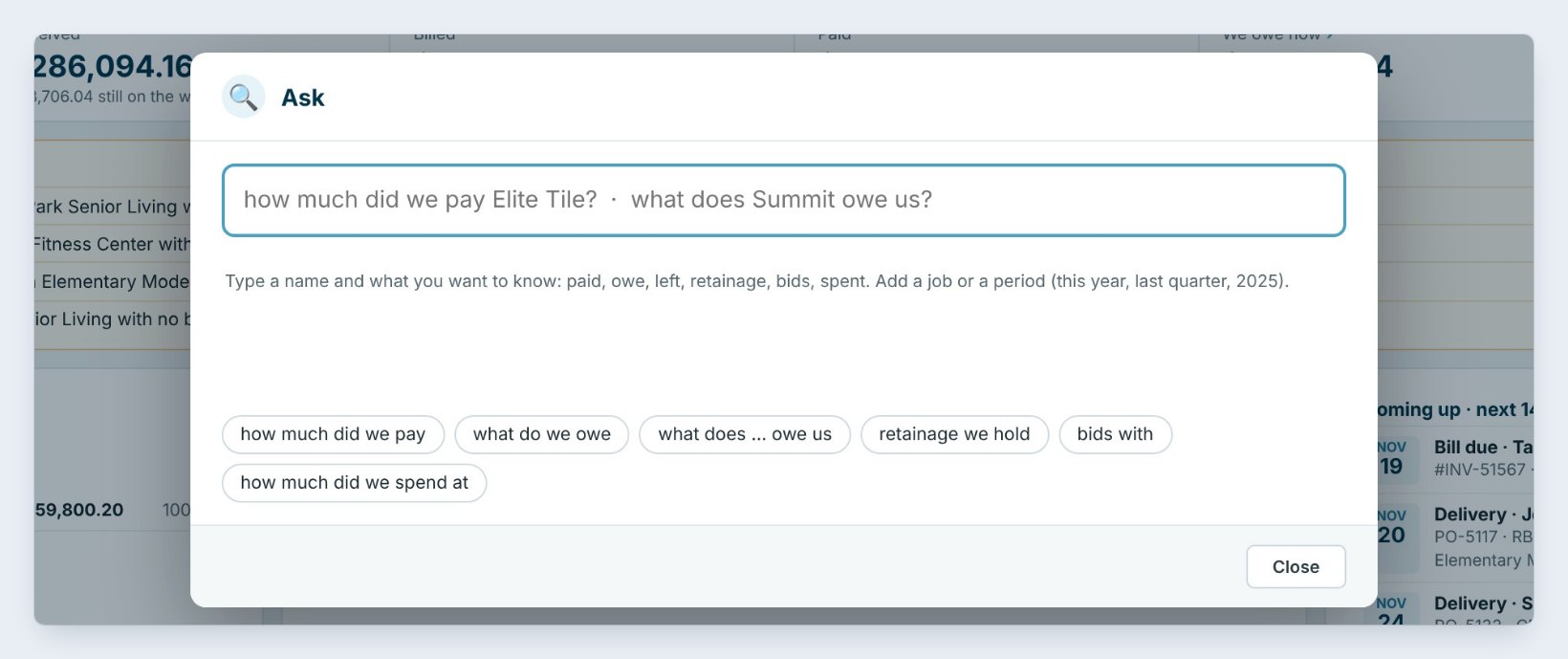
Press Ask or Ctrl + K and type a question the way you would say it: how much did we pay Elite Tile, or what does Summit owe us. Add a job or a period, such as this year or last quarter.
The answer comes from your own numbers, not from AI, with buttons to open that sub, general contractor or vendor. The chips below give you a head start: how much did we pay, what do we owe, retainage we hold, bids with and how much did we spend at.
6What can go wrong, and how to fix it
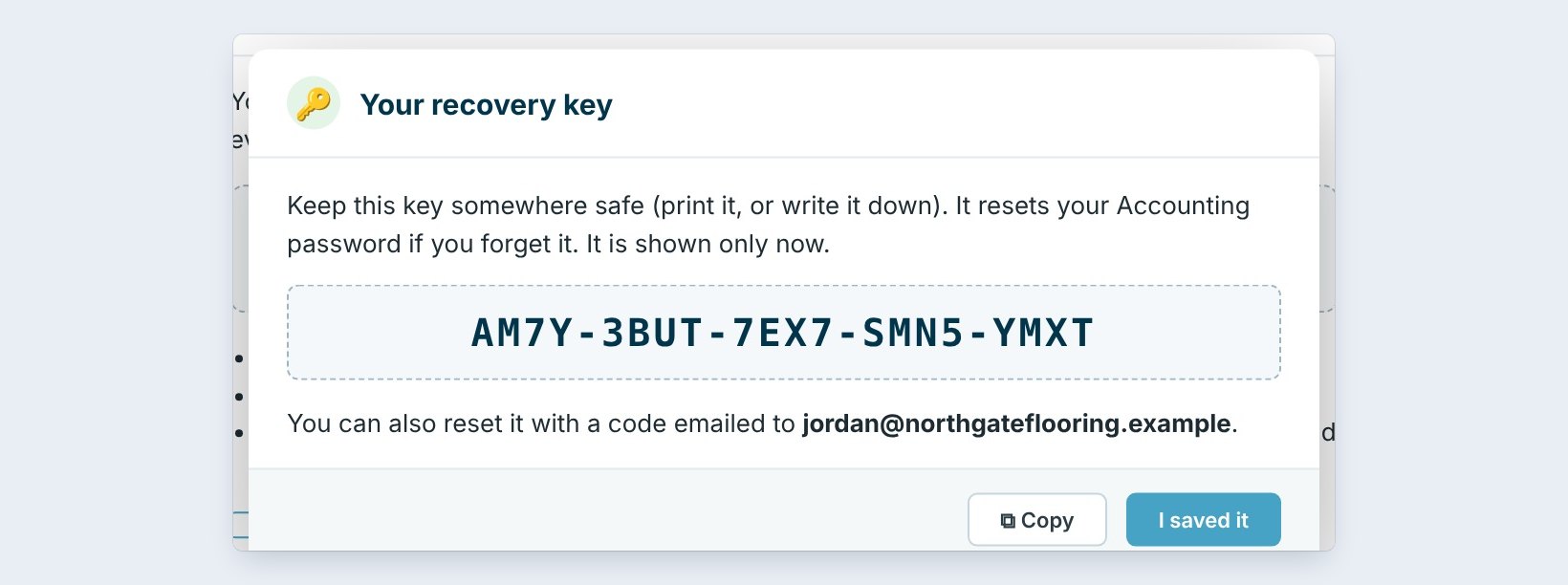
You forgot the Accounting password. When you set it, BidWise shows a recovery key once. Print it or write it down. It resets the password, or you can reset it with a 6-digit code emailed to you.
Collected looks too low. A payment that was never recorded on the invoice is not counted. Record it in Invoicing with its real date, and Year & quarter, Balances and the forecast all update.
A bill landed in a closed quarter. Date it in the open quarter, or ask the Master user to reopen the quarter, fix it, and close it again.
Worked example: Northgate’s fourth quarter
What the Accounting tab shows on November 17:
| Screen | Number | What it means |
|---|---|---|
| Year & quarter | $576,461.59 invoiced | Q4 so far |
| Year & quarter | $277,236.80 cash in minus out | Ahead for the quarter |
| Balances | $64,051.29 retainage receivable | Held by general contractors |
| Cash forecast | $157,091.71 coming in | Next 13 weeks |
| Close quarter | Q4 not over yet | Close it in January |
The owner saw that the retainage alone was a month of payroll, and started asking for it at each job’s closeout.
What to do next
Next, track subs, bills, POs and expenses, and get ready for year-end.
See your next 13 weeks of cash
The Accounting tab comes with BidWise. Start with the 30-day free trial, no credit card.
Frequently Asked Questions
Is the Accounting tab a full accounting program?
No. It keeps invoices, payments, bills, expenses and the reports an accountant asks for. Company overhead such as rent and office pay stays in your accounting software.
Why does Accounting have its own password?
Because it holds the company’s financial records. The password must be different from your sign-in, and the tab locks after 10 minutes without use.
Can I use QuickBooks Online instead?
Yes. BidWise Business can send Won jobs and invoices to QuickBooks Online, and you can tell the Accounting tab you use other accounting software.
Which parts need BidWise Business?
Balances, Closed jobs, Close quarter, Insurance audit and Lien rights. Year & quarter, bills, expenses and the accountant pack are on both plans.

Written by
Cristian Valcu – Founder & CEO, Commercial Flooring Estimating LLC
Cristian has estimated commercial flooring for over 20 years and built BidWise around the way flooring contractors actually price, propose and track their bids.
Last updated: