BidWise guide · Invoicing and getting paid
Who Owes Us Money: Receivables, Reminders and GC Statements
Invoicing › Receivables shows who owes you money and how late it is, by GC, in the buckets not due yet, 1 to 30, 31 to 60 and over 60 days late, plus the retainage still to collect. Collect and bill on the Invoices page lists every late invoice with a What now? button, automatic reminders email the GC on a schedule, and Statements for all GCs sends each GC every open invoice at once.


Why it matters
A flooring contractor carries material, labor and retainage for months. Every week an invoice sits unpaid is your money paying for the GC’s job.
The six steps
- Read the tilesInvoiced, paid, open, overdue, retainage.
- Work Collect and billOwed to us, Should have billed, What now?
- Check the agingBy GC: not due, 1–30, 31–60, over 60.
- Let reminders chaseBefore due, then 1, 10 and 30 days late.
- Know your GCsWho pays, how fast, and who is slow.
- What can go wrongCommon snags and the fix for each.
1Start with the Invoices tiles


Open Invoicing › Invoices. Six tiles give the year at a glance: $576,461.59 invoiced, $295,149.20 paid, which is 51%, $124,220.68 open but not due yet, $157,091.71 overdue on one invoice that is 14 days late, $64,051.29 of retainage held on 4 jobs, and $1,360,616.87 of Won work left to bill.
That last tile matters as much as the overdue one: work you haven't billed can't be paid.
2Work the list in Collect and bill
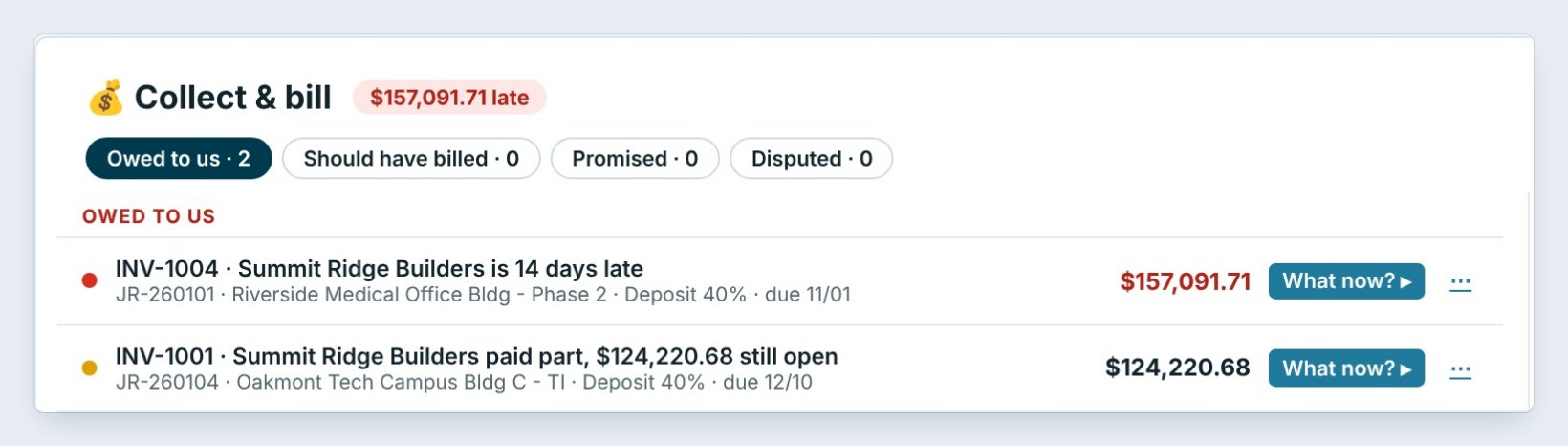
Right under the tiles, Collect and bill lists the money to chase. Owed to us shows INV-1004, Summit Ridge Builders is 14 days late, $157,091.71. Should have billed lists Won jobs with work done but no invoice. Promised and Disputed keep those invoices in their own piles.
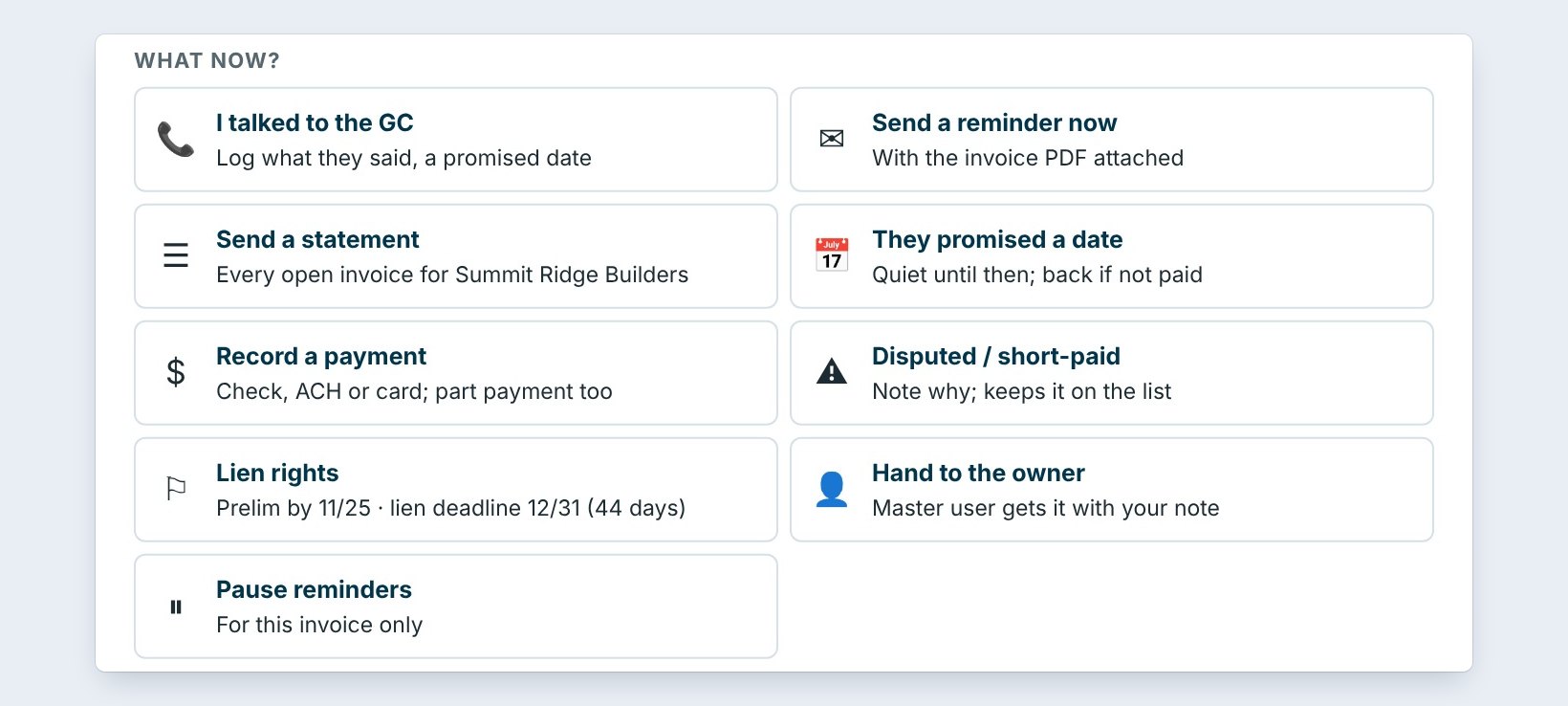
Click What now? for the GC's accounts payable phone and email, the reminders already sent and how fast the GC usually pays. Then pick the move: I talked to the GC, Send a reminder now, Send a statement, They promised a date, Record a payment, Disputed or short-paid, Lien rights, or Hand to the owner.
When the GC promises a date, log it with They promised a date. The invoice goes quiet until that day, then comes back by itself if the money did not arrive.
3Check Receivables aging by GC
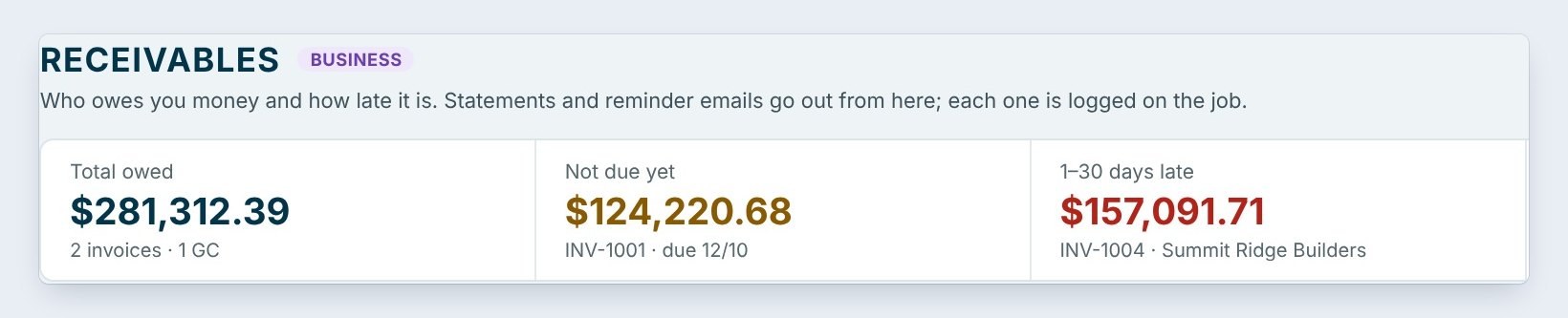
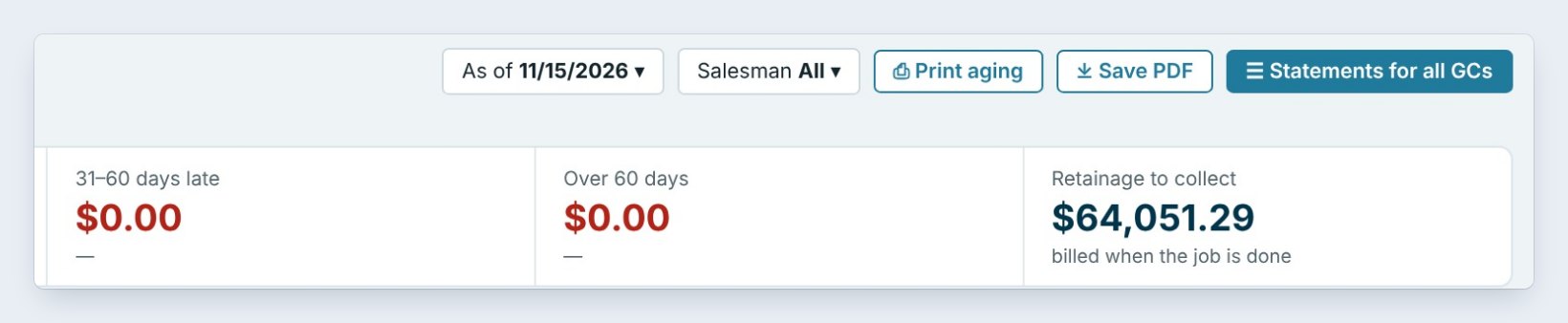
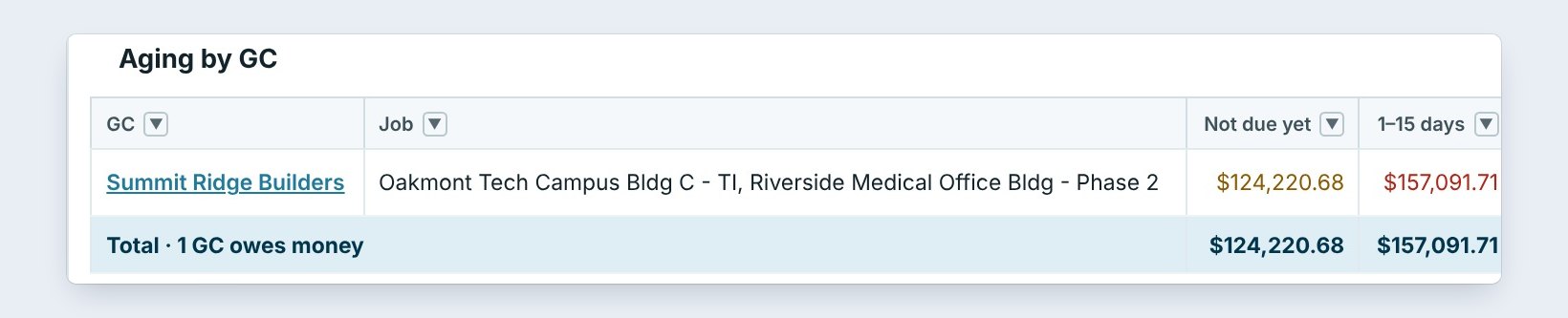

Invoicing › Receivables answers the owner's question: who owes us, and how late? The tiles split the $281,312.39 owed into not due yet, 1 to 30 days late, 31 to 60 and over 60 days, plus retainage to collect, billed when the job is done.
Aging by GC puts each GC on one row, with the oldest invoice and the next reminder. Click a GC to see every open invoice. Print aging or Save PDF for the Monday meeting, and pick As of another date to see where you stood at month end.
4Let automatic reminders do the chasing
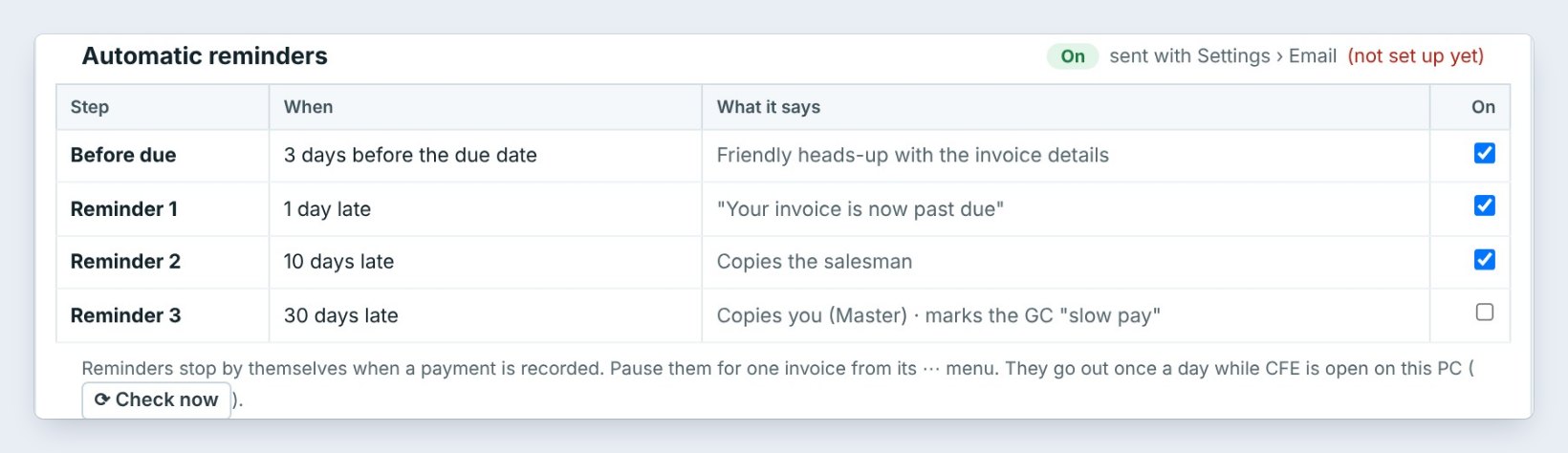
Turn on Automatic reminders and BidWise emails the GC for you, with the invoice details: a friendly heads-up 3 days before the due date, Reminder 1 at 1 day late, Reminder 2 at 10 days late with the salesman copied, and Reminder 3 at 30 days late, which copies you and marks the GC slow pay.
Reminders stop by themselves when a payment is recorded. Pause them for one invoice from its menu, say during a dispute. They go out once a day while BidWise is open, and every one lands in the Reminder log.
5Know which GCs pay, and how fast


The Master user sees the bigger picture in Accounting › GCs: bids sent, work won, invoiced, paid, what they owe, the retainage they hold and the average days to pay. The Slow payers (45+ days) chip lists the GCs who drag their feet.
Use it before you bid: a GC who pays in 60 days costs you two months of carrying the job. Price that in, or ask for a deposit.
Send Statements for all GCs on the first of the month. One email per GC with every open invoice gets more checks cut than five separate reminders.
6What can go wrong, and how to fix it
Reminders say not set up yet. Email isn't set up, so nothing goes out. Open Settings › Email and send a test. No AP email yet. Add the GC's accounts payable contact in Client Info › GCs, and What now? shows it from then on.
A paid invoice still shows late. The payment wasn't recorded. Use Record payment; with QuickBooks Online connected, payments come back by themselves. The GC short-paid. Mark it Disputed or short-paid with a note, so it stays on the list without more reminders.
Worked example: Monday morning collections at Northgate
Two open invoices, both from Summit Ridge Builders:
| Invoice | Job | Open | Status | Next move |
|---|---|---|---|---|
| INV-1004 | Riverside Medical Office Bldg, deposit 40% | $157,091.71 | 14 days late | Call AP, log the promised date |
| INV-1001 | Oakmont Tech Campus Bldg C, deposit 40% | $124,220.68 | Part paid, due 12/10 | Let the reminder go 3 days before |
| Retainage | 4 jobs | $64,051.29 | Held by GCs | Bill when each job is done |
| Ready to bill | Lincoln Elementary Modernization | $399,847.56 | Won, nothing invoiced | Deposit invoice today |
Ten minutes, and every dollar has a next step and an owner.
What to do next
Next: see who you owe money to.
Get paid faster
Receivables, Collect and bill and automatic reminders come with BidWise Business. Start with the 30-day free trial, no credit card.
Frequently Asked Questions
Do reminders go out if BidWise is closed?
No. They go out once a day while BidWise is open on a PC; Check now sends any that are due.
Can I stop reminders for one GC?
Yes. Pause reminders on that invoice from its menu, or untick a step for everyone.

Written by
Cristian Valcu – Founder & CEO, Commercial Flooring Estimating LLC
Cristian has estimated commercial flooring for over 20 years and built BidWise around the way flooring contractors actually price, propose and track their bids.
Last updated: