BidWise guide · Getting started
Team's Day: Take Over, Hand Off and See Who Is on What
Team's day shows every open line on the team's My day and who is on it, so two people never chase the same vendor and nothing waits on someone who is out. Tap I'm on it and the others see it within a minute. Take over a line a teammate left from an earlier day, hand a line to the right person from the ··· menu, and read what each person did this month. Team's day is on BidWise Business.


Why share the day?
In a flooring office the same job touches the estimator, the person ordering, the warehouse and the person billing. When everyone keeps their own list, two people call the same vendor and a late delivery sits because the person who had it is out on a site.
Team's day puts every open line from the team's My day on one screen with who is on it. People claim lines with one tap, take over what a teammate left and hand work to the right person, and the owner sees what got done without asking.
The six steps
- Open Team's dayPeople, who is on what, and everyone's open lines.
- Say I'm on itOne tap; the team sees it within a minute.
- Take over a linePick up what a teammate left from an earlier day.
- Hand to a teammateThe more menu: open the job, let go, hand it over.
- Read the month logWhat each person did, line by line.
- What can go wrongFixes for the usual snags.
1Open Team's day and see who is on what
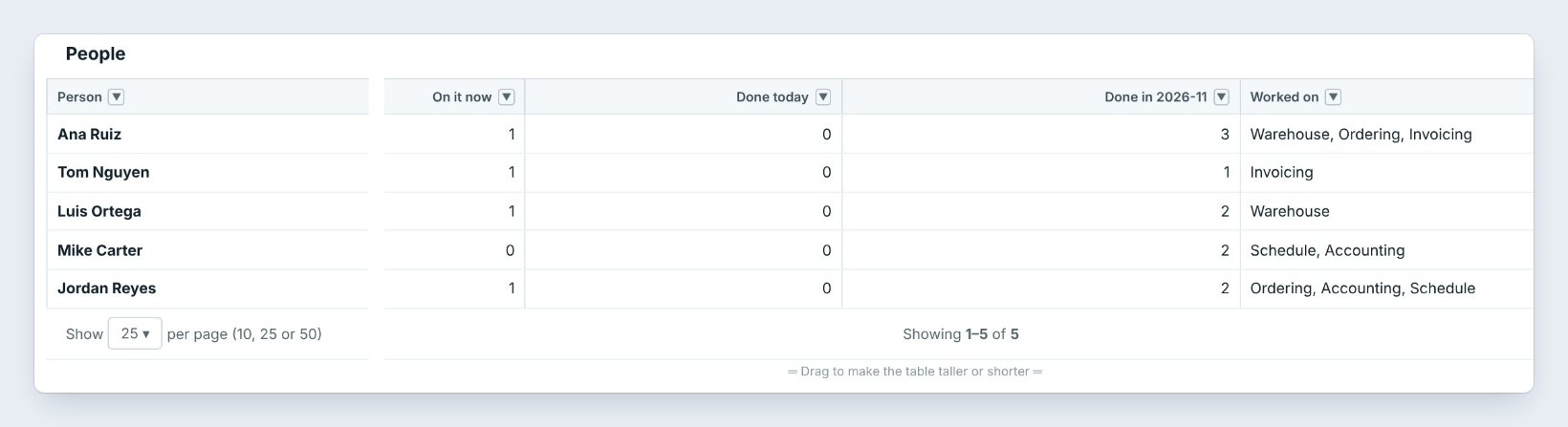
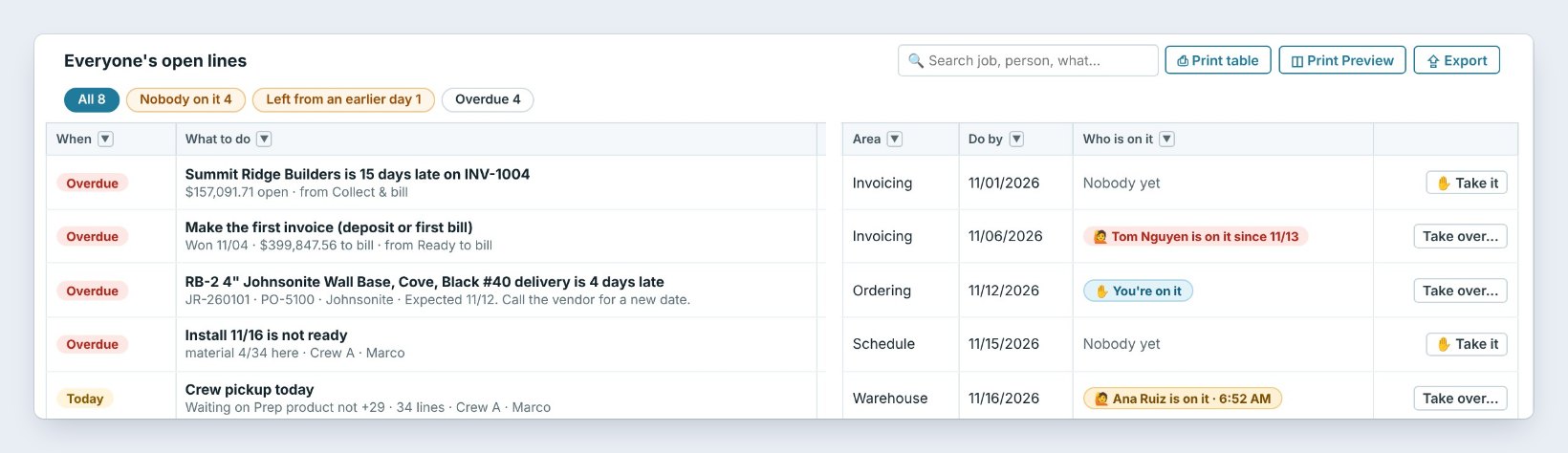
In My day, click Team's day on the ribbon. People lists each teammate with the lines they are On it now, Done today and done this month, and the areas they worked on.
Below is Everyone's open lines, with filters for Nobody on it, Left from an earlier day and Overdue. Each line shows the job, the area, the Do by date and Who is on it, such as Tom Nguyen is on it since 11/13 or Nobody yet.
2Tap I'm on it so the team knows
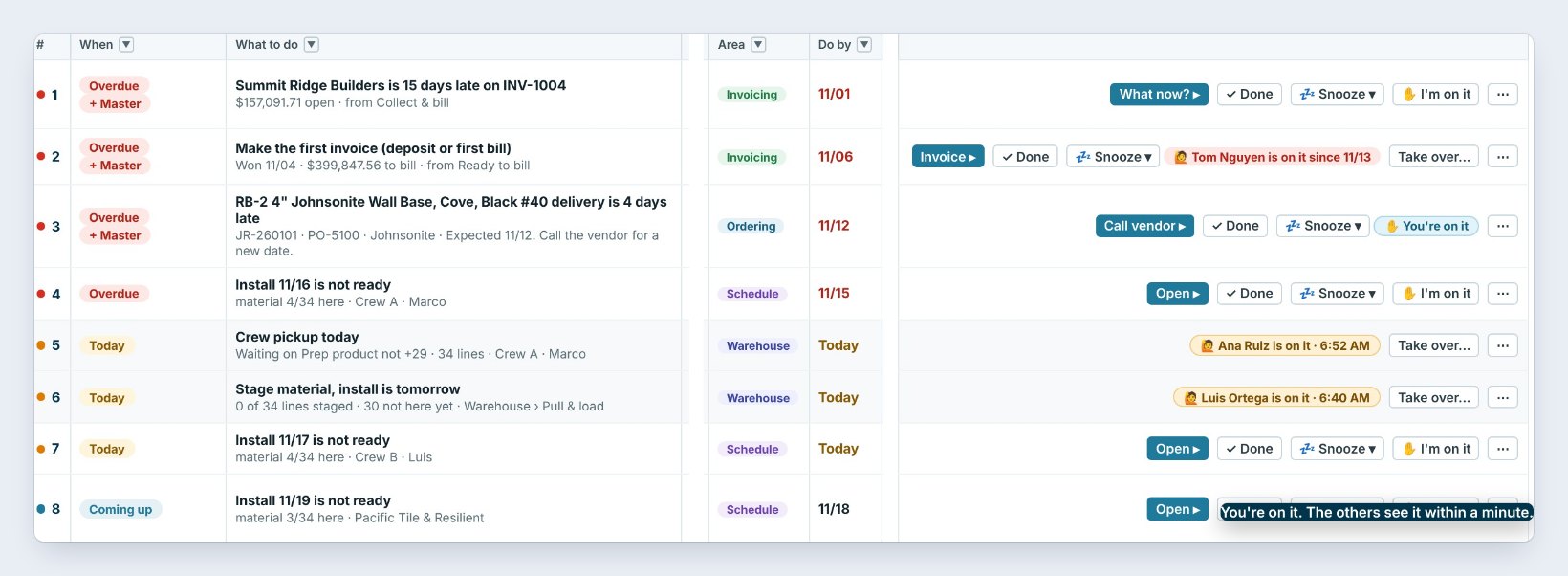
On your My day, tap I'm on it on a line, here the late Johnsonite wall base delivery. It turns into You're on it, and the others see it within a minute through Company data sync.
Lines a teammate has show their name and the time, such as Ana Ruiz is on it · 6:52 AM on the crew pickup. Nobody else has to call the vendor or the crew about it.
Make I'm on it a habit for anything that takes a phone call. It is the one tap that stops two people from calling the same vendor.
3Take over a line a teammate left
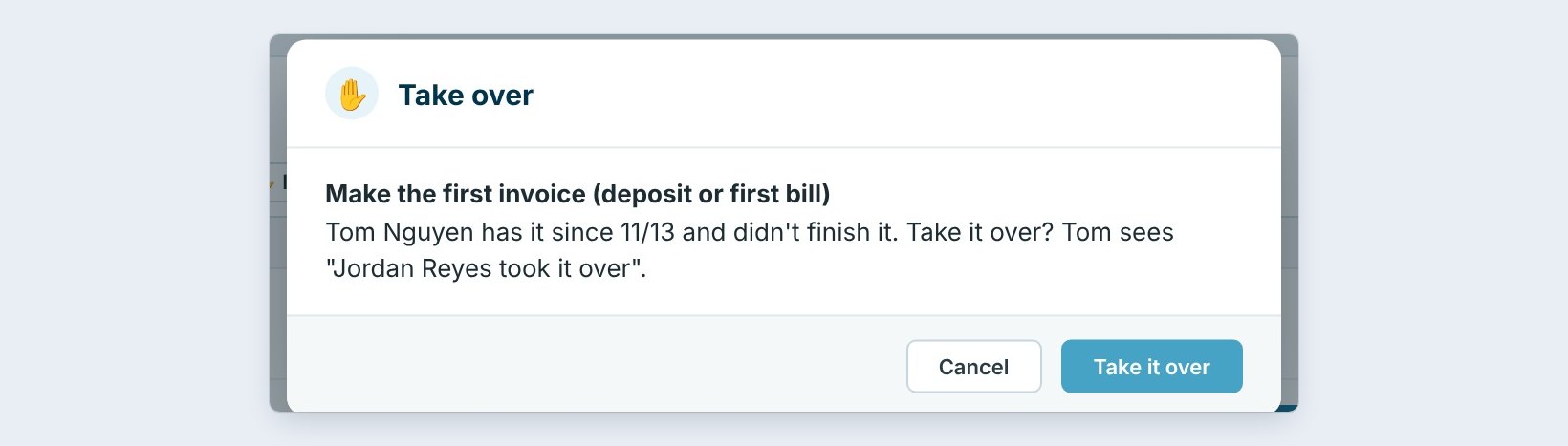
When a line sits with someone who is out, click Take over... on it. The window says who has it and since when: Tom Nguyen has it since 11/13 and didn't finish it.
Click Take it over. The line moves to your day and Tom sees Jordan Reyes took it over, so nobody is surprised.
4Hand a line to the right teammate
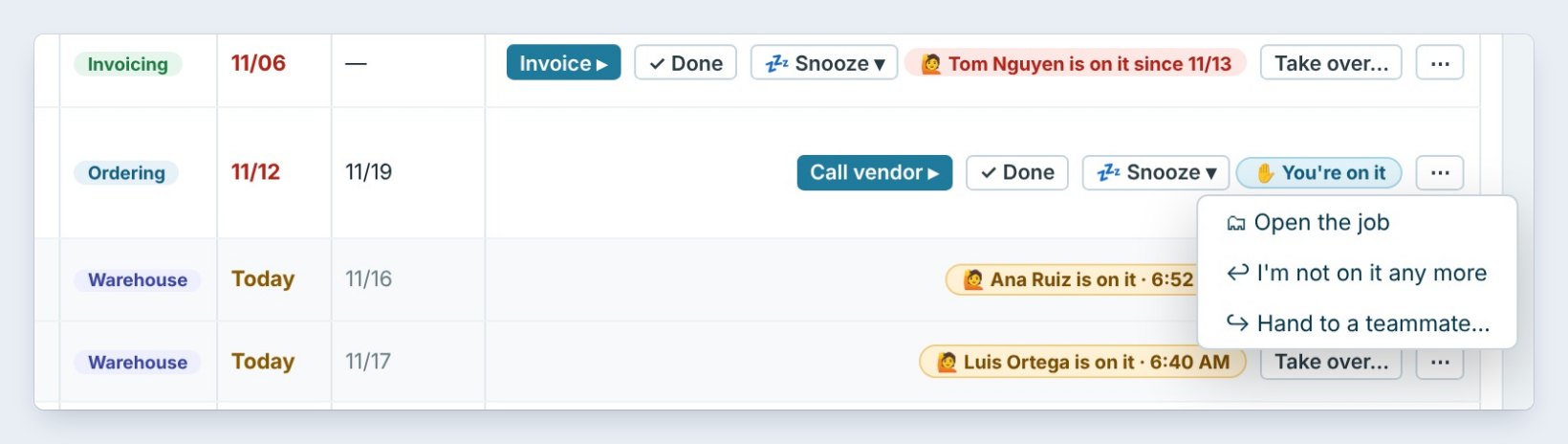
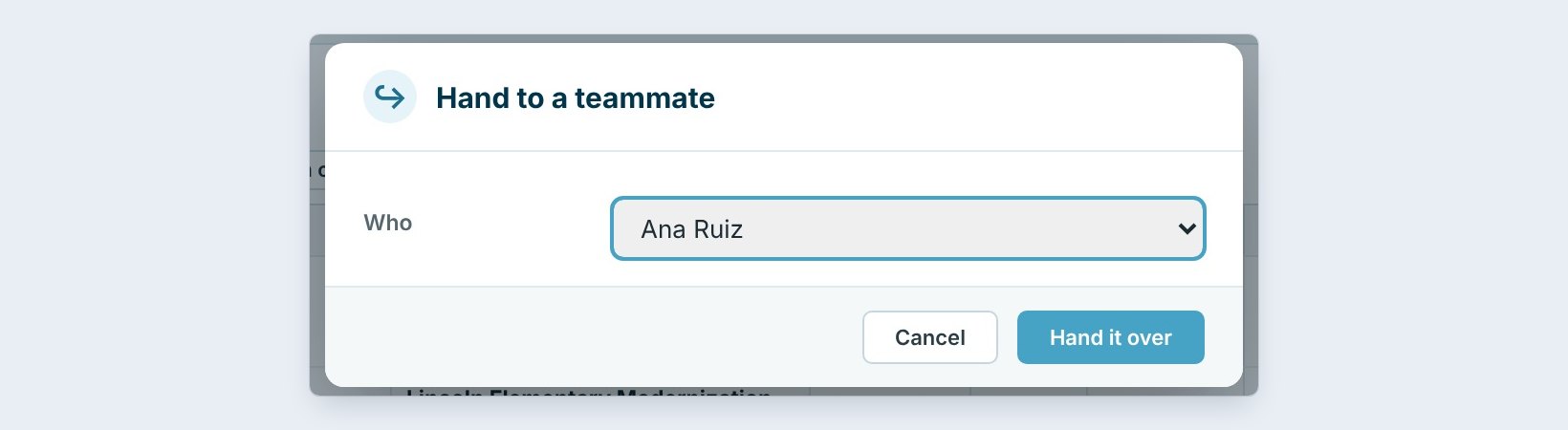
Click the ··· button at the end of a line for Open the job, I'm not on it any more and Hand to a teammate....
Pick Who, here Ana Ruiz, and click Hand it over. The line shows on Ana's day with from Jordan Reyes. The Master user can turn handing off on or off in My day settings.
5Read what each person did this month
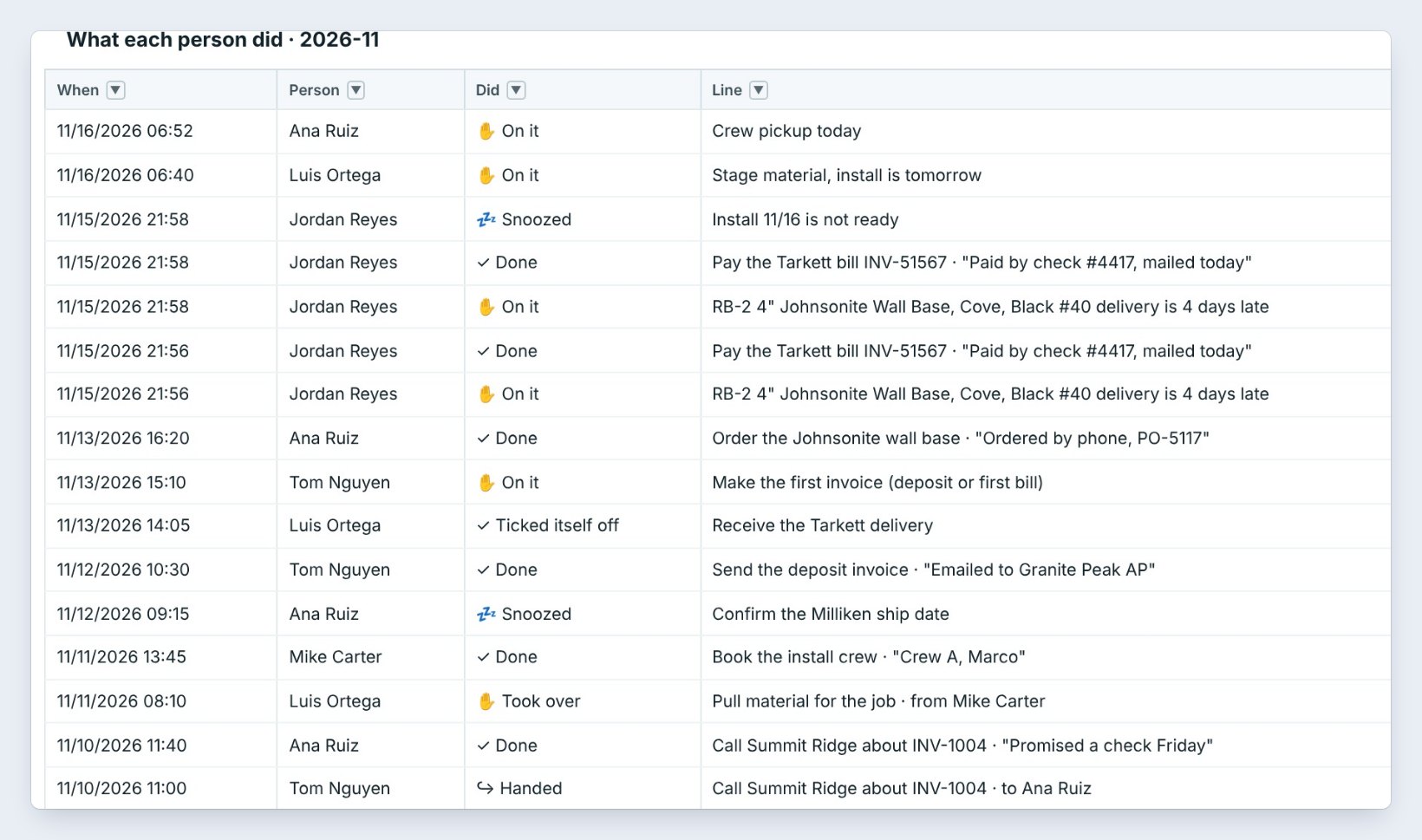
Scroll down to What each person did. Every On it, Done, Snoozed, Took over and Handed is there with the time, the person, the line and the note they typed, such as Ordered by phone, PO-5117.
Pick another Month to look back. Search by person or job, and print or export it for the CEO view of the BidWise HUB.
6What can go wrong, and how to fix it
Teammates don't see your I'm on it. Check the status bar says Online · up to date. Lines reach the other office PCs through Company data sync, within about a minute.
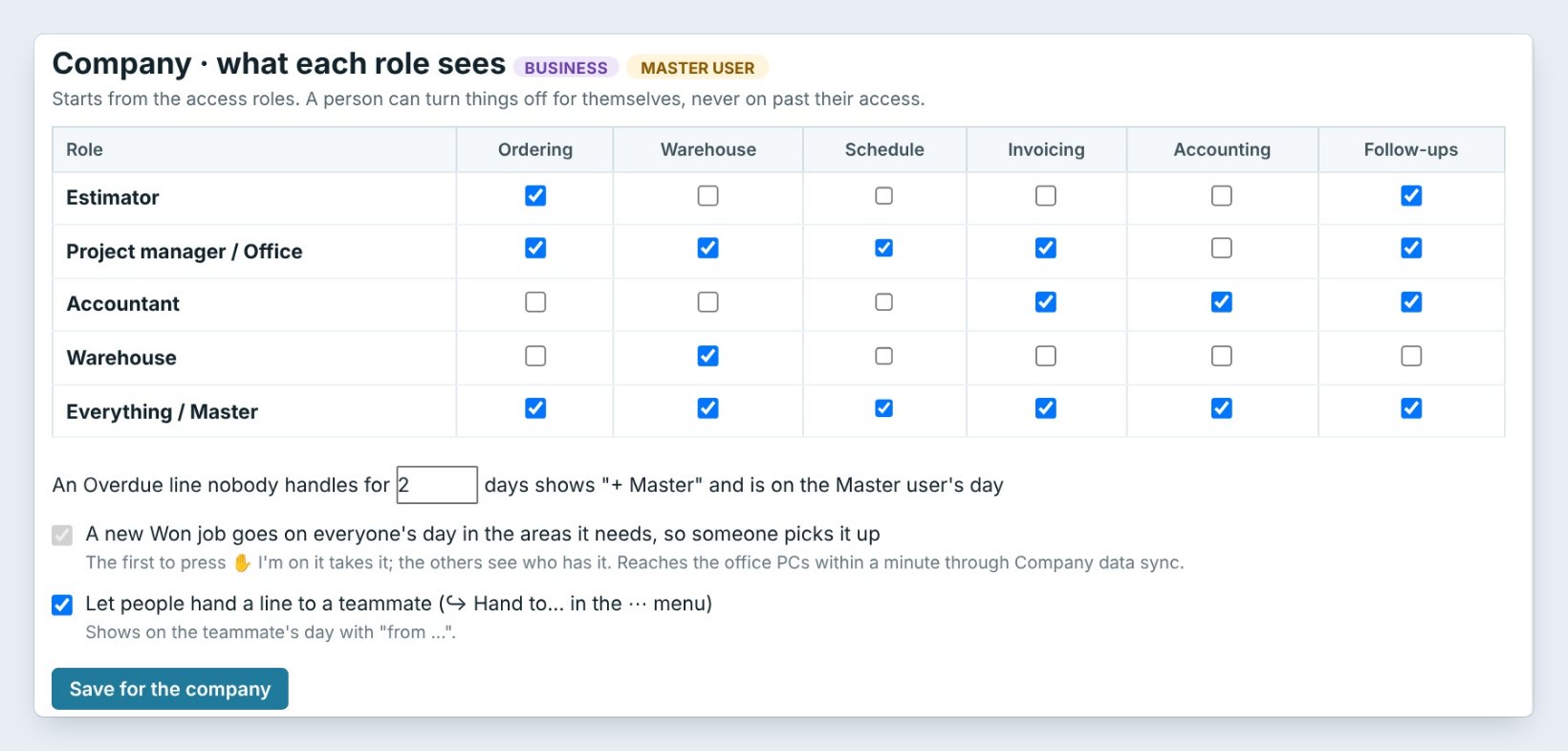
There is no Hand to a teammate in the menu. The Master user turned it off. It is Let people hand a line to a teammate in My day settings, under Company.
A line sat overdue and nobody took it. After the number of days set here, 2 by default, it shows + Master and lands on the Master user's day. Someone does not see a line at all? Check the areas their role sees in the table above.
Worked example: Monday morning at Northgate Commercial Flooring
Five people on My day, Monday 11/16:
| Time | Who | What happened |
|---|---|---|
| 6:40 AM | Luis Ortega | On it: stage material for Cedar Park Senior Living |
| 6:52 AM | Ana Ruiz | On it: crew pickup for Valley Fitness Center |
| 7:05 AM | Jordan Reyes | On it: the late Johnsonite wall base delivery |
| 7:10 AM | Jordan Reyes | Took over Tom's first invoice for Lincoln Elementary |
| 7:15 AM | Jordan Reyes | Handed the Summit Ridge collection call to Ana Ruiz |
By 7:15 every overdue line had a name on it, and nobody called the same vendor twice.
What to do next
Start with your own My day, and give each person the right areas with team roles.
Run the office as one team
Team's day comes with BidWise Business. Start with the 30-day free trial, no credit card.
Frequently Asked Questions
Is Team's day on the Personal plan?
No. Team's day, I'm on it, Take over and Hand to a teammate are on BidWise Business, where more than one person works in the same company data.
How fast does the team see I'm on it?
Within about a minute. It goes to the other office PCs through Company data sync.
What happens to a line nobody handles?
An Overdue line nobody handles for the number of days you set, 2 by default, shows "+ Master" and lands on the Master user's day.
Can I stop people from handing lines off?
Yes. The Master user turns Let people hand a line to a teammate on or off in My day settings, under Company.

Written by
Cristian Valcu – Founder & CEO, Commercial Flooring Estimating LLC
Cristian has estimated commercial flooring for over 20 years and built BidWise around the way flooring contractors actually price, propose and track their bids.
Last updated: