BidWise guide · Getting started
Team Roles: Choose What Each Person Can Open
In BidWise Business the Master user picks what each person can open, in Integrate › Team › What they can open. Pick a role, Estimator, Project manager / Office, Accountant, Warehouse or Everything, or tick the areas one by one. Untick Sees bid prices, costs and profit for warehouse staff. The change reaches that person's PC within 2 minutes. The Master user always has everything.


Why give people different access?
Not everyone in a flooring company needs every screen. The warehouse lead needs the pull list, not your margins. An estimator needs bids, not the books. The bookkeeper needs invoices and bills, not the takeoff.
Roles keep each screen with the person who uses it. Your prices and profit stay private, nobody changes a bill by mistake, and each person's ribbon is shorter and easier to use.
The six steps
- Open the team listIntegrate, then Team.
- EstimatorBids, no Invoicing or Accounting.
- Project manager / OfficeBilling, scheduling and ordering.
- Warehouse, no pricesUntick Sees bid prices.
- Add seatsOne seat per person, two PCs each.
- What can go wrongFixes for the usual snags.
1Open the team list
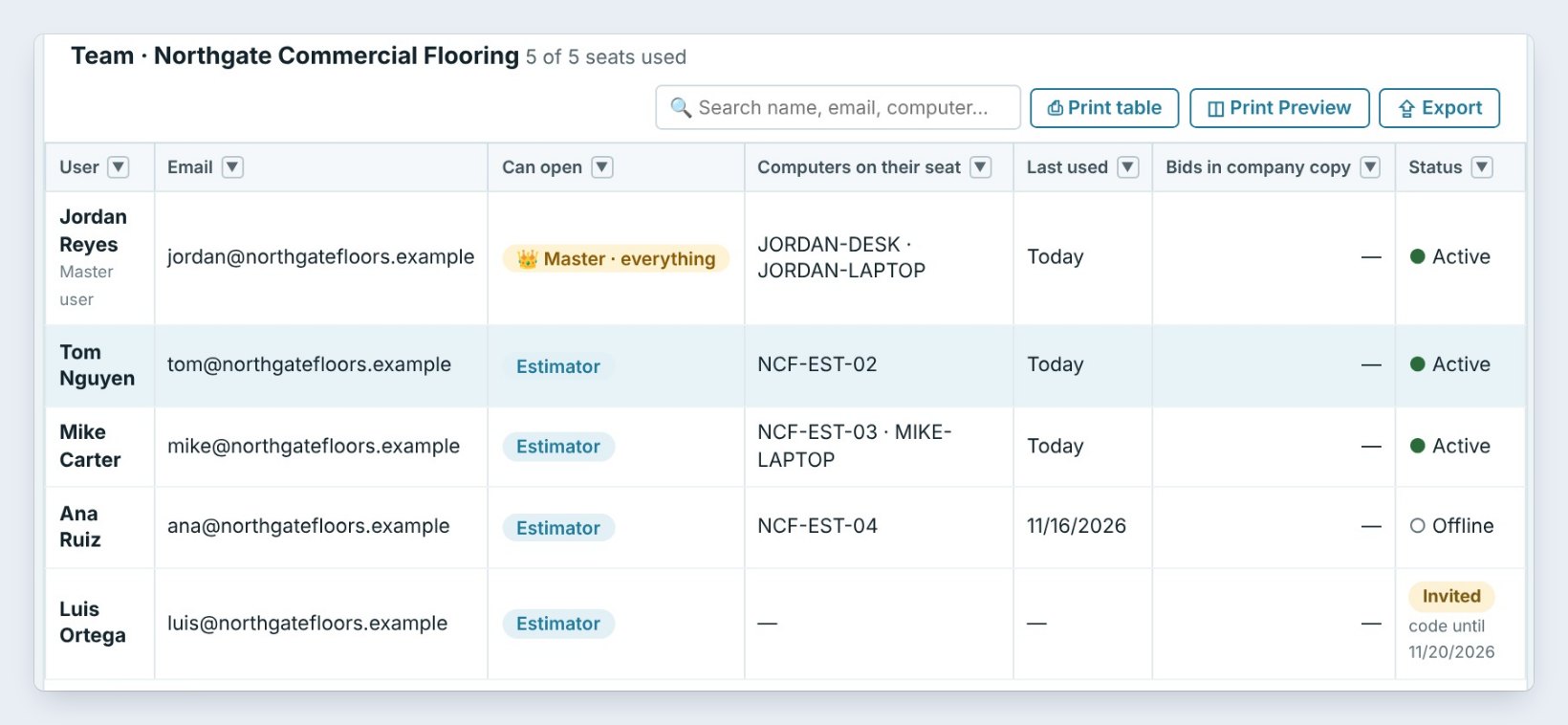
Sign in as the Master user and go to Integrate › Team. The list shows each person, their email, what they can open, the computers on their seat, when they last used BidWise and their status.
A new person starts as an Estimator. Click a name, then What they can open to change it. The Master user, here Jordan Reyes, always has everything.
2Estimator: bids, no Invoicing or Accounting
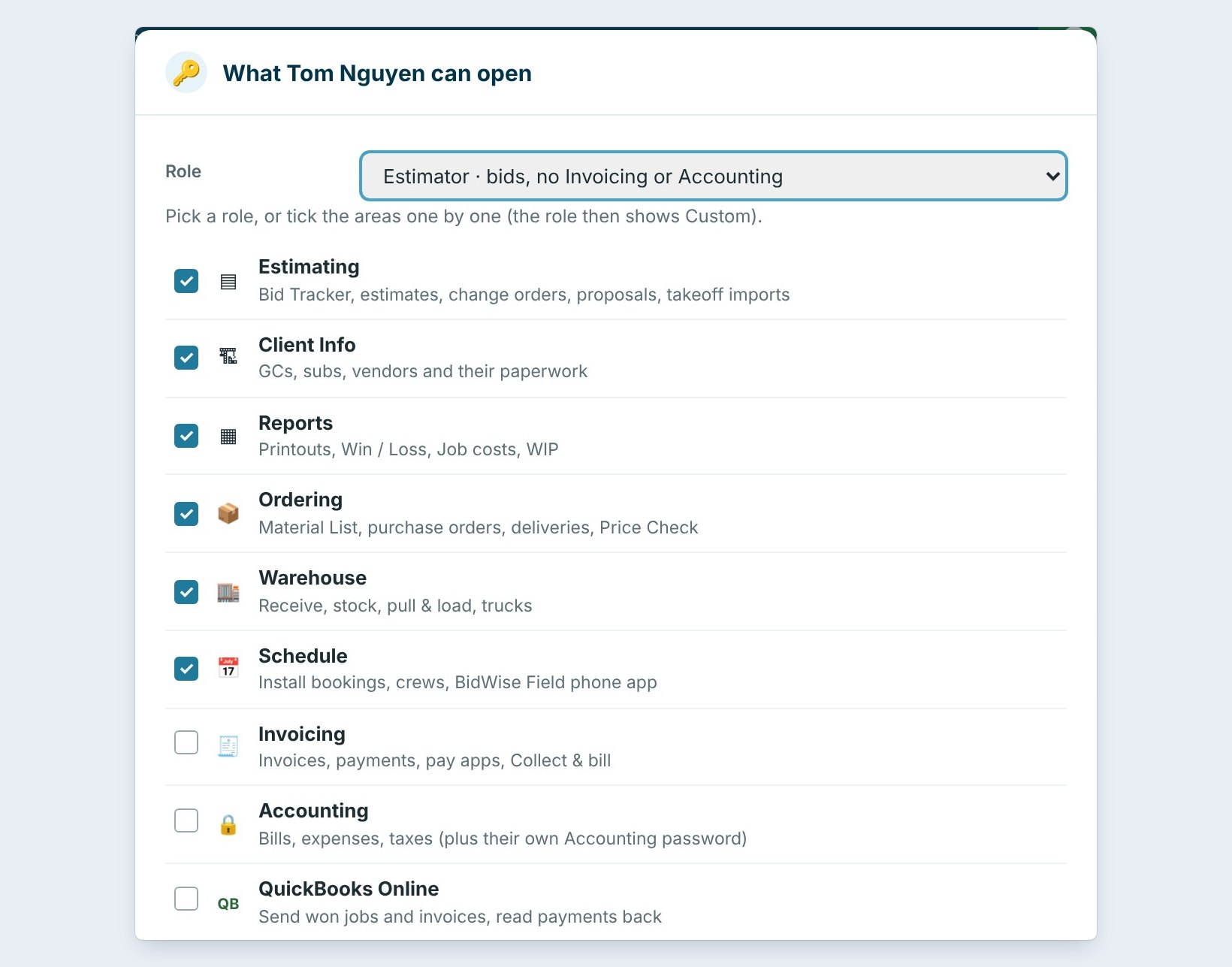
The Role list fills in the ticks for you. Estimator opens Estimating, Client Info, Reports, Ordering, Warehouse and Schedule. Invoicing, Accounting and QuickBooks Online stay closed.
When an estimator wins a job, they press Ready to bill and the job goes to the people who invoice. Tick any area by hand and the role shows Custom.
Want one estimator to keep invoicing their own jobs? Leave the Estimator role and tick Invoicing too. It shows as Custom.
3Project manager / Office and Accountant
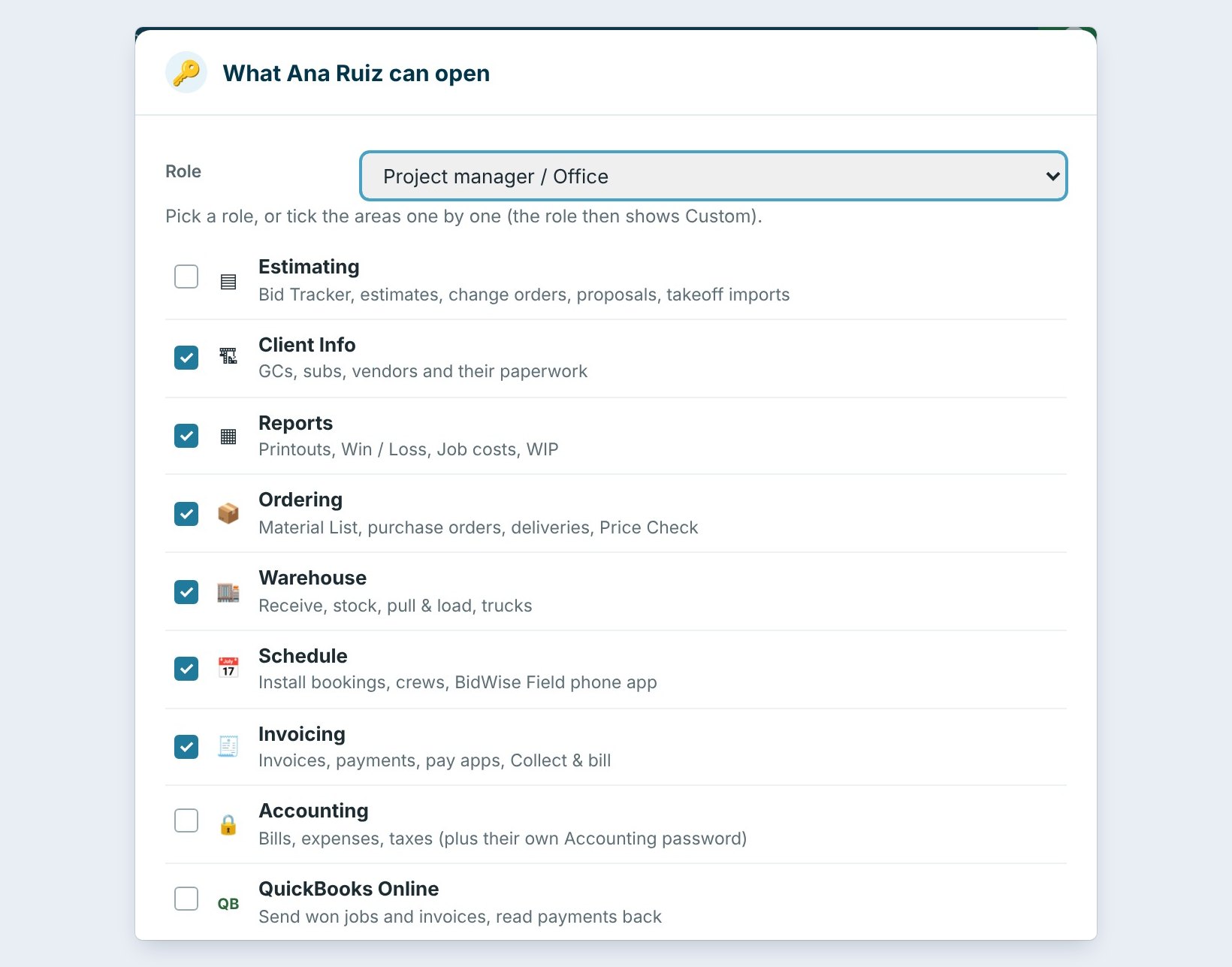
Project manager / Office opens Client Info, Reports, Ordering, Warehouse, Schedule and Invoicing. It is for the person who orders material, books the crews and sends the invoices, without changing the bids.
Accountant / bookkeeper opens Client Info, Reports, Invoicing, Accounting and QuickBooks Online. Accounting still asks for its own password, so the books stay locked even on a shared PC.
4Warehouse: no bid prices, costs or profit
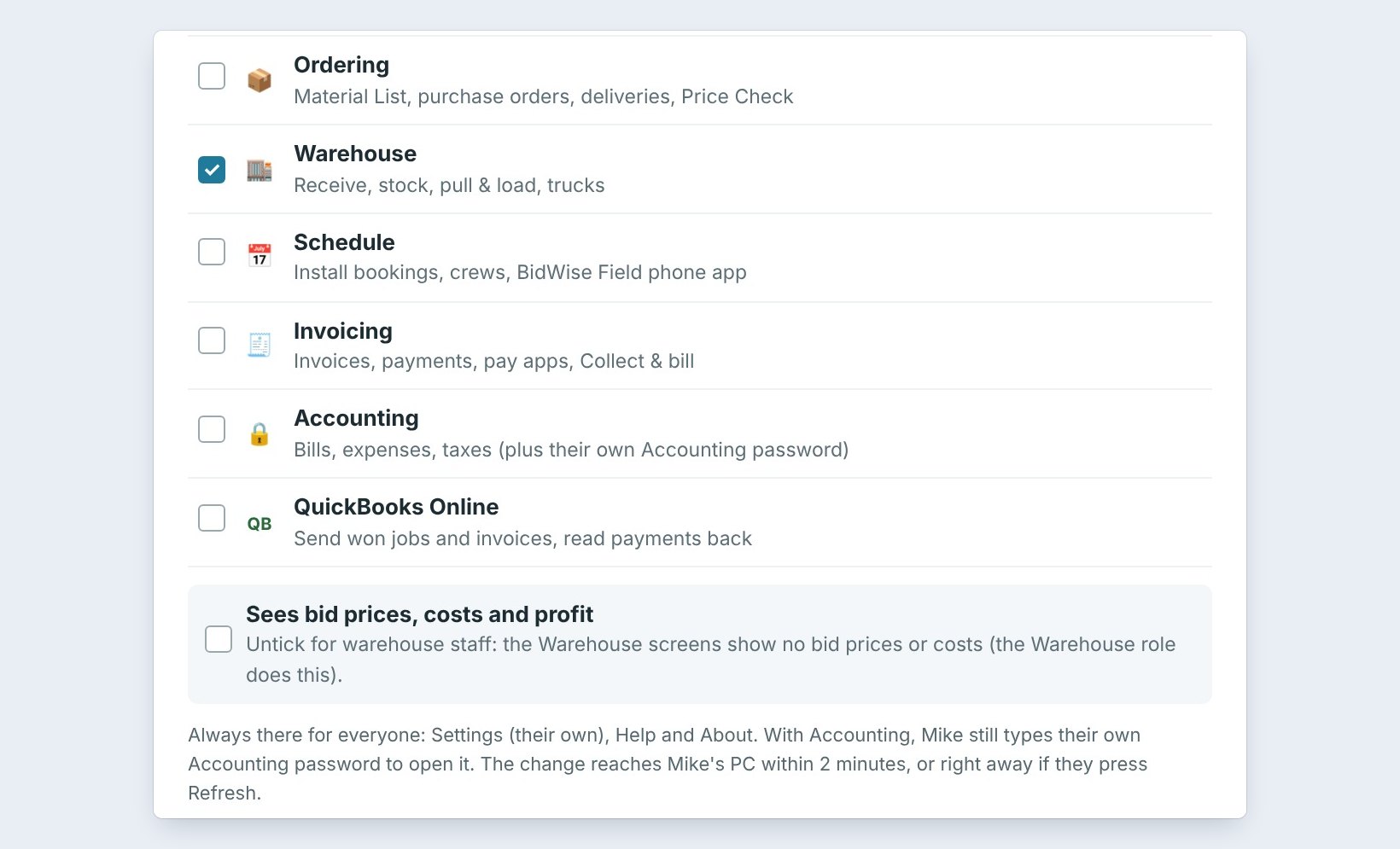
Warehouse opens only the Warehouse: receive, stock, pull and load, and the trucks. Sees bid prices, costs and profit is unticked, so the warehouse screens show no prices.
Press Save. The change reaches that person's PC within 2 minutes, or right away if they press Refresh. Settings, Help and About are always there for everyone.
5Check the roles and add seats
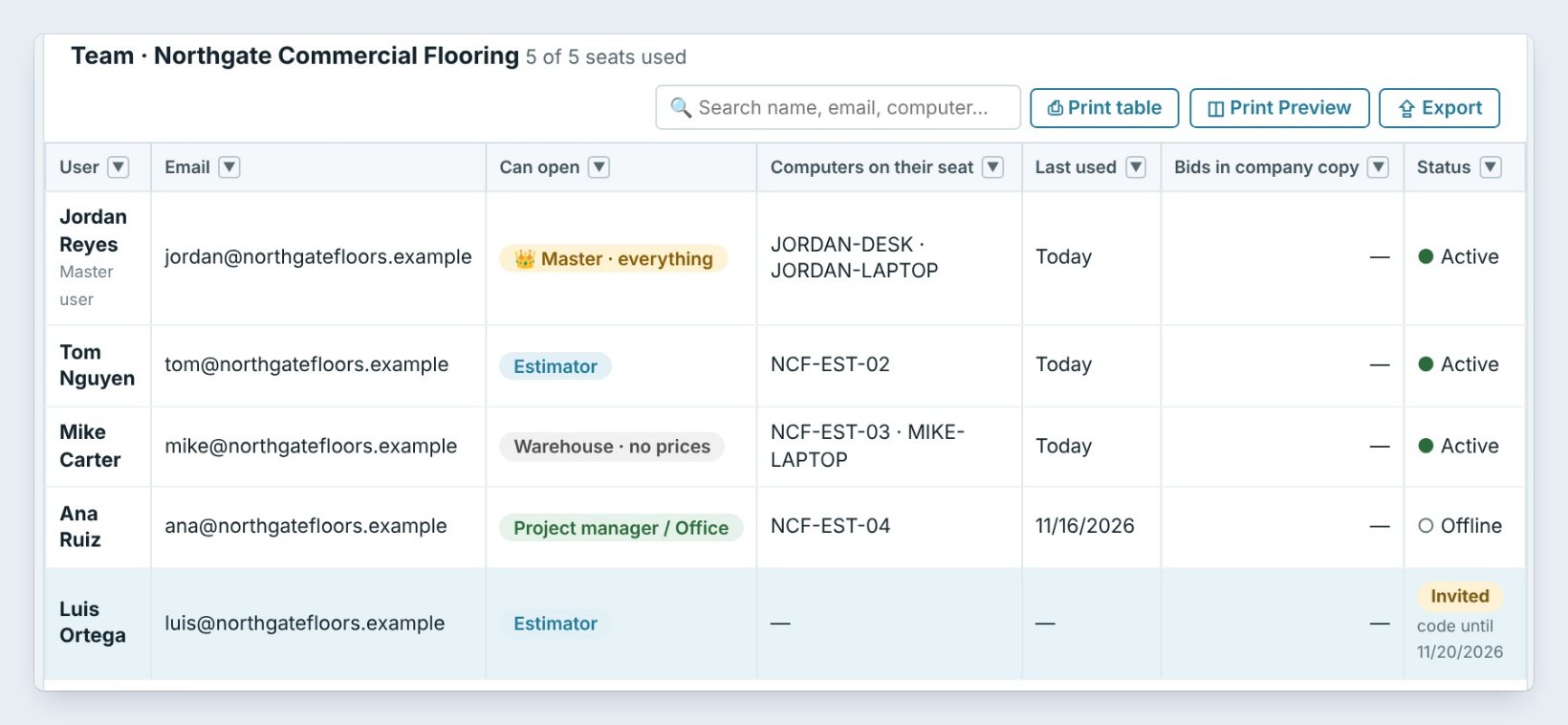
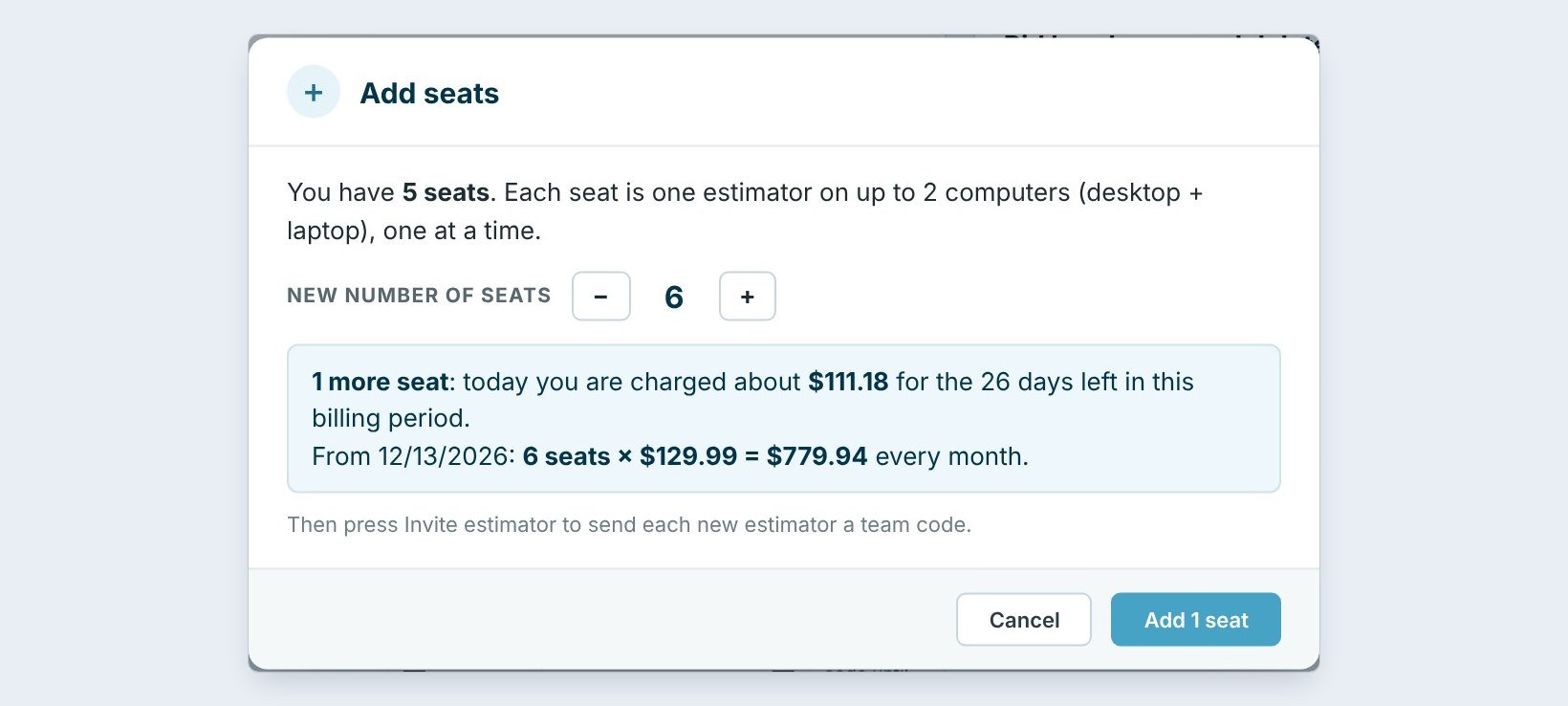
The Can open column now shows each person's role. Every seat is one person on up to 2 computers, a desktop and a laptop, one at a time.
To add someone, press Add seats. BidWise shows what you pay today for the days left in the billing period and the new monthly total before you confirm. Then press Invite estimator to email them a 6-digit team code.
6What can go wrong, and how to fix it
"Invoicing is not open for you." That person does not have the area. The Master user ticks it in What they can open, and it reaches their PC within 2 minutes.
Someone without Estimating opens a bid. They see who is responsible for it, the Estimator and Salesman, with email and phone, instead of the estimate.
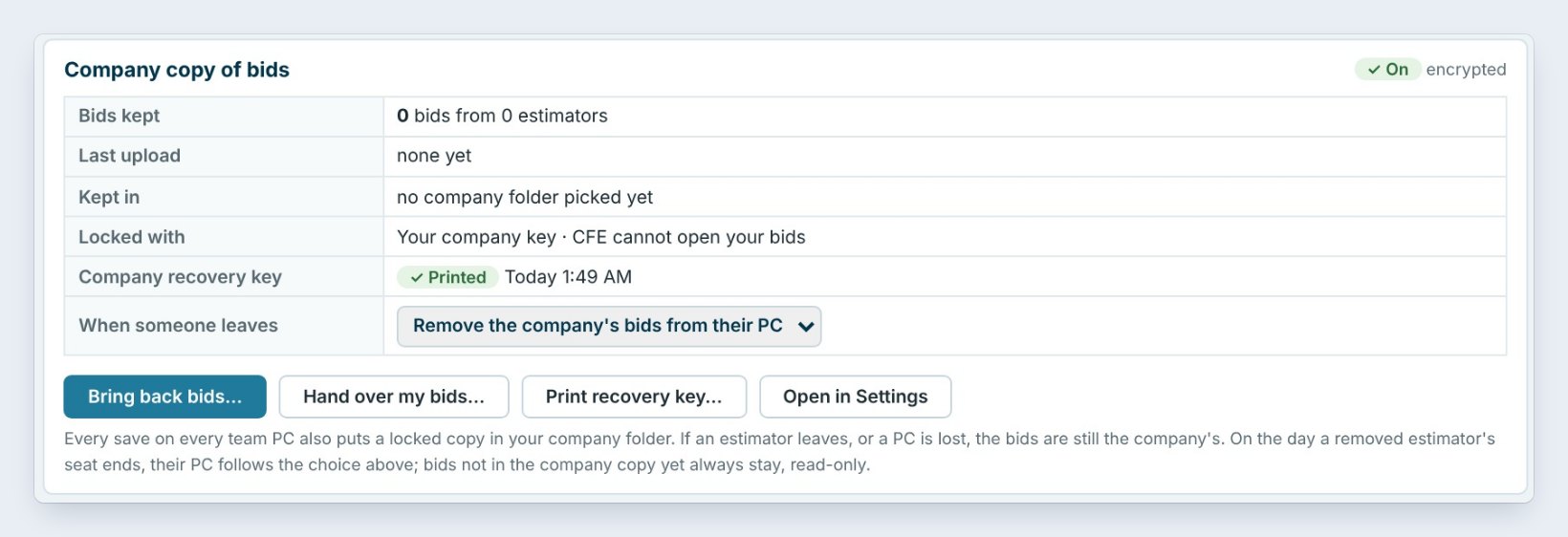
Someone leaves the company. Press Remove user. With the Company copy of bids on, every bid they saved is already in your company folder, and When someone leaves removes the company's bids from their PC.
Worked example: a five-person flooring company
Northgate Commercial Flooring has five seats:
| Person | Role | Can open |
|---|---|---|
| Jordan Reyes | Master user | Everything |
| Tom Nguyen | Estimator | Bids, ordering, schedule |
| Ana Ruiz | Project manager / Office | Ordering, schedule, invoicing |
| Mike Carter | Warehouse | Warehouse only, no prices |
| Luis Ortega | Estimator | Bids, ordering, schedule (invited) |
Tom wins a job and presses Ready to bill. Ana sends the invoice. Mike pulls the material without seeing what it was bid at. Jordan sees everything.
What to do next
Next, see how the office takes over a won job in Ready to bill: estimator to office, and how seats work in team members and seats.
Give every person the right screens
Team roles come with BidWise Business. Start with the 30-day free trial, no credit card.
Frequently Asked Questions
Who can change what people can open?
Only the Master user, in Integrate › Team › What they can open. The Master user always has everything.
Can the warehouse see our bid prices?
Not with the Warehouse role. Sees bid prices, costs and profit is unticked, so the warehouse screens show no prices.
How fast does a change reach the other PC?
Within 2 minutes, or right away if the person presses Refresh.
Can I give one person a mix of areas?
Yes. Tick the areas one by one and the role shows Custom.
Is this in BidWise Personal?
No. Team roles come with BidWise Business, where each seat is one person on up to 2 computers.

Written by
Cristian Valcu – Founder & CEO, Commercial Flooring Estimating LLC
Cristian has estimated commercial flooring for over 20 years and built BidWise around the way flooring contractors actually price, propose and track their bids.
Last updated: