BidWise guide · Invoicing and getting paid
Receivables Aging and Automatic Payment Reminders
Receivables shows who owes your company money and how late it is, by GC, in the aging buckets your accountant uses. Send a GC a statement of every open invoice with one click. Automatic reminders email the GC 3 days before the due date, 1 day late and 10 days late, stop by themselves when the payment is recorded, and every email is kept in the Reminder log.


Why automate payment reminders?
Flooring subs carry the material and the labor for 30, 60, sometimes 90 days before the GC pays. Every week an invoice sits, the cash for the next job gets thinner, and nobody in the office enjoys making the collection call.
Receivables shows exactly who is late and by how much, and the reminders do the polite part by themselves: a heads-up before the due date and two follow-ups after it. You only call the GCs that still have not paid.
The six steps
- Open ReceivablesTotal owed, aging buckets and aging by GC.
- Send a GC statementEvery open invoice for one GC.
- Turn on the remindersBefore due, 1 day late, 10 and 30 days late.
- Check the reminder logEvery email: when, which step, to whom.
- Remind or record a paymentRemind now; payments stop the reminders.
- What can go wrongFixes for the usual snags.
1Open Receivables and read the aging
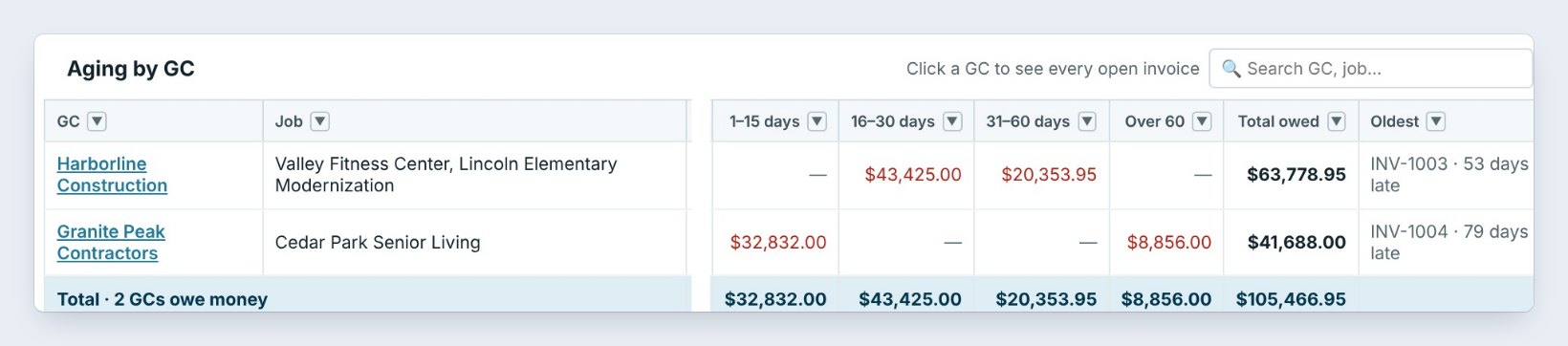
On Invoicing, click Receivables. The tiles show the Total owed, here $105,466.95 on 4 invoices from 2 GCs, then Not due yet, 1–30 days late, 31–60 days late, Over 60 days, and Retainage to collect, billed when the job is done.
Aging by GC has one line per GC with their jobs, each bucket, the total owed, the Oldest invoice and the next reminder. Harborline Construction owes $63,778.95, the oldest INV-1003 at 53 days late. Pick an As of date or a Salesman, and Print aging for your accountant.
2Send a GC a statement
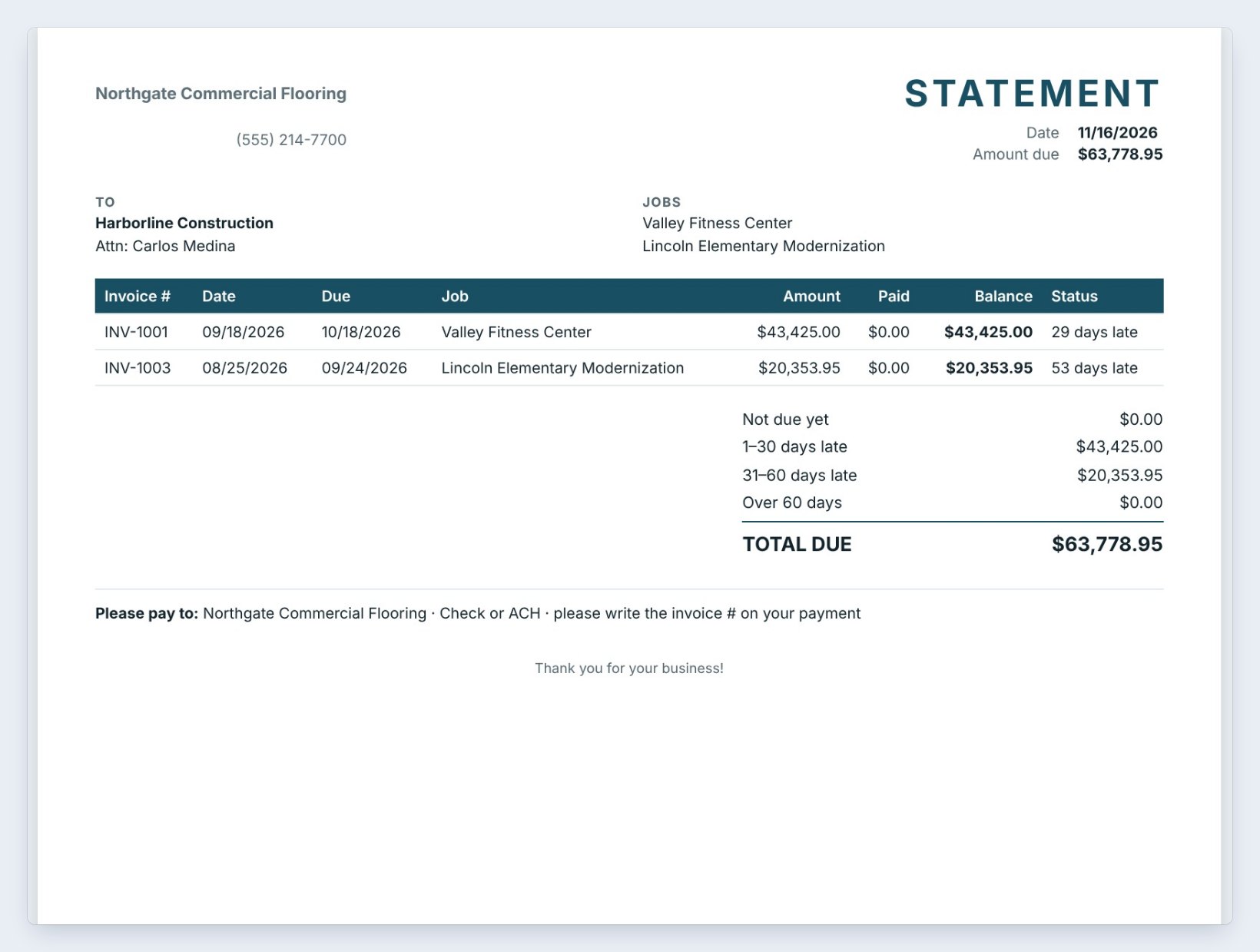
Click Statement on a GC’s line. The statement lists every open invoice for that GC, here INV-1001 for Valley Fitness Center and INV-1003 for Lincoln Elementary, with the date, due date, balance and how late each one is, then the aging and the Total due of $63,778.95.
Click Print, Save PDF or Email. Statements for all GCs makes one for every GC that owes money, which is handy at month end.
Send statements to the GC's accounts payable person, not the project manager. AP pays from statements; the PM just forwards them.
3Turn on the automatic reminders
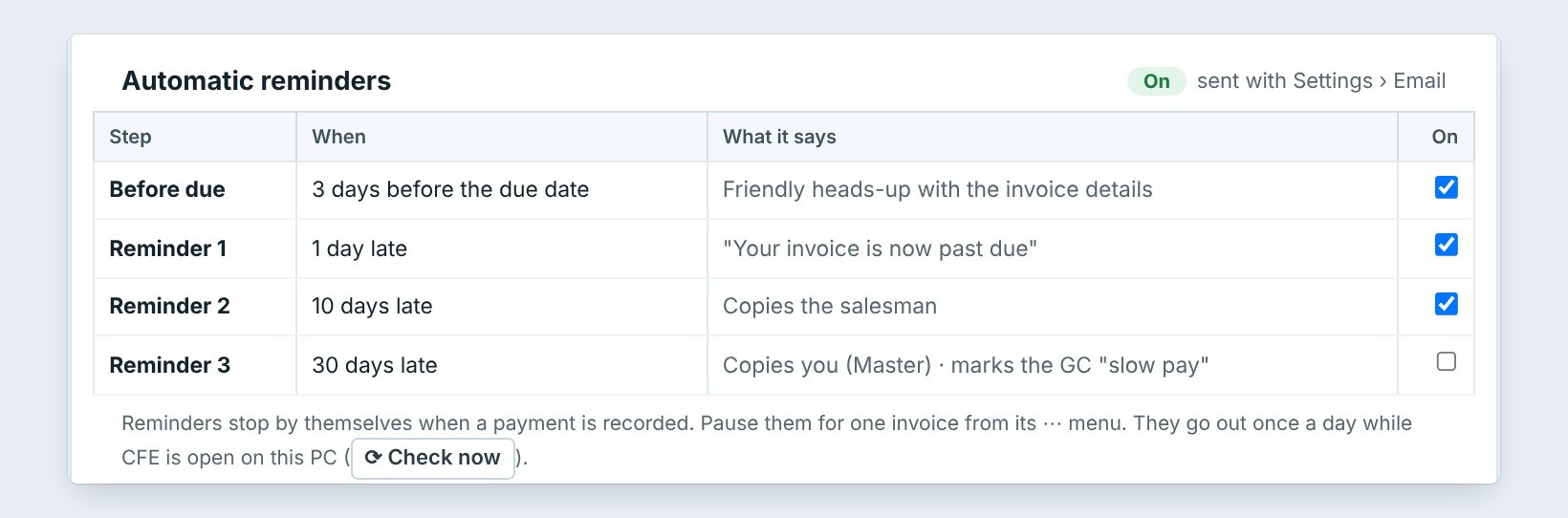
Under Automatic reminders, tick the steps you want. Before due goes 3 days before the due date with a friendly heads-up. Reminder 1 goes 1 day late: Your invoice is now past due. Reminder 2 goes 10 days late and copies the salesman. Reminder 3, 30 days late, copies you and marks the GC slow pay.
They go out once a day while BidWise is open on this PC, through Settings › Email. They stop by themselves when a payment is recorded.
4Check what went out in the reminder log
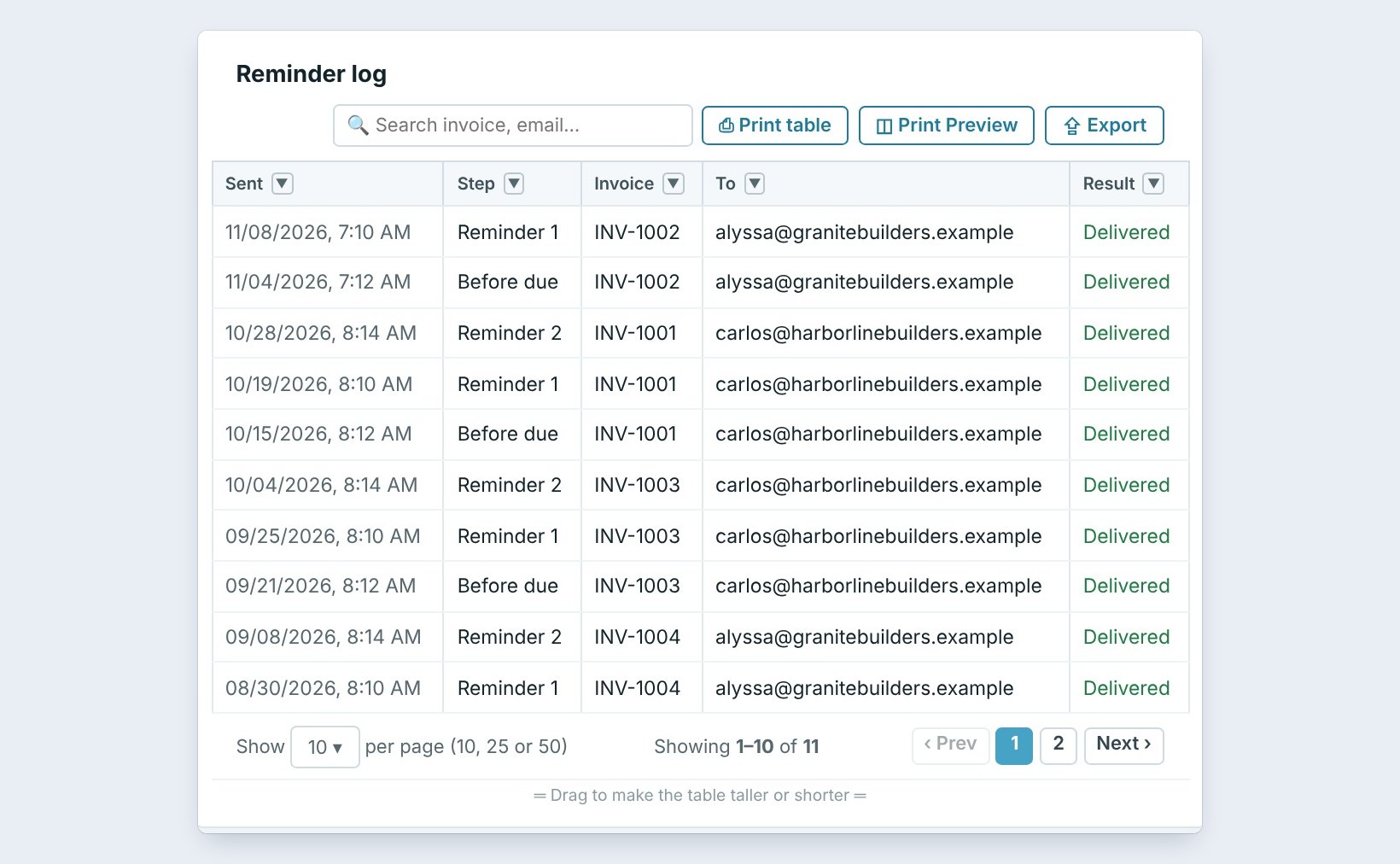
The Reminder log keeps every reminder: when it was sent, the step, the invoice, who it went to and the Result. Here INV-1001 got its Before due on 10/15, Reminder 1 on 10/19 and Reminder 2 on 10/28.
Search by invoice or email when a GC says they never got it. Each reminder is also logged on the job.
5Remind a GC now, or record the payment

Click Remind on a GC’s line to send a reminder now, without waiting for the next step. The email shows the invoice, the amount and the due date.
When the check comes in, click Record payment on the Invoicing tab, pick the invoice and type the amount, date and check number. The invoice is marked paid, it leaves Receivables, and its reminders stop.
6What can go wrong, and how to fix it
No reminders go out. Receivables shows not set up yet next to Automatic reminders until Settings › Email works. Reminders go once a day while BidWise is open on this PC; click Check now to send what is due right away.
The GC disputes an invoice. Pause its reminders from the invoice’s ··· menu so you do not keep emailing while you sort it out.
You use QuickBooks Online. If QuickBooks sends your invoices, it sends its own reminders, so BidWise does not send a second set.
Worked example: Northgate's receivables on 11/16
Four open invoices, two GCs:
| Invoice | GC | Balance | Days late |
|---|---|---|---|
| INV-1002 Cedar Park | Granite Peak Contractors | $32,832.00 | 9 |
| INV-1001 Valley Fitness | Harborline Construction | $43,425.00 | 29 |
| INV-1003 Lincoln Elementary | Harborline Construction | $20,353.95 | 53 |
| INV-1004 Cedar Park | Granite Peak Contractors | $8,856.00 | 79 |
Total owed $105,466.95. The reminders already went out on schedule, so the only calls left are the two invoices over 50 days.
What to do next
Record the checks with invoices and payments, or let GCs pay online with Stripe Pay Now.
Get paid without the awkward calls
Receivables and automatic reminders come with BidWise Business. Start with the 30-day free trial, no credit card.
Frequently Asked Questions
Is Receivables on the Personal plan?
No. Receivables aging, GC statements and automatic reminders are on BidWise Business.
Do reminders stop when the GC pays?
Yes. When the payment is recorded and the invoice has nothing left to pay, its reminders stop by themselves.
Can I change what the reminders say?
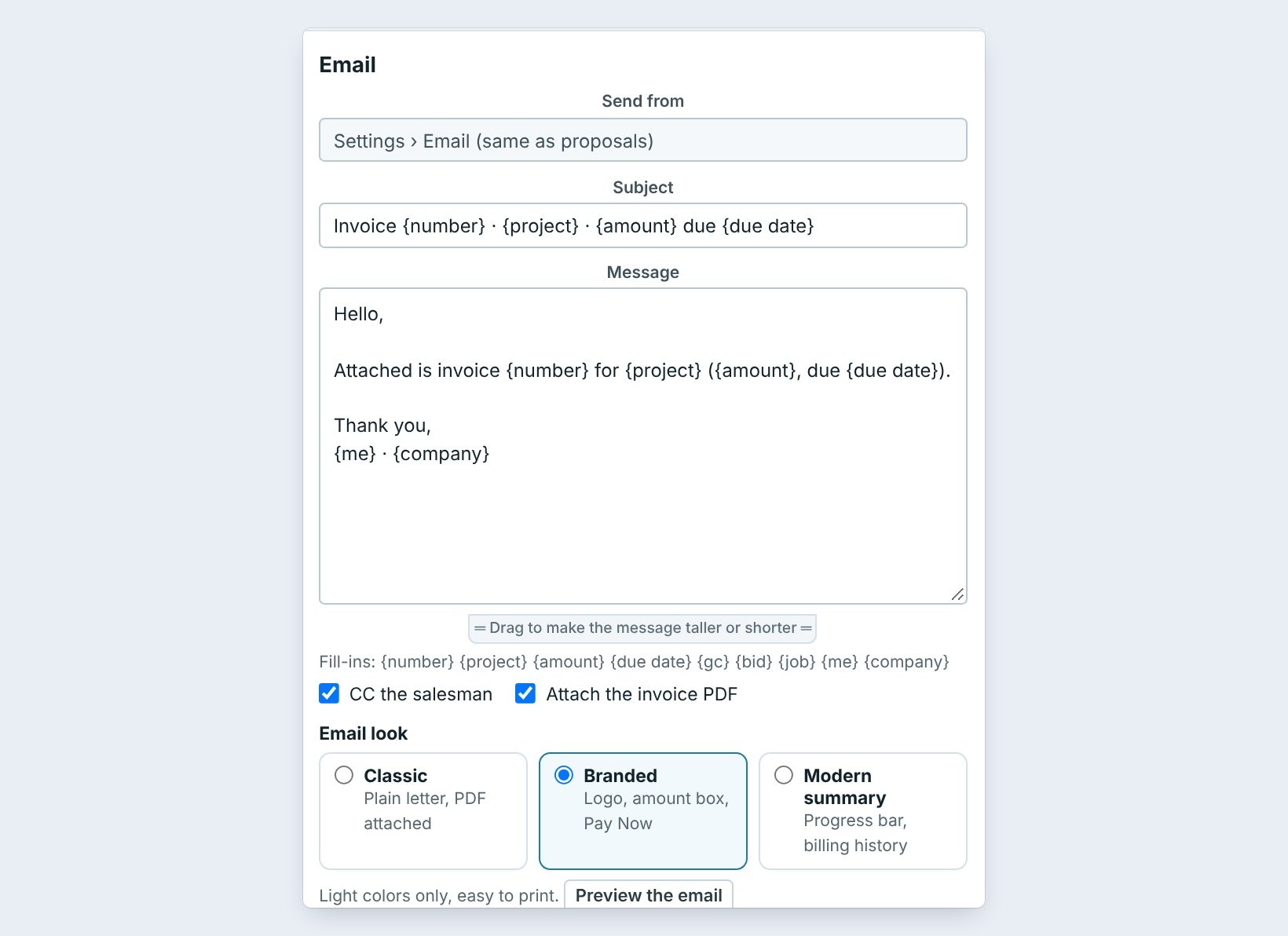
The steps and days are set in Receivables. The invoice email subject, message and look are in Invoicing › Invoice settings.
Does retainage count as late?
No. Retainage to collect has its own tile and is billed when the job is done.

Written by
Cristian Valcu – Founder & CEO, Commercial Flooring Estimating LLC
Cristian has estimated commercial flooring for over 20 years and built BidWise around the way flooring contractors actually price, propose and track their bids.
Last updated: