BidWise guide · Invoicing and getting paid
Progress Billing and G702/G703 Pay Apps
On a big commercial job the GC pays by application: the % of each line completed, less retainage. In BidWise Business you split the base bid into a schedule of values once, then each month type the % complete on each line. Retainage is held by itself, the invoice goes out by email, and the Pay app (G702 / G703 style) builds the summary and continuation sheet from the same numbers.


Why bill by % complete?
Commercial GCs rarely pay a flooring contract in one invoice. They pay monthly applications for what is installed, hold 5 or 10% retainage, and want their own form: a G702 summary and a G703 continuation sheet line by line.
Doing that in a spreadsheet means retyping the same lines every month and hoping the totals carry over. BidWise keeps the lines, what was billed before and the retainage, so each application starts where the last one ended.
The six steps
- Split the base bidA schedule of values: the lines you bill by %.
- Type the % completeRetainage is held by itself.
- Send the invoicePreview, email the GC, or mark as sent.
- Print the pay appG702 summary and G703 continuation sheet.
- Watch the job billingBilled, paid, owed, retainage and left to bill.
- What can go wrongFixes for the usual snags.
1Split the base bid into a schedule of values
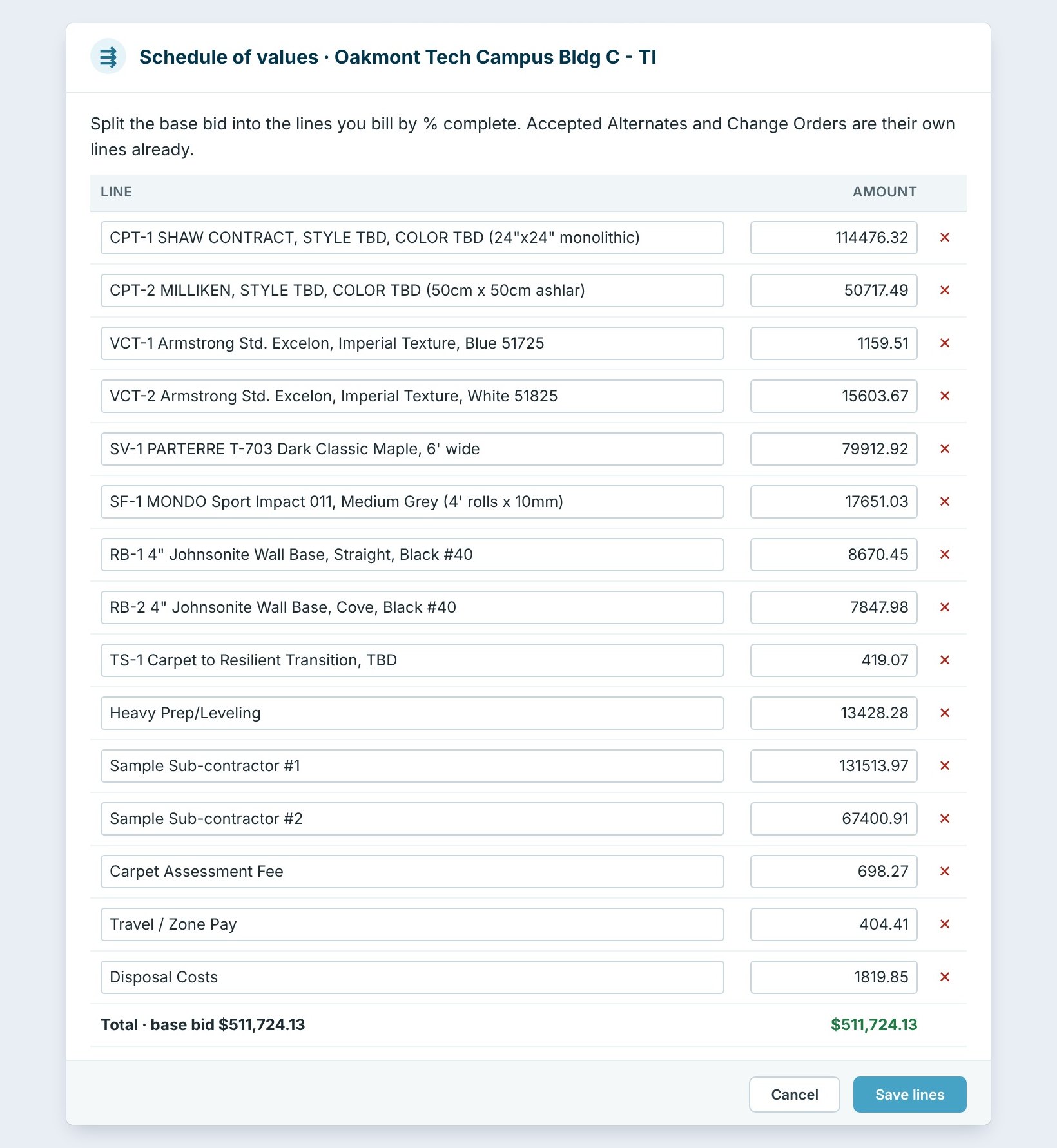
On Invoicing › Progress billing, pick the job and click Split the base bid. BidWise fills the Schedule of values from the Estimate Quote: one line per product and cost, here Shaw carpet $114,476.32, Milliken $50,717.49, the VCT, the sheet vinyl, the Mondo sport floor, wall base and prep.
Edit the names and amounts to match the GC’s breakdown; the total must stay the base bid, here $511,724.13. Accepted alternates and change orders are their own lines already. Click Save lines.
2Make the invoice and type the % complete
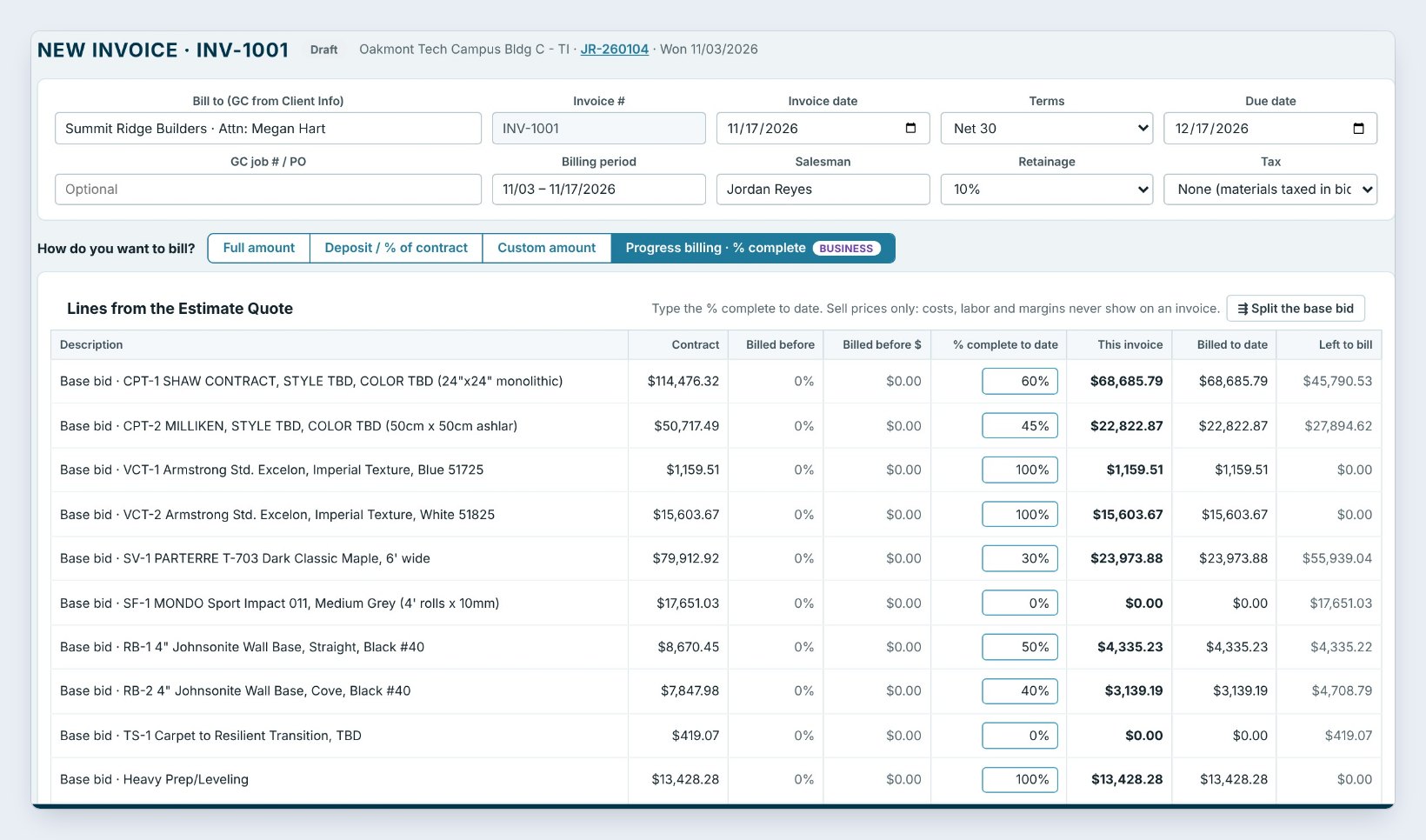
Click New invoice and pick Progress billing · % complete. The GC, terms, billing period, salesman and Retainage of 10% are at the top.
Type the % complete to date on each line: 60% of the Shaw carpet, 45% of the Milliken, 100% of the VCT and the prep. Each line shows This invoice, Billed to date and Left to bill. Here the work this period is $214,013.93, retainage held is $21,401.39, and the amount due is $192,612.54. Costs, labor and margins never show on the invoice.
Walk the job, or ask the crew lead for room progress in the Field app, before you type the percentages. The GC's super will check them against what is on the floor.
3Preview and send the invoice
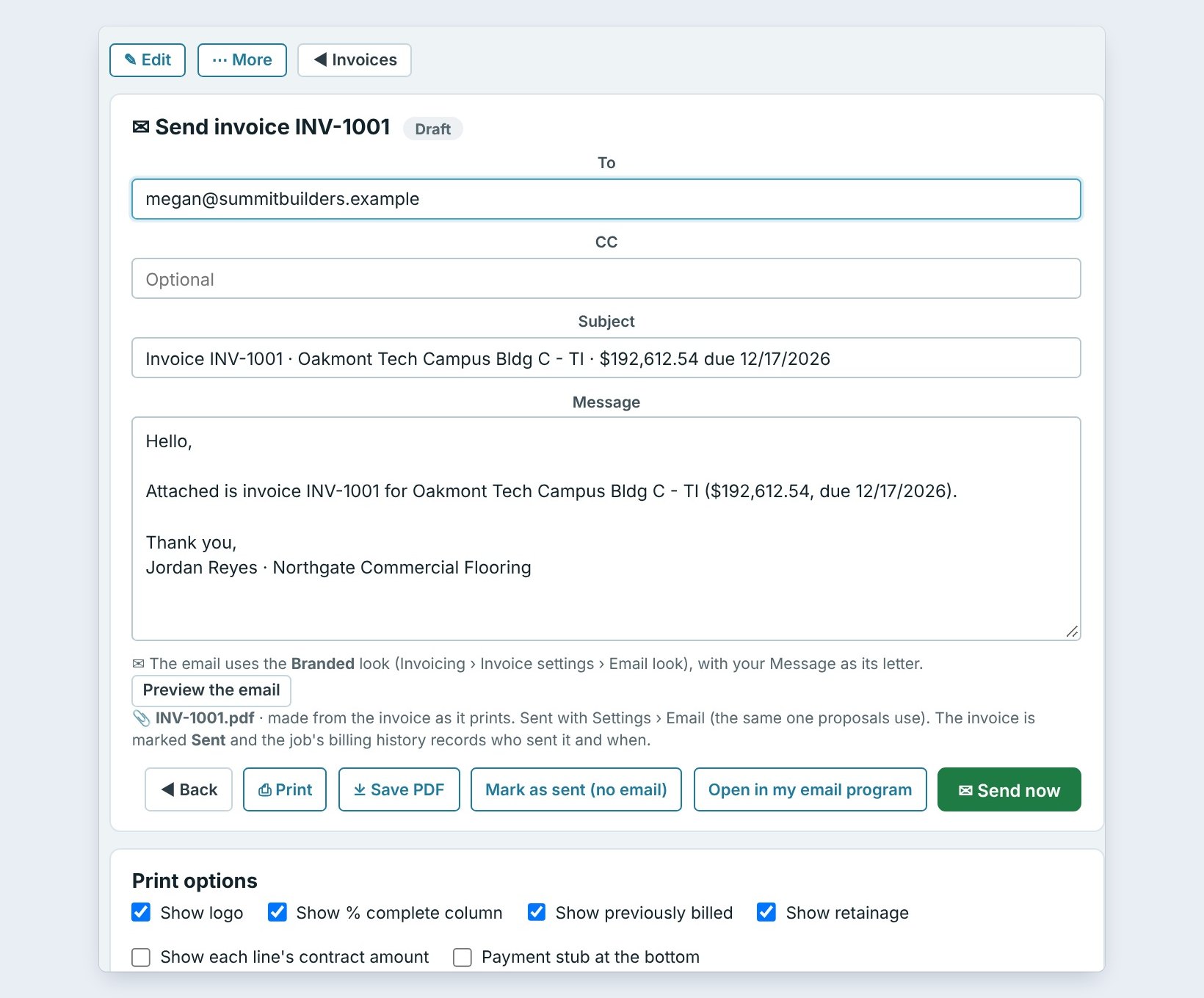
Click Save & send. The invoice shows on the left as it prints, with the % to date and previously billed columns. On the right, Send invoice has the GC’s email, the subject with the amount and due date, and your message.
Click Send now, Open in my email program, or Mark as sent (no email) if you upload it to the GC’s portal. Print options choose whether the % complete, previously billed and retainage columns show.
4Print the G702/G703 style pay app
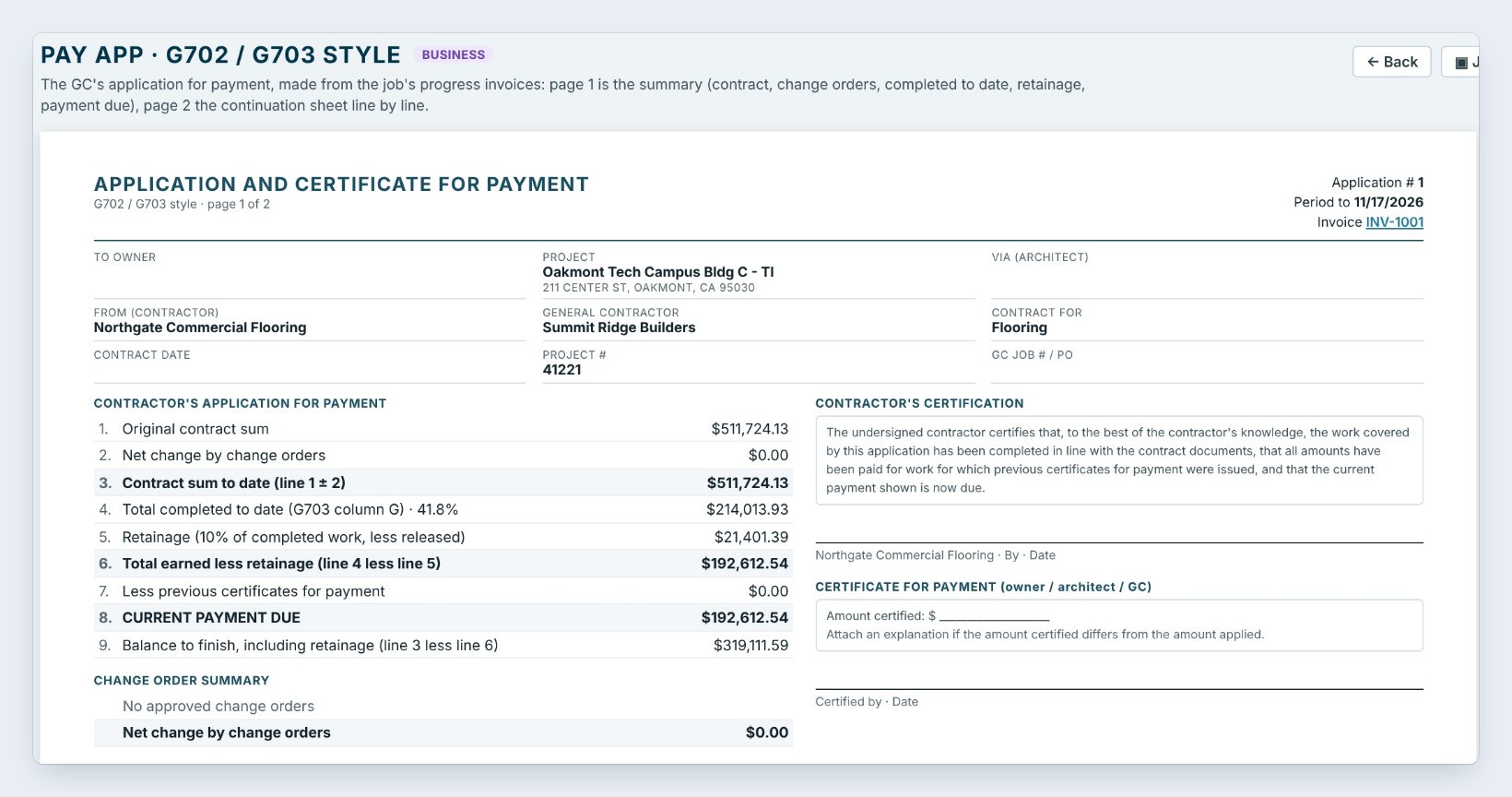
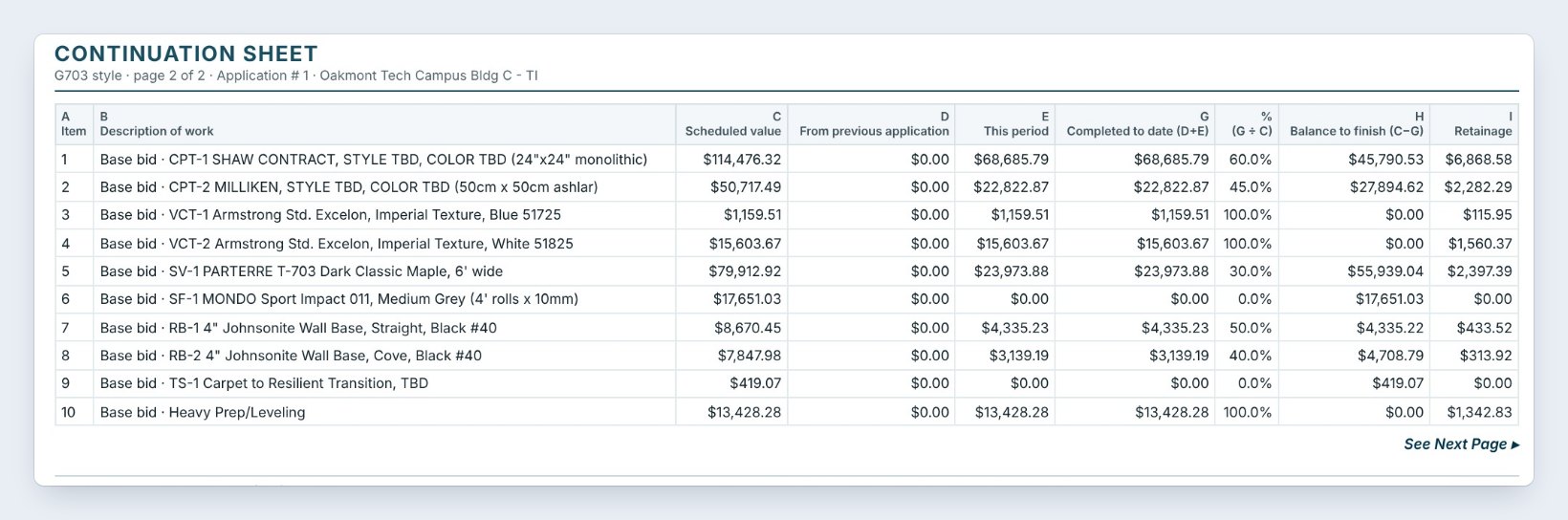
Click Pay app (G702). Page 1 is the Application and Certificate for Payment: the original contract sum, the change orders, completed to date, retainage and the Current payment due, $192,612.54. Page 2 is the Continuation sheet, with the scheduled value, previous application, this period, completed to date, balance to finish and retainage on every line.
Add the owner, architect and contract date once with Owner, architect, dates; every application on the job uses them. Then Print, Save PDF or Email, in portrait or landscape.
5Watch the whole job in Job billing
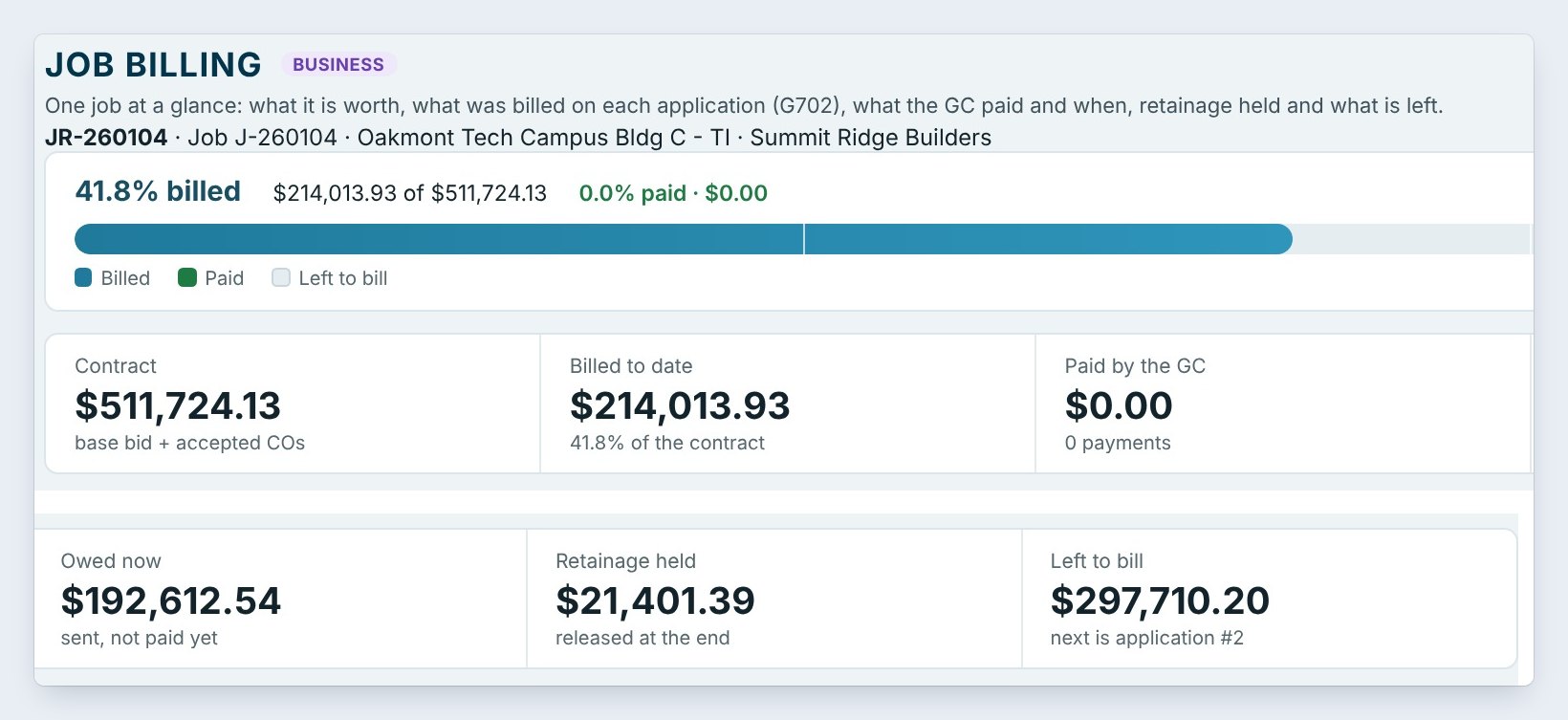
Job billing shows one job at a glance: 41.8% billed, the contract, billed to date, paid by the GC, Owed now, Retainage held, released at the end, and Left to bill.
Each application is a line with its period, completed to date, retainage and payment due. When the GC pays, click + $ on the line to record it. Next month, + Pay app #2 starts from the billed-to-date numbers.
6What can go wrong, and how to fix it
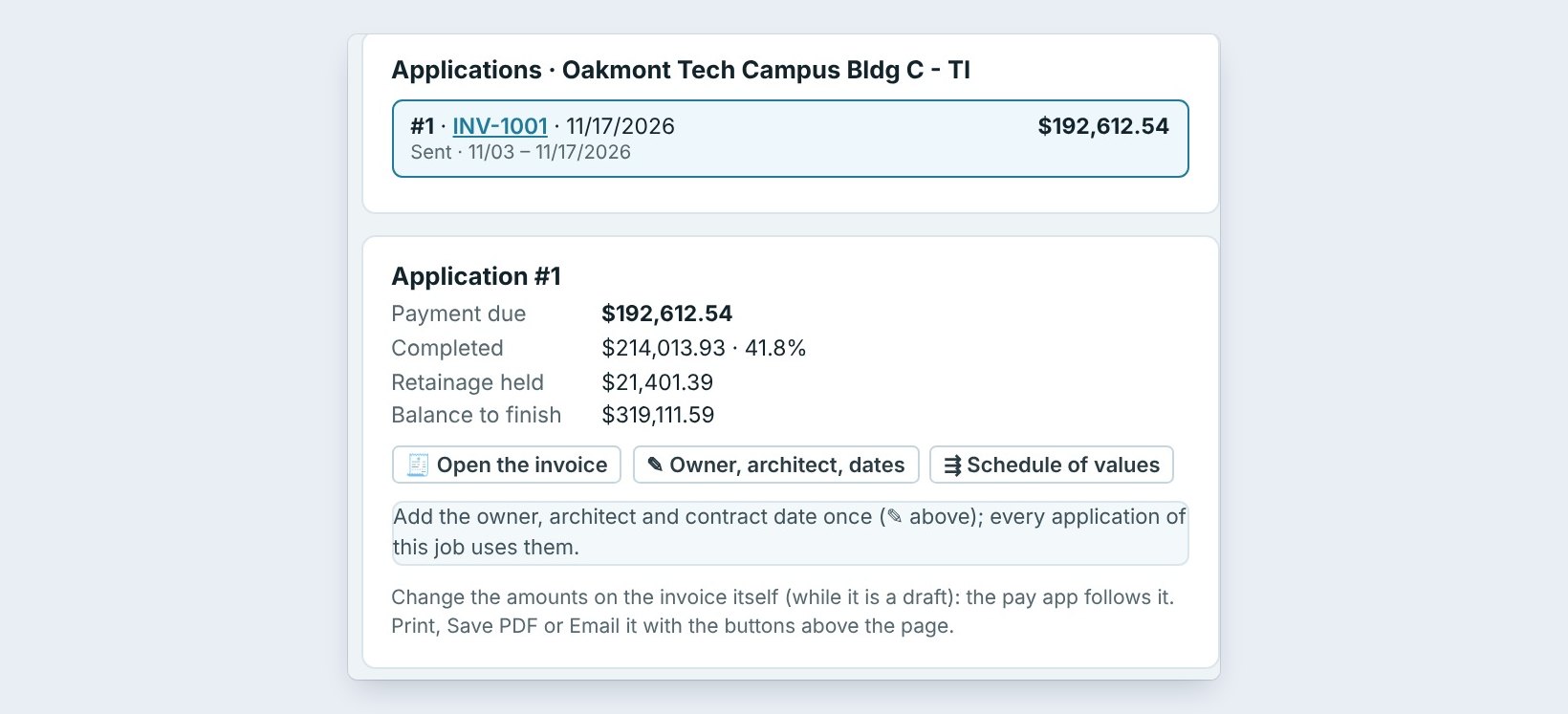
A number on the pay app is wrong. Change it on the invoice itself while it is a draft, with Open the invoice. The pay app follows the invoice. Edit changes only the wording on one application, and Reset to the numbers undoes it.
The schedule of values does not add up. The lines must total the base bid. Open Schedule of values and fix the amounts before the first application.
The retainage is wrong. Set the % on the invoice. Retainage held is released at the end with Invoicing › Retainage.
Worked example: Oakmont Tech Campus, application #1
Base bid $511,724.13, 10% retainage, billing period 11/03 to 11/17:
| Line | Contract | % to date | This period |
|---|---|---|---|
| Shaw carpet tile | $114,476.32 | 60% | $68,685.79 |
| Milliken carpet tile | $50,717.49 | 45% | $22,822.87 |
| Parterre sheet vinyl | $79,912.92 | 30% | $23,973.88 |
| All 15 lines | $511,724.13 | 41.8% | $214,013.93 |
Less 10% retainage of $21,401.39, the current payment due is $192,612.54, and $297,710.20 is left to bill on the job.
What to do next
Record the GC’s payments with invoices and payments, and chase late ones with receivables aging and reminders.
Send your next pay app in minutes
Progress billing and pay apps come with BidWise Business. Start with the 30-day free trial, no credit card.
Frequently Asked Questions
Is progress billing on the Personal plan?
No. Personal has the short invoice form: the full amount, a deposit % or a custom amount. Progress billing by line, retainage and pay apps are on BidWise Business.
Is it the official AIA form?
No. It is a G702 / G703 style pay app with the same layout and numbers: the application summary on page 1 and the continuation sheet on page 2.
Can I add change orders?
Yes. Approved change orders are their own lines on the invoice and show in the change order summary on the pay app.
How is retainage released?
Retainage held shows on Job billing and Invoicing › Retainage. Release it at the end of the job and it goes on the final invoice.

Written by
Cristian Valcu – Founder & CEO, Commercial Flooring Estimating LLC
Cristian has estimated commercial flooring for over 20 years and built BidWise around the way flooring contractors actually price, propose and track their bids.
Last updated: